Best VPN for Mint Linux: Native Clients & Easy Setup
Find the best VPN for Mint Linux with native .deb packages and GUI clients. We compare top providers with native .deb packages and GUI clients on Cinnamon, XFCE, and MATE desktops.
 Michael Gargiulo
Find your VPN
What will you mostly use a VPN for?
Pick one, then answer a few quick questions. We name the VPN that fits, and say why.
VPN for streaming
Question 1 of 3
What made you look for a streaming VPN?
24,965 VPN picks made through VPN.com in the last 30 days

Your match

NordVPN
App store ratings, part of the score
4.664.59

ProtonVPN
App store ratings, part of the score
4.614.70
VPN for privacy
Question 1 of 3
What made you look for a privacy VPN?
24,965 VPN picks made through VPN.com in the last 30 days
Your match
NordVPN
App store ratings, part of the score
4.664.59
ProtonVPN
App store ratings, part of the score
4.614.70
VPN for gaming
Question 1 of 3
What made you look for a gaming VPN?
24,965 VPN picks made through VPN.com in the last 30 days
Your match
NordVPN
App store ratings, part of the score
4.664.59
ProtonVPN
App store ratings, part of the score
4.614.70
VPN for free plans
Question 1 of 3
What made you look for a free VPN?
24,965 VPN picks made through VPN.com in the last 30 days
Your match
ProtonVPN
App store ratings, part of the score
4.614.70
NordVPN
App store ratings, part of the score
4.664.59
NordVPN7,213 serversNordVPN's privacy and security record is strong on process and mixed on proof
93 out of 100, built from two weighted parts
App store ratings, part of the score
4.664.59
Researched Oct 3, 2026Claims checked: 31Independent sources: 11Scores updated Oct 22, 2026
 ExpressVPN3,000+ servers
86 out of 100, built from two weighted parts
App store ratings, part of the score
4.684.69
Researched Oct 3, 2026Claims checked: 27Independent sources: 13Scores updated Oct 22, 2026
 Surfshark4,500+ servers
Surfshark's evidence mixes real, readable third-party documents with provider assertions
85 out of 100, built from two weighted parts
App store ratings, part of the score
4.714.64
Researched Oct 3, 2026Claims checked: 32Independent sources: 5Scores updated Oct 22, 2026
Bottom Line: Linux Mint ships with Network Manager pre-installed, making OpenVPN and WireGuard setup straightforward. Several top VPN providers now offer native
.debpackages or GUI clients that work on Cinnamon, XFCE, and MATE desktops with minimal configuration.
Linux Mint users face a specific challenge when choosing a VPN: not every provider builds a client that integrates cleanly with Mint’s desktop environments. While Mint shares its package ecosystem with Ubuntu and Debian, differences in Cinnamon’s system tray behavior, Network Manager applet versions, and LTS release cycles mean that a VPN working on Ubuntu doesn’t always work identically on Mint. This guide reviews five VPNs that support Linux Mint 21.x, covering installation methods, protocol support, GUI availability, and what each provider documents about performance so you can pick the right one without trial and error.
VPN Support on Linux Mint: What You Need to Know
Linux Mint includes Network Manager by default. It supports OpenVPN and WireGuard connections out of the box. You can configure either protocol manually through the Network Manager GUI or via the command line. However, manual setup means you lose features like automatic server switching, split tunneling, and kill switch protection.
That’s where native Linux clients matter. A VPN provider with a dedicated .deb package or AppImage gives you:
- One-click connect from the system tray on Cinnamon, XFCE, or MATE
- Automatic updates through APT or the provider’s own repository
- Built-in kill switch that cuts internet access if the VPN tunnel drops
- Split tunneling so you can route only specific apps through the VPN
Manual configuration through Network Manager still works with almost any provider. It gives you granular control over routing and DNS. It’s a solid fallback for providers without a Mint-specific client. But for daily use, a native client saves time and reduces configuration mistakes.
For a broader comparison of VPN options across all distributions, see our parent hub page.
What Makes a VPN Work Well on Linux Mint
Not every VPN that claims “Linux support” delivers a good experience on Mint. Here’s what to evaluate.
Mint Desktop Compatibility
Check whether the VPN client runs properly on your desktop environment. Cinnamon handles system tray icons differently than GNOME. Some VPN clients render incorrectly or fail to display a tray icon on XFCE. A provider that tests on Mint specifically, not just generic Ubuntu, is worth prioritizing.
Installation Method
The smoothest install experience on Mint uses a .deb package or an APT repository. Look for providers that offer:
- A downloadable
.debfile you can install withsudo dpkg -i <package>.deb - An official APT repository so updates arrive through
sudo apt update && sudo apt upgrade - Clear setup documentation referencing Linux Mint by name
Protocol Support
Linux Mint’s Network Manager supports both OpenVPN and WireGuard natively. WireGuard typically delivers 15-30% faster speeds than OpenVPN due to its leaner codebase. Confirm your chosen VPN supports WireGuard on Linux. Some providers restrict it to Windows and macOS clients.
Security Features That Matter
- AES-256 encryption as the baseline standard
- Kill switch that works at the system level on Linux, not just inside the GUI
- DNS leak protection configured automatically rather than requiring manual
resolv.confedits - Split tunneling for routing select applications outside the VPN tunnel
LTS Release Compatibility
Linux Mint follows Ubuntu’s LTS cycle. A VPN that supports the current Mint release (based on Ubuntu 22.04 LTS) but hasn’t updated for the latest point release can break after a system update. Check the provider’s Linux changelog before subscribing.
Best VPNs for Linux Mint
NordVPN Offers the Most Complete Mint Integration
NordVPN provides one of the most complete Linux experiences available. It offers a .deb package installed via its own APT repository, a CLI tool, and an optional GUI through the NordVPN Linux app (currently in beta for some Mint versions). The client supports WireGuard through NordLynx, NordVPN’s custom implementation.
Mint-specific install:
sudo apt install nordvpnAfter adding NordVPN’s repository key and source list, updates arrive automatically through APT.
Protocol support: NordLynx (WireGuard), OpenVPN UDP/TCP
GUI on Cinnamon/XFCE: Beta GUI available; CLI is fully functional and well-documented
Pros
- Native
.debpackage with APT repository integration - NordLynx is NordVPN’s WireGuard-based protocol, and NordVPN ranks #1 of 22 on our Trust Score
- System-level kill switch works on Mint
- 7,213 servers in 150 countries
Cons
- GUI client is still in beta and may not render perfectly on XFCE
- Priced higher than budget options (from $3.59/month on 2-year plans)
Verdict: The strongest all-around pick for Linux Mint users who want native integration and fast speeds.
Private Internet Access (PIA) Delivers the Best GUI on Mint
PIA stands out with a fully functional GUI client built for Linux. The graphical interface works reliably on Cinnamon and XFCE, making it the most beginner-friendly option on this list. Installation uses a downloaded .run script.
Mint-specific install:
wget https://installers.privateinternetaccess.com/download/pia-linux.run
chmod +x pia-linux.run
./pia-linux.run
Protocol support: WireGuard, OpenVPN UDP/TCP
GUI on Cinnamon/XFCE: Full GUI with system tray integration; works on all Mint desktop environments
Pros
- Full GUI client with system tray integration on Linux Mint
- WireGuard support with in-app toggle
- Affordable at $2.03/month on 3-year plans
- Open-source Linux client (code available on GitHub)
Cons
- Speeds vary by server location
- Streaming access success is inconsistent outside the US
Verdict: Best choice for Mint users who want a point-and-click GUI without touching the terminal.
IPVanish Requires Manual Setup but Supports Unlimited Devices
IPVanish does not provide an official Linux Mint client with a GUI. You connect through OpenVPN configuration files imported into Network Manager or via the command line. Setup requires downloading .ovpn files from IPVanish’s website and importing them manually.
Mint-specific install:
sudo apt install network-manager-openvpn-gnome openvpnThen import .ovpn files through Network Manager’s GUI.
Protocol support: OpenVPN only on Linux (no WireGuard support on Linux clients)
GUI on Cinnamon/XFCE: No dedicated client; uses Network Manager’s built-in VPN interface
Pros
- Unlimited simultaneous device connections
- Nearby servers generally give the best speeds, as with any VPN
- Good for torrenting with SOCKS5 proxy support
Cons
- No native Mint/Linux client; manual OpenVPN setup required
- No WireGuard on Linux
- Streaming support is unreliable
Verdict: A reasonable option if you already subscribe and need unlimited devices. The manual setup and missing WireGuard support make it hard to recommend over PIA or NordVPN for Mint specifically.
Ivacy Covers the Basics on a Tight Budget
Ivacy offers a command-line solution for Linux Mint. There is no GUI client. Setup involves downloading OpenVPN configuration files and running them through the terminal. Documentation exists but is less detailed than competitors.
Mint-specific install:
sudo apt install openvpn
sudo openvpn --config /path/to/ivacy-server.ovpn
Protocol support: OpenVPN on Linux (IKEv2 available through manual Network Manager config)
GUI on Cinnamon/XFCE: None
Pros
- Among the lowest-priced options in this guide on long-term plans
- Suited to browsing and standard streaming
- Works with some geo-restricted streaming services
Cons
- No GUI client for Linux Mint
- Smaller server network (5,700+ servers, but fewer locations than NordVPN or PIA)
- Support is less extensive than the larger providers
Verdict: The budget pick. Only recommended if cost is the primary concern and you’re comfortable managing OpenVPN connections via terminal.
ExpressVPN Prioritizes Speed and Streaming Access
ExpressVPN provides a well-documented CLI app for Linux Mint. The .deb installer makes setup clean, and the command structure is simple. No GUI is available, but the CLI is intuitive enough for intermediate users.
Mint-specific install:
sudo dpkg -i expressvpn_<version>_amd64.deb
expressvpn activate
expressvpn connect
Protocol support: Lightway (ExpressVPN’s proprietary protocol), OpenVPN UDP/TCP
GUI on Cinnamon/XFCE: No GUI; CLI only. Browser extension available for server switching.
Pros
- Lightway is ExpressVPN’s own protocol, built for fast reconnects and speed
- Excellent streaming access rate across Netflix, BBC iPlayer, Disney+
- Strong security audit history (Cure53 and KPMG audits published publicly)
- Simple CLI commands with tab-complete support
Cons
- Most expensive option at $6.67/month on annual plans
- Limited to 8 simultaneous device connections
- No GUI for Linux
Verdict: Best for users who prioritize streaming access and raw speed, and don’t mind paying a premium.
Comparison Table
| VPN | Install Method | Protocol on Mint | GUI Client | Price (Best Plan) | Best For |
|---|---|---|---|---|---|
| NordVPN | .deb via APT repo | NordLynx (WireGuard), OpenVPN | Beta GUI + CLI | $3.49/mo | Overall best for Mint |
| PIA | .run installer | WireGuard, OpenVPN | Full GUI | $2.03/mo | Best GUI experience |
| IPVanish | Manual .ovpn import | OpenVPN only | None (Network Manager) | $2.19/mo | Unlimited devices |
| Ivacy | Manual OpenVPN | OpenVPN, IKEv2 | None | Lowest here | Tight budget |
| ExpressVPN | .deb package | Lightway, OpenVPN | None (CLI only) | $2.99/mo | Streaming + speed |
Final Verdict
For most Linux Mint users, NordVPN offers the best balance of speed, security, and Mint-specific integration through its APT repository and NordLynx protocol. If you prefer a full GUI without terminal use, PIA is the clear winner with its open-source graphical client that works across Cinnamon, XFCE, and MATE. Budget users should look at Ivacy, and streaming-focused users will get the best results from ExpressVPN’s Lightway protocol.
All five options support Linux Mint 21.x (Ubuntu 22.04 LTS base). Before committing, use the money-back guarantee period to test your chosen VPN on your specific Mint setup. Desktop environment quirks, kernel versions, and Network Manager updates can all affect compatibility. Download VPN software only from official provider websites to avoid tampered packages.
Resources for this page
Charts and reference images from our research, free to view and share.
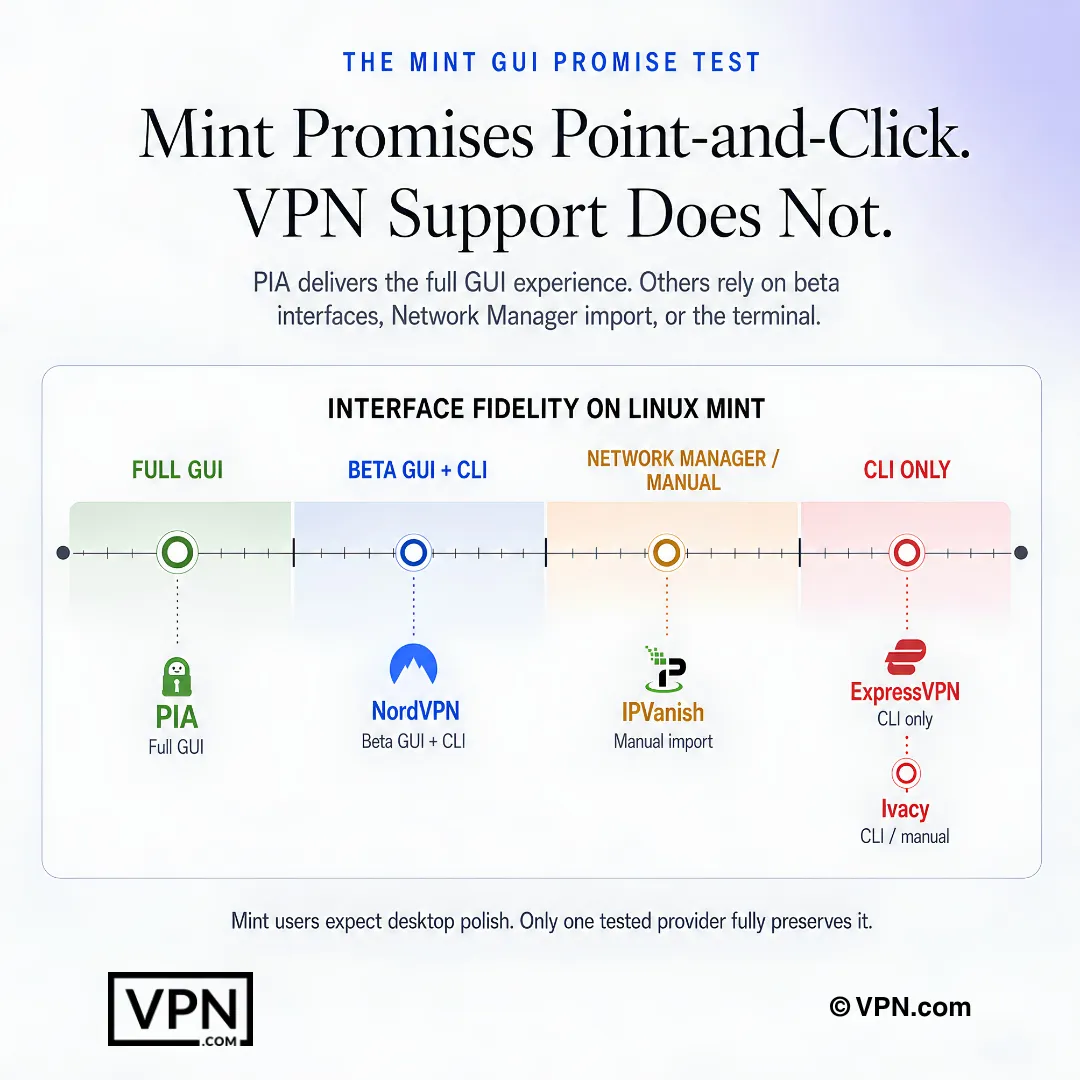
Mint users should compare interface fit, not just whether a provider claims Linux support.
Frequently Asked Questions
Does Linux Mint need a VPN app installed, or does Network Manager handle everything?
Linux Mint ships with Network Manager preinstalled, supporting OpenVPN and WireGuard connections out of the box, so you can configure a VPN manually without installing anything extra. Manual setup, however, sacrifices automatic server switching, split tunneling, and kill switch protection. A native client, like NordVPN’s .deb package via APT or PIA’s .run installer, restores those features with one-click connect from the Cinnamon, XFCE, or MATE tray.
How do I install NordVPN on Linux Mint with a native client?
Add NordVPN’s APT repository key and source list, then run sudo apt install nordvpn to pull the .deb package with automatic updates through APT. It includes a fully functional CLI and a GUI currently in beta for some Mint versions. NordLynx, NordVPN’s WireGuard implementation, handles the tunnel, and a system-level kill switch works on Mint.
What’s the setup process for PIA’s GUI client on Cinnamon or XFCE?
Download PIA’s .run script, run chmod +x pia-linux.run to make it executable, then execute ./pia-linux.run to launch the installer. It’s the only fully graphical client here that works reliably across Cinnamon, XFCE, and MATE with system tray integration. PIA supports WireGuard with an in-app toggle, and its Linux client’s code is published openly on GitHub.
Which Mint-compatible VPNs actually support WireGuard versus OpenVPN only?
NordVPN runs NordLynx, its custom WireGuard build, and PIA offers standard WireGuard with an in-app toggle; WireGuard typically delivers 15-30% faster speeds than OpenVPN thanks to its leaner codebase. ExpressVPN instead uses its proprietary Lightway protocol. IPVanish supports OpenVPN only on Linux with no WireGuard option, and Ivacy is limited to OpenVPN plus manually configured IKEv2.
What if a VPN’s Mint client doesn’t show a system tray icon on Cinnamon or XFCE?
Some VPN GUIs render incorrectly or skip the tray icon entirely on XFCE, a known rendering quirk versus GNOME-based desktops. NordVPN’s Linux GUI is still in beta and may not display properly on XFCE, though its CLI remains fully functional and documented. PIA’s GUI is built to work across Cinnamon, XFCE, and MATE, so falling back to the command line resolves most tray issues.
How many devices can I connect alongside my Mint machine on these providers’ plans?
It varies by provider. NordVPN covers 10 simultaneous devices, ExpressVPN allows 10 to 14 depending on the plan tier, and Surfshark permits unlimited connections on a single account. IPVanish also offers unlimited simultaneous connections on Linux, useful if you’re running the VPN across a Mint desktop plus phones, tablets, and a router at once.
Which VPN is fastest for Linux Mint users specifically?
NordVPN ranks #1 of 22 on our Trust Score, aggregated from published third-party tests, and its NordLynx protocol, a custom WireGuard implementation, keeps that performance intact on Linux Mint through Network Manager or its native client. ExpressVPN’s Lightway protocol delivers comparable WireGuard-like speeds, while IPVanish and Ivacy stick to OpenVPN only, which typically runs slower on Mint.
Can I still access streaming platforms while running a VPN on Linux Mint?
Yes, though results vary by provider. ExpressVPN markets access to Netflix, BBC iPlayer, and Disney+ through its Lightway protocol. NordVPN uses SmartPlay to automatically route you to a streaming-ready server. PIA and IPVanish are less focused on streaming outside the US, so check server-specific results before relying on either for geo-restricted content.
Does manual VPN configuration through Mint’s Network Manager include a kill switch?
No. Configuring OpenVPN or WireGuard manually through Network Manager gives you granular routing and DNS control but skips kill switch protection, split tunneling, and automatic server switching entirely. Native clients restore this: NordVPN’s Linux app includes a system-level kill switch confirmed to work on Mint, and PIA’s GUI adds a similar switch alongside its WireGuard toggle.
What’s the refund window if a VPN doesn’t work properly on my Mint setup?
NordVPN, ExpressVPN, and Surfshark all back their plans with a 30-day money-back guarantee, giving you time to test .deb installation, GUI rendering on your specific desktop environment, and WireGuard performance before committing. Since Cinnamon, XFCE, and kernel versions can all affect compatibility differently, use this window to confirm the client works on your point release before it expires.
How do prices compare across Mint-compatible VPNs with native Linux clients?
NordVPN starts from $3.49 a month and ExpressVPN from $2.99 a month, both on their longest-term plans, while Surfshark undercuts both at from $2.49 a month with unlimited device connections included. IPVanish, Ivacy, and PIA are positioned as budget-friendly alternatives, though Ivacy sacrifices any GUI client and IPVanish requires manual OpenVPN setup on Linux Mint rather than a native app.
Will my VPN break after Linux Mint installs an LTS point release update?
It’s possible if the provider hasn’t updated its Linux client for the latest point release, since Mint follows Ubuntu’s LTS cycle and currently tracks the Ubuntu 22.04 LTS base. Check the provider’s Linux changelog before subscribing, and confirm compatibility with your specific Mint version, since Network Manager applet updates and kernel changes can affect VPN connections differently across releases.
What should I do if IPVanish or Ivacy’s manual OpenVPN setup won’t connect on Mint?
First confirm the network-manager-openvpn-gnome and openvpn packages are installed via sudo apt install, then re-import the .ovpn file through Network Manager’s GUI rather than the command line, or vice versa. IPVanish supports OpenVPN only on Linux with no WireGuard fallback, and Ivacy’s documentation is less detailed than competitors’, so double-check server addresses and port settings in the config file itself.