How to Hide Your IP Address? Step-by-Step Guide
Learn how to hide your IP address using VPNs and other methods. Protect your privacy, prevent tracking, and secure your online activity.
 Michael Gargiulo
Find your VPN
What will you mostly use a VPN for?
Pick one, then answer a few quick questions. We name the VPN that fits, and say why.
VPN for streaming
Question 1 of 3
What made you look for a streaming VPN?
25,093 VPN picks made through VPN.com in the last 30 days

Your match

NordVPN
App store ratings, part of the score
4.664.59

ProtonVPN
App store ratings, part of the score
4.614.70
VPN for privacy
Question 1 of 3
What made you look for a privacy VPN?
25,093 VPN picks made through VPN.com in the last 30 days
Your match
NordVPN
App store ratings, part of the score
4.664.59
ProtonVPN
App store ratings, part of the score
4.614.70
VPN for gaming
Question 1 of 3
What made you look for a gaming VPN?
25,093 VPN picks made through VPN.com in the last 30 days
Your match
NordVPN
App store ratings, part of the score
4.664.59
ProtonVPN
App store ratings, part of the score
4.614.70
VPN for free plans
Question 1 of 3
What made you look for a free VPN?
25,093 VPN picks made through VPN.com in the last 30 days
Your match
ProtonVPN
App store ratings, part of the score
4.614.70
NordVPN
App store ratings, part of the score
4.664.59
NordVPN7,213 serversNordVPN's privacy and security record is strong on process and mixed on proof
93 out of 100, built from two weighted parts
App store ratings, part of the score
4.664.59
Researched Oct 3, 2026Claims checked: 31Independent sources: 11Scores updated Oct 22, 2026
 ExpressVPN3,000+ servers
86 out of 100, built from two weighted parts
App store ratings, part of the score
4.684.69
Researched Oct 3, 2026Claims checked: 27Independent sources: 13Scores updated Oct 22, 2026
 Surfshark4,500+ servers
Surfshark's evidence mixes real, readable third-party documents with provider assertions
85 out of 100, built from two weighted parts
App store ratings, part of the score
4.714.64
Researched Oct 3, 2026Claims checked: 32Independent sources: 5Scores updated Oct 22, 2026
Why Hiding Your IP Address Matters
Every device on the internet has an IP address. It acts as a return label on every packet of data you send. If someone captures that label, they can learn your approximate location, target your connection with attacks, or track your browsing habits.
This guide covers four proven methods to hide your IP address, step by step. It also explains the risks of an exposed IP and how to check your current address on any device.
How To Hide Your IP Address: Four Proven Methods
The table below compares every major option at a glance. Detailed steps for each method follow.
| Method | Hides IP | Encrypts Traffic | Speed Impact | Cost | Best For |
|---|---|---|---|---|---|
| VPN | Yes | Yes (all apps) | Low–Moderate | $2–7/mo | All-round privacy and security |
| Proxy Server | Yes | No | Low | Free–Low | Browser-only geo-accessing |
| Tor Browser | Yes | Yes (multi-hop) | High | Free | Maximum anonymity |
| Mobile Data | Partially | No | None | Carrier plan | Temporary IP change |
Method 1: Use a VPN (Fastest and Most Practical)
A VPN replaces your real IP with the VPN server’s IP across every app on your device. It also encrypts all traffic between your device and the server. NIST describes a VPN as a virtual network built on top of existing physical networks that provides a secure communications mechanism[1] for data moving between computers or networks.
Step-by-step setup:
- Choose a no-logs VPN provider. NordVPN runs on the WireGuard-based NordLynx protocol and says its no-logs policy has been independently audited.
- Download and install the app on your device (Windows, Mac, iOS, Android, or Linux).
- Open the app and sign in.
- Select a server location. Pick a country where you want your traffic to appear.
- Click Connect. The app assigns you a new IP within seconds.
- Verify the change by visiting a site like WhatIsMyIPAddress.com to confirm your new address.
Pros: Encrypts all traffic, works across every app, modest speed loss on a modern protocol such as NordLynx, accesses geo-restricted content.
Cons: Costs $2–7 per month. The VPN provider can technically see your real IP, so a verified no-logs policy matters.
Method 2: Connect Through a Proxy Server
A proxy server sits between your browser and the website you visit. The IETF’s HTTP specification defines a proxy as a message-forwarding agent chosen by the client[2], so the site sees the proxy’s IP instead of yours.
Step-by-step setup:
- Find a reputable proxy service. Free public proxies are risky: a two-month study of publicly listed HTTP proxies[3] found 38% modified the content passing through them, and 5.15% did so in malicious or unwanted ways.
- Open your browser’s network or proxy settings.
- Enter the proxy server’s address and port number.
- Save the settings and reload any open pages.
- Check your IP on WhatIsMyIPAddress.com to confirm the change.
Pros: Quick to set up. Low speed impact. Often free.
Cons: No encryption of its own. Only hides your IP in the browser, not other apps. Researchers have caught free proxies injecting ads, tracking code and redirects to malware pages into the sites you load.
Method 3: Browse With Tor
The Tor network routes your traffic through a guard, a middle and an exit relay[4], all run by volunteers. Each relay in the circuit knows only which relay gave it data and which relay it passes data to[5], so no single node sees both your real IP and your destination. The Tor Project publishes the browser for free.
Step-by-step setup:
- Download the Tor Browser from torproject.org.
- Install and launch the browser.
- Click Connect. The browser routes traffic through three relays automatically.
- Browse normally. Every site sees the exit relay’s IP instead of yours.
Pros: Built for strong anonymity. Free. No account required.
Cons: Speeds drop noticeably because traffic crosses several relays. Services such as online banking and streaming sites may block exit relays[4]. Not suitable for gaming or large downloads.
Method 4: Switch to Mobile Data
Your cellular carrier assigns a different IP from your home ISP. Disconnecting from Wi-Fi and using mobile data gives you a new IP instantly. Many carriers also run carrier-grade NAT, which shares one public IPv4 address among several subscribers[6], so the address websites see may not map to you alone.
Steps:
- Turn off Wi-Fi on your phone or tablet.
- Enable mobile data in your device settings.
- Verify the new IP at WhatIsMyIPAddress.com.
Pros: Instant, free (within your data plan), no extra software.
Cons: No encryption. Your carrier can still see all traffic. Not a long-term solution.
Quick tip: A VPN is the most practical choice for daily use. It hides your IP and encrypts your data at the same time. Tor provides the strongest anonymity but slows your connection too much for streaming or gaming. Mobile data works as a fast temporary fix but offers zero encryption.
What Risks Does an Exposed IP Address Create?
Hiding your IP matters because an exposed address opens the door to real threats. Below are the most common risks.
Targeted DDoS Attacks Disable Your Connection
An attacker who knows your IP can flood it with junk traffic. CISA explains that a denial-of-service condition is accomplished by flooding the targeted host or network with traffic until the target cannot respond[7]. Gamers and streamers face this threat most often.
Location Tracking Narrows Down Your Physical Area
An IP address can point to your approximate location and your ISP. That detail can make social engineering and phishing attacks more convincing. The Verizon 2024 Data Breach Investigations Report[8] found that the human element, such as falling for phishing or making an error, was a component of 68% of breaches.
Device Hacking Through Router Vulnerabilities
Weak router passwords and outdated firmware let attackers scan open ports on your IP. CISA warns that default log-in credentials are not secure[9] and that leaving them unchanged creates risk. Once inside, attackers can install malware or pivot to other devices on your network.
Identity Theft Starts With Exposed Personal Data
An IP alone is not enough for full identity theft. But paired with data from phishing emails or data breaches, it helps criminals build a profile and impersonate you online.
Copyright Infringement Notices Tied to Your IP
Rights holders monitor torrent swarms and log IPs downloading protected content. In the U.S., the DMCA lets a copyright owner ask a court clerk to issue a subpoena to a service provider to identify an alleged infringer[10], which is how an IP address gets matched to an account holder.
Spam and Phishing Campaigns Target Your Network
Attackers harvest IPs from email headers, ad clicks, and torrent peer lists. They use those addresses to send targeted spam or craft phishing messages that reference your location for credibility.
How Someone Can Find Your IP Address
Understanding how your IP gets exposed helps you protect it.
- Email headers. The SMTP standard says a receiving server must add a trace line whose FROM clause should contain an address literal with the IP address of the source[11], so mail you send can carry your IP.
- Torrent peer lists. Peers in a torrent swarm connect to each other directly, so other users can see your IP.
- Online ads and malicious links. Clicking an ad or a compromised link sends your IP to the destination server. Adware embedded in those links can log it.
- Router exploits. Weak passwords or unpatched firmware let attackers connect to your router remotely.
- Borrowed devices. Anyone with physical access to your device can check network settings or visit an IP-lookup site.
How To Check Your Current IP Address
Before you mask your address, confirm what it is. The process takes under a minute on any device.
| Device | Steps |
|---|---|
| Windows | Settings → Network & Internet → Select Wi-Fi or Ethernet → Properties → Find IPv4 address |
| Mac | System Preferences → Network → Select connection → Advanced → TCP/IP → IPv4 Address |
| iPhone | Settings → Wi-Fi → Tap your network name → IPv4 Address section |
| Android | Settings → About Device → Status → IP address |
| Any device | Open a browser and visit WhatIsMyIPAddress.com |
What Is an IP Address?
IP stands for Internet Protocol. An IP address is a numerical label assigned to every device on a network. It serves two functions: identifying the device and providing its general location so data packets reach the correct destination.
Two versions exist. IPv4 uses 32-bit addresses[12] (e.g., 192.168.1.1) and remains in wide use. IPv6 expands the address size from 32 bits to 128 bits[13] to support far more devices. The Internet Assigned Numbers Authority (IANA) allocates pools of addresses to the five Regional Internet Registries[14], and ISPs then assign addresses to their users.
Every home network also has two types of addresses. Your public IP faces the internet and is visible to every site you visit. Your private IP identifies each device on your local network and stays invisible outside your router. RFC 1918[15] reserves ranges such as 192.168.0.0/16 for private networks.
Final Verdict
Your IP address is a direct link to your location, your network, and your online activity. Hiding it reduces your exposure to DDoS attacks, location tracking, phishing, and copyright complaints.
A VPN is the most effective everyday solution. It hides your IP across all apps and encrypts every packet, with a speed cost that depends on the protocol and server distance. NordVPN combines a no-logs policy it says has been independently audited with 7,213 servers in 150 countries and the WireGuard-based NordLynx protocol.
For maximum anonymity, pair Tor with careful browsing habits. For a quick IP change without extra software, switch to mobile data. Whichever method you choose, the most important step is to stop browsing with your real IP exposed.
References
- NIST. n.d. NIST.SP.800 77r1. Retrieved October 16, 2026 from https://nvlpubs.nist.gov/nistpubs/SpecialPublications/NIST.SP.800-77r1.pdf.Archived: Wayback Machine snapshot
- R. T. Fielding. n.d. RFC 9110: HTTP Semantics. Retrieved October 16, 2026 from https://www.rfc-editor.org/rfc/rfc9110.html#name-intermediaries.Archived: Wayback Machine snapshot
- Ndss-symposium. 2017. Ndss2018 04A 1 Tsirantonakis Paper. Retrieved October 16, 2026 from https://www.ndss-symposium.org/wp-content/uploads/2018/02/ndss2018_04A-1_Tsirantonakis_paper.pdf.Archived: Wayback Machine snapshot
- Tor Project. n.d. Tor Project | Types of relays on the Tor network. Retrieved October 16, 2026 from https://community.torproject.org/relay/types-of-relays/.Archived: Wayback Machine snapshot
- The Tor Project, Inc. n.d. Tor Project: Overview. Retrieved October 16, 2026 from https://2019.www.torproject.org/about/overview.html.en.Archived: Wayback Machine snapshot
- Rfc-editor. n.d. Rfc6888. Retrieved October 16, 2026 from https://www.rfc-editor.org/rfc/rfc6888.html.
- Cybersecurity and Infrastructure Security Agency CISA. n.d. Understanding Denial-of-Service Attacks. Retrieved October 16, 2026 from https://www.cisa.gov/news-events/news/understanding-denial-service-attacks.Archived: Wayback Machine snapshot
- Verizon. n.d. 2024 Dbir Data Breach Investigations Report. Retrieved October 16, 2026 from https://www.verizon.com/business/resources/reports/2024-dbir-data-breach-investigations-report.pdf.Archived: Wayback Machine snapshot
- Cybersecurity and Infrastructure Security Agency CISA. n.d. Home Network Security. Retrieved October 16, 2026 from https://www.cisa.gov/news-events/news/home-network-security.Archived: Wayback Machine snapshot
- Govinfo. n.d. U.S.C. Title 17 - COPYRIGHTS. Retrieved October 16, 2026 from https://www.govinfo.gov/content/pkg/USCODE-2023-title17/html/USCODE-2023-title17-chap5-sec512.htm.Archived: Wayback Machine snapshot
- Rfc-editor. n.d. Rfc5321. Retrieved October 16, 2026 from https://www.rfc-editor.org/rfc/rfc5321.html#section-4.4.Archived: Wayback Machine snapshot
- Rfc-editor. n.d. Rfc791. Retrieved October 16, 2026 from https://www.rfc-editor.org/rfc/rfc791.html.
- Rfc-editor. n.d. Rfc8200. Retrieved October 16, 2026 from https://www.rfc-editor.org/rfc/rfc8200.html.Archived: Wayback Machine snapshot
- IANA. n.d. Number Resources. Retrieved October 16, 2026 from https://www.iana.org/numbers.Archived: Wayback Machine snapshot
- Rfc-editor. n.d. Rfc1918. Retrieved October 16, 2026 from https://www.rfc-editor.org/rfc/rfc1918.html.
Resources for this page
Charts and reference images from our research, free to view and share.
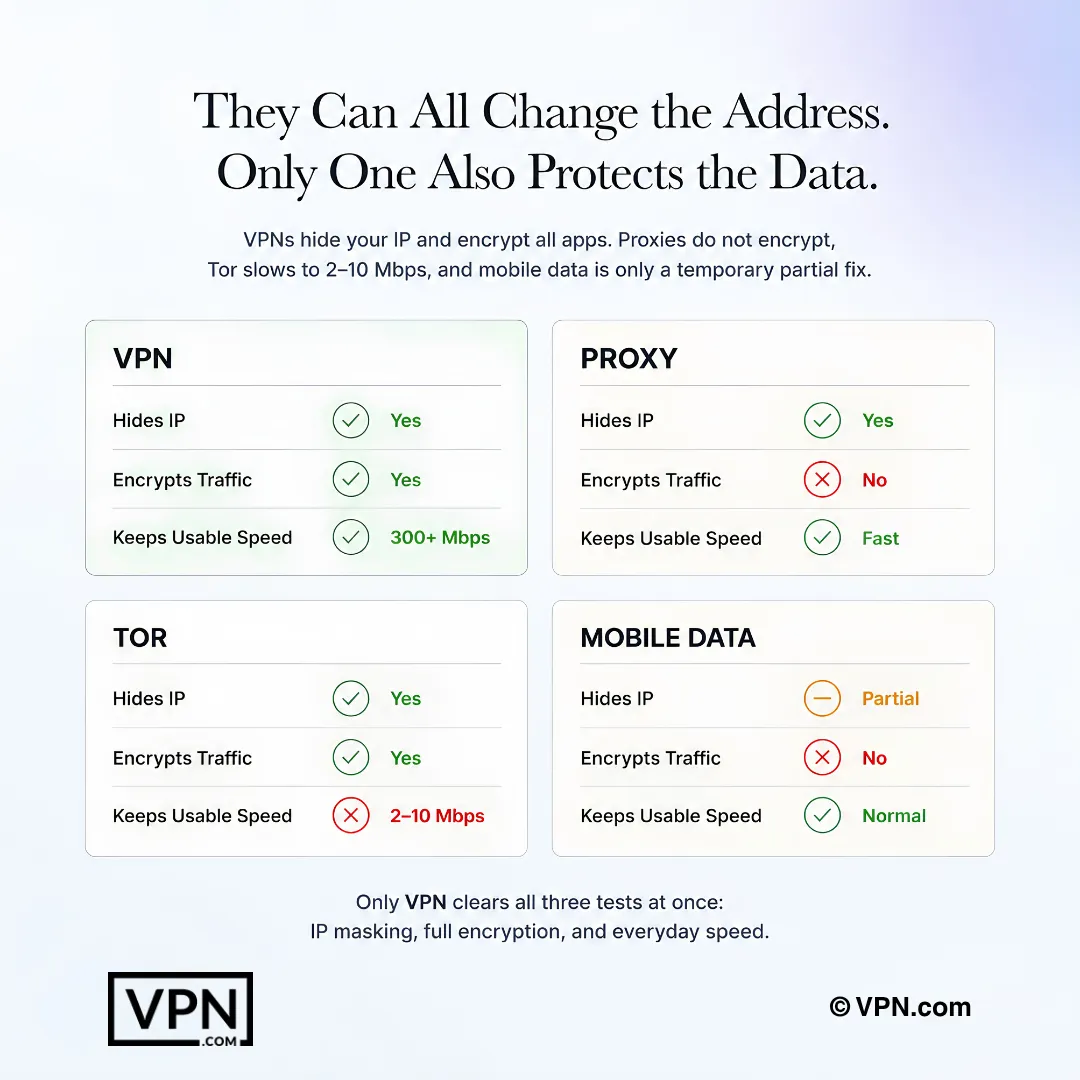
Several tools can change the visible IP address, but they differ significantly in encryption, privacy, and everyday usability.
Frequently Asked Questions
What’s the most practical way to hide my IP address for everyday use?
A VPN is the most practical method because it replaces your real IP with the server’s IP across every app on your device, not just your browser, while encrypting all traffic in the process. NordVPN, for example, runs on the WireGuard-based NordLynx protocol and says its no-logs policy has been independently audited. Proxies cover only the browser; Tor sacrifices speed for stronger anonymity.
What’s the actual difference between hiding my IP with a VPN versus a proxy server?
A VPN encrypts all traffic and replaces your IP system-wide across every app, while a proxy only reroutes traffic inside the one browser you configure it in, with no encryption at all. That leaves other apps, like email clients or torrent software, still exposing your real IP even while your browser shows the proxy’s address. Free public proxies have also been caught modifying pages, so paid options are safer.
Does browsing with Tor hide my IP more effectively than a VPN does?
Tor offers the strongest anonymity of the methods covered here, routing traffic through three volunteer-operated relays so no single node knows both your real IP and destination. That multi-hop routing causes a significant speed drop, and many streaming sites block Tor exit nodes outright. A VPN hides your IP with only a low to moderate speed impact, making it more practical for daily browsing, streaming, or gaming.
Can hiding my IP address actually stop someone from finding my physical location?
Yes, to a meaningful degree. An exposed IP can point to your approximate location and ISP, details that make phishing and social engineering attacks more convincing; the Verizon 2024 Data Breach Investigations Report found the human element, such as phishing or error, was a component of 68% of breaches. Masking your IP through a VPN, proxy, or Tor replaces that identifying address with the server’s or relay’s location instead.
Does switching to mobile data actually hide my IP address from websites?
Partially. Your cellular carrier assigns a different IP than your home ISP, so disconnecting from Wi-Fi and enabling mobile data instantly changes the address sites see, at no extra cost. But it adds no encryption, meaning your carrier can still see all your traffic, and it functions as a temporary fix rather than a long-term privacy solution.
Is it legal to hide my IP address using a VPN or proxy?
Yes, hiding your IP through a VPN, proxy, Tor, or mobile data is legal in the vast majority of countries; these are standard privacy tools, not evasion tactics. The complication is what you do while hidden: rights holders monitor torrent swarms and can use court subpoenas to have ISPs match IPs to account holders, and copyright law applies whether or not your IP was masked.
How do I confirm my IP address actually changed after connecting to a VPN?
Visit a site like WhatIsMyIPAddress.com before and after connecting and compare the two addresses; a working connection assigns you a new IP within seconds of clicking Connect. The same verification step applies to proxies, Tor, and mobile data, since all four methods should produce a visibly different address than your default ISP-assigned one.
Will hiding my IP address slow down my internet connection?
It depends on the method. VPNs bring a low to moderate speed impact from encryption overhead, proxies have a low impact since they don’t encrypt traffic at all, and Tor brings a high impact from routing through three layered-encryption relays. NordVPN ranks #1 of 22 on our Trust Score, aggregated from published third-party tests, among the least noticeable options if you choose a VPN.
How much does it cost to hide my IP address with a VPN?
VPN plans that hide your IP run from a promotional monthly rate up to roughly $7 per month on longer terms, while proxies cost free to low amounts and Tor and mobile data are free outright, though mobile data still bills against your carrier plan. Surfshark’s cheapest plan starts from $2.49/month, while NordVPN starts from $3.49/month and ExpressVPN from $2.99/month, both on their longest-term plans.
What if a website still detects my real IP after I connect to a VPN?
Recheck your address at WhatIsMyIPAddress.com to confirm whether the VPN actually reassigned a new one, since a failed or dropped connection can leave your real IP exposed without an obvious warning. Confirm the app shows a connected state and try a different server location. A provider like NordVPN, ExpressVPN, or Surfshark that says its no-logs policy has been audited reduces the risk of an untested or leaky connection.
Can I hide my IP address across every device in my household at once?
Yes, with a VPN that supports enough simultaneous connections, unlike a proxy, which only covers a single configured browser. NordVPN covers 10 devices per account, ExpressVPN offers 10 to 14 depending on plan, and Surfshark allows unlimited simultaneous connections, useful for larger households covering phones, laptops, and tablets under one subscription.
What if I try a VPN to hide my IP and it doesn’t work out for me?
NordVPN, ExpressVPN, and Surfshark all back their plans with a 30-day money-back guarantee, so you can test IP-masking and speed for a month before committing long-term. If the app fails to reassign your IP consistently or speeds feel unusable for streaming or gaming, request a refund within that window rather than waiting past it.
Does hiding my IP with a VPN help me access geo-restricted streaming content?
Yes, since a VPN’s server-assigned IP makes it look like you’re browsing from that server’s country. Proxies can achieve a similar browser-only effect, while Tor’s exit-node IPs are frequently blocked by streaming platforms outright, and mobile data doesn’t change your apparent country at all, only your carrier-assigned local IP.
Should I use a free proxy or a paid VPN to hide my IP address?
A paid VPN is safer for anything beyond quick browser-only geo-access, since it encrypts all traffic across every app, while free proxies can inject ads or tracking code instead of protecting you. A proxy suits occasional browser-only use given its low cost and low speed impact, but a VPN’s low to moderate impact is a reasonable trade for full-device encryption.