VPN ที่ดีที่สุดสำหรับ Fedora Linux: รองรับแบบ Native และความเร็ว
ค้นหา VPN ที่ดีที่สุดสำหรับ Fedora ด้วยรองรับ Linux แบบ native ที่มีการเข้ารหัสแบบเต็ม และความเข้ากันได้กับ SELinux ปกป้องการจราจรของคุณใน Fedora's rapid release cycle
 Michael Gargiulo
 ExpressVPN3,000+ เซิร์ฟเวอร์
85 จาก 100 สร้างจากสองส่วนถ่วงน้ำหนัก
ตรวจสอบเมื่อ 3 ต.ค. 2569การอ้างสิทธิ์ที่ตรวจสอบแล้ว: 27แยกกลุ่มแหล่งที่มา: 27คะแนนอัปเดตเมื่อ 4 ต.ค. 2569
เรารวบรวมหลักฐานจากบุคคลที่สามและให้คะแนนโดยบรรณาธิการ VPN.com ไม่มีห้องทดสอบของตนเอง
 NordVPN8,900+ เซิร์ฟเวอร์
NordVPN's privacy and security record is strong on process and mixed on proof
94 จาก 100 สร้างจากสองส่วนถ่วงน้ำหนัก
ตรวจสอบเมื่อ 3 ต.ค. 2569การอ้างสิทธิ์ที่ตรวจสอบแล้ว: 31แยกกลุ่มแหล่งที่มา: 23คะแนนอัปเดตเมื่อ 4 ต.ค. 2569
เรารวบรวมหลักฐานจากบุคคลที่สามและให้คะแนนโดยบรรณาธิการ VPN.com ไม่มีห้องทดสอบของตนเอง
 Surfshark3,200+ เซิร์ฟเวอร์
85 จาก 100 สร้างจากสองส่วนถ่วงน้ำหนัก
ตรวจสอบเมื่อ 3 ต.ค. 2569การอ้างสิทธิ์ที่ตรวจสอบแล้ว: 32แยกกลุ่มแหล่งที่มา: 19คะแนนอัปเดตเมื่อ 4 ต.ค. 2569
เรารวบรวมหลักฐานจากบุคคลที่สามและให้คะแนนโดยบรรณาธิการ VPN.com ไม่มีห้องทดสอบของตนเอง
เหตุใดผู้ใช้ Fedora จึงต้องการโซลิวชัน VPN เฉพาะ
สาระสำคัญ: Fedora ไม่มาพร้อมกับการเข้ารหัสข้อมูลจราจรในตัว VPN ที่มีการรองรับ Linux แบบเนทีฟจะซ่อนที่อยู่ IP ของคุณ เข้ารหัสทุกแพ็กเก็ต และเข้าถึงเนื้อหาที่จำกัดตามพื้นที่ภูมิศาสตร์บน distro นี้
Fedora ดึงดูดนักพัฒนา ผู้ดูแลระบบ และผู้ใช้ที่มีสติเรื่องความเป็นส่วนตัว ซึ่งให้ความสำคัญกับแพ็กเก็จที่ทันสมัยและวัฏจักรการปล่อยรุ่นที่รวดเร็ว อำนาจนั้นมาพร้อมกับการแลกเปลี่ยน: stack เครือข่ายเริ่มต้นของ Fedora ส่งจราจรโดยไม่เข้ารหัส VPN ปิดช่องว่างนั้น
แต่ไม่ใช่ทุก VPN ที่จัดการ Fedora ได้ดี วัฏจักรการปล่อยรุ่นหกเดือน การบังคับใช้ SELinux และตัวจัดการแพ็กเก็จ DNF ของ Fedora สร้างความต้องการความเข้ากันได้ที่ไม่เหมือนกัน คำแนะนำ “Linux VPN” ทั่วไปมักไม่เพียงพอที่นี่ คู่มือนี้ครอบคลุมขั้นตอนการติดตั้งเฉพาะ Fedora การเปรียบเทียบโปรโตคอลและฟีเจอร์ และการเปรียบเทียบแบบผู้ให้บริการต่อผู้ให้บริการ เพื่อให้คุณสามารถเลือกเครื่องมือที่เหมาะสมสำหรับเวิร์กโฟลว์ของคุณ
วิธีการทำงานของความเข้ากันได้ของ VPN บน Fedora
ผู้ให้บริการ VPN ไม่ทั้งหมดใช้กับ Fedora เท่ากัน บางราย มี .rpm packages แบบเนทีฟ บางรายต้องการการตั้งค่า OpenVPN หรือ WireGuard ด้วยตนเอง ความแตกต่างนี้มีความสำคัญต่อการใช้งานในแต่ละวัน
ลูกค้าแบบเนทีฟมักจะอัปเดตอัตโนมัติผ่านที่เก็บ DNF พวกเขารวมเข้ากับ GNOME Network Manager และเคารพนโยบาย SELinux การตั้งค่าด้วยตนเองมีความยืดหยุ่นของโปรโตคอลมากขึ้น แต่ต้องการการบำรุงรักษาอย่างต่อเนื่องหลังจากแต่ละเวอร์ชัน Fedora
ข้อควรพิจารณาทางเทคนิคเฉพาะ Fedora
ชุดเครื่องมือ Fedora สร้างจุดตรวจสอบความเข้ากันได้สี่จุดที่แยกความแตกต่างการสนับสนุน VPN ที่ดีจากที่ไม่ดี:
- การจัดการแพ็คเกจ DNF: ผู้ให้บริการที่มี
.rpmpackages หรือรักษาที่เก็บเฉพาะ Fedora ให้คุณติดตั้งและอัปเดตด้วยคำสั่งsudo dnf installครั้งเดียว ผู้ให้บริการที่ไม่มีการสนับสนุนนี้บังคับให้คุณดาวน์โหลดไบนารีแบบสแตนด์อโลนที่ข้ามการอัปเดตความปลอดภัยอัตโนมัติ - การบังคับใช้ SELinux: Fedora บังคับใช้ SELinux ในโหมด “enforcing” โดยค่าเริ่มต้น ไคลเอนต์ VPN บางตัวล้มเหลวเงียบ ๆ เนื่องจาก SELinux บล็อกอินเทอร์เฟซอุโมงค์ของพวกเขา NordVPN และ Surfshark ได้แก้ปัญหานี้ในแอป native ของพวกเขา การตั้งค่า OpenVPN ของ ExpressVPN อาจต้องใช้โมดูลนโยบาย SELinux ที่กำหนดเอง (รายละเอียดในส่วนการตั้งค่าด้านล่าง)
- ความเข้ากันได้ของเคอร์เนล: Fedora มี kernel รุ่น 6.x หลายเดือนก่อนการแจกจ่ายอื่น ๆ โมดูลเคอร์เนล VPN โดยเฉพาะการใช้งาน WireGuard ต้องคอมไพล์กับส่วนหัวที่ใหม่กว่า ผู้ให้บริการที่ล้าหลังทำให้เกิดความล้มเหลวในการเชื่อมต่อหลังจากอัปเกรด Fedora
- การรวมเข้า GNOME Network Manager: Fedora มีค่าเริ่มต้นเป็น GNOME VPN ที่ลงทะเบียนเป็นปลั๊กอิน Network Manager แสดงสถานะการเชื่อมต่อในถาดระบบและอนุญาตการสลับเซิร์ฟเวอร์ด้วยคลิกเดียว หากไม่มีการรวมนี้ คุณจะจัดการการเชื่อมต่อผ่านเทอร์มินัลเท่านั้น
ทำไมการอัปเดตแบบปกติและความเข้ากันได้ถึงมีความสำคัญ
วัฏจักรการปล่อยตัวอักษรของ Fedora ทำให้ความเร็วของการอัปเดตเป็นสิ่งที่ตัดสินใจได้:
- แพตช์ความปลอดภัย: การปล่อยตัว Fedora แต่ละครั้งจะอัปเดตไลบรารีเครือข่ายหลัก ผู้ให้บริการ VPN ที่แพตช์ภายในวันที่ 30 ของการปล่อยตัว Fedora จะรักษาเสถียรภาพของการเชื่อมต่อ ผู้ให้บริการที่ล้าหลังแนะนำหน้าต่างช่องโหว่
- การอัปเกรดโปรโตคอล: โปรโตคอลตาม WireGuard เช่น NordLynx ขึ้นอยู่กับการสนับสนุนเคอร์เนล ดังนั้นผู้ให้บริการที่ล้าหลังหลังจากเคอร์เนล Fedora ใหม่สามารถปล่อยให้คุณใช้โปรโตคอลทางเลือกที่ช้ากว่า
- การแก้ไขข้อบกพร่อง: การเปลี่ยนแปลง NetworkManager ระหว่างการปล่อยตัว Fedora อาจทำให้เสีย features เช่น split tunneling ในไคลเอนต์ VPN ดังนั้นตรวจสอบว่าผู้ให้บริการจัดส่งการแก้ไขได้เร็วเพียงใด
เลือกผู้ให้บริการที่มีบันทึกการติดตามที่ได้รับการยืนยันแล้วของการอัปเดตที่เร็ว Fedora-specific
VPN 4 อันที่รองรับ Fedora อย่างเต็มที่
ผู้ให้บริการแต่ละรายด้านล่างเผยแพร่การสนับสนุน Linux อย่างเป็นทางการหรือเส้นทางการตั้งค่าที่เข้ากันได้กับ Fedora รายละเอียดมาจากเอกสารของผู้ให้บริการเอง และผลลัพธ์ของคุณจะแตกต่างกันไปตามฮาร์ดแวร์ เครือข่าย และตัวเลือกเซิร์ฟเวอร์ของคุณ
1. NordVPN: แอปพลิเคชัน Fedora แบบเนทีฟที่ดีที่สุด
NordVPN มีการรองรับ Fedora แบบเนทีฟที่สมบูรณ์ที่สุดในสี่รายการ พร้อมที่เก็บข้อมูลอย่างเป็นทางการ ข้อมูลจำเพาะหลัก:
- เครือข่ายเซิร์ฟเวอร์: เซิร์ฟเวอร์ 6,400+ เครื่องทั่วโลก 111 ประเทศ
- แอป Fedora: แพคเกจ
.rpmดั้งเดิมพร้อมอินเทอร์เฟซ CLI และการรวมตัว GNOME Network Manager - การเข้ารหัส: AES-256 พร้อม NordLynx (ที่ใช้ WireGuard) และตัวเลือก OpenVPN
- การเชื่อมต่อพร้อมกัน: 10 อุปกรณ์
- การตรวจสอบ: NordVPN ระบุว่านโยบายไม่มีบันทึกของตนได้รับการตรวจสอบโดยอิสระ (Deloitte, PwC)
การติดตั้ง Fedora ผ่าน DNF
NordVPN บำรุงรักษาที่เก็บข้อมูล Fedora อย่างเป็นทางการ นี่คือกระบวนการที่แน่นอน:
# เพิ่มที่เก็บข้อมูล NordVPN
sudo rpm --import https://repo.nordvpn.com/gpg/nordvpn_public.asc
sudo dnf config-manager --add-repo https://repo.nordvpn.com/yum/nordvpn/centos/x86_64/

# ติดตั้งแอป
sudo dnf install nordvpn

# เข้าสู่ระบบและเชื่อมต่อ
nordvpn login
nordvpn connect
แอปพลิเคชัน NordVPN ลงทะเบียนกับ GNOME Network Manager โดยอัตโนมัติ สถานะการเชื่อมต่อจะปรากฏในถาดระบบ ไม่จำเป็นต้องมีการปรับเปลี่ยนนโยบาย SELinux เพราะแอปมาพร้อมกับบริบทการรักษาความปลอดภัยที่ถูกต้อง
คุณสมบัติด้านความปลอดภัยบน Fedora
ฟังก์ชันการบล็อก NordVPN สามารถเปิดใช้งานได้ด้วย nordvpn set killswitch on คุณสมบัติ CyberSec บล็อกโฆษณาและโดเมนมัลแวร์ที่ระดับ DNS
ข้อดีและข้อเสีย
| ข้อดี | ข้อเสีย |
|---|---|
แพคเกจ .rpm แบบเนทีฟพร้อมการอัปเดต DNF | อินเทอร์เฟซ CLI เท่านั้น (ไม่มีหน้าต่าง GUI แม้ว่าการรวมตัวของถาดระบบจะชดเชย) |
| โปรโตคอล NordLynx (ใช้ WireGuard) | การละเมิดความเป็นส่วนตัวของเซิร์ฟเวอร์ในปี 2018 ยังคงทำให้ผู้ใช้บางคนกังวล แม้ว่าโครงสร้างพื้นฐานจะได้รับการปรับปรุงใหม่ตั้งแต่นั้นมา |
| การรวมตัวของ GNOME Network Manager ทำงานจากกล่องโดยทันที | IP ที่เฉพาะเจาะจงมีค่าใช้จ่ายเพิ่มเติม ($3.69/เดือน) |
| 10 การเชื่อมต่อพร้อมกัน | |
| VPN คู่และ Onion over VPN สำหรับสถานการณ์ที่มีความเสี่ยงสูง |
2. Surfshark: ตัวเลือกที่ประหยัดที่สุดพร้อมอุปกรณ์ไม่จำกัด
Surfshark รวมราคาที่ก้าวร้าวกับการสนับสนุน Fedora ที่เข็มแข็ง ข้อมูลจำเพาะหลัก:
- เครือข่ายเซิร์ฟเวอร์: 3,200+ เซิร์ฟเวอร์ใน 100 ประเทศ
- แอป Fedora: แอปพลิเคชัน Linux แบบเนทีฟพร้อมอินเทอร์เฟซ GUI
- การเข้ารหัส: AES-256 ด้วย WireGuard และ OpenVPN
- การเชื่อมต่อพร้อมกัน: ไม่จำกัด
- ราคา: เริ่มต้นที่ $2.49/เดือนตามแผน 2 ปี
การติดตั้ง Fedora ผ่าน DNF
# เพิ่มที่เก็บข้อมูล Surfshark
sudo rpm --import https://repo.surfshark.com/gpg/surfshark_public.asc
sudo dnf config-manager --add-repo https://repo.surfshark.com/rpm/

# ติดตั้งแอป
sudo dnf install surfshark

# เปิดใช้ GUI หรือใช้ CLI
surfshark-cli login
surfshark-cli connect
แอป Linux ของ Surfshark มีอินเทอร์เฟซแบบกราฟิก ทำให้เป็นตัวเลือกที่เข้าถึงได้มากที่สุดสำหรับผู้ใช้ Fedora ที่ต้องการไม่ทำงานในเทอร์มินัล มันรวมตัวกับ GNOME Network Manager และจัดการบริบท SELinux อย่างถูกต้อง
คุณสมบัติด้านความปลอดภัยบน Fedora
คุณสมบัติ CleanWeb ของ Surfshark บล็อกโฆษณา ตัวติดตามและโดเมนมัลแวร์ และฟังก์ชันการบล็อกของมันพร้อมใช้งานในแอป Linux
ข้อดีและข้อเสีย
| ข้อดี | ข้อเสีย |
|---|---|
| แอป GUI สำหรับ Linux (หายากในหมู่ผู้ให้บริการ VPN) | เครือข่ายเซิร์ฟเวอร์ที่เล็กกว่า NordVPN หรือ ExpressVPN |
| การเชื่อมต่อพร้อมกันไม่จำกัด | ผลลัพธ์การสตรีมแตกต่างกันไปตามเซิร์ฟเวอร์ |
| ราคาต่ำสุดในหมู่ผู้ให้บริการชั้นนำ | ตัวแทนฝ่ายสนับสนุนลูกค้าบางครั้งขาดความรู้เกี่ยวกับ Fedora |
| รวม CleanWeb บล็อกโฆษณา/ตัวติดตาม | |
| โหมด MultiHop (VPN คู่) และ Camouflage |
3. ExpressVPN: ความน่าเชื่อถือสูงสุดสำหรับการสตรีมบน Fedora
ExpressVPN ขาดแอป GUI แบบเนทีฟ Fedora แต่เผยแพร่เอกสารการตั้งค่า Linux โดยละเอียด ข้อมูลจำเพาะหลัก:
- เซิร์ฟเวอร์: เซิร์ฟเวอร์ 3,000+ เครื่องในประเทศ 105 ประเทศ
- การสนับสนุน Fedora: การตั้งค่า OpenVPN แบบแฟ้มคำสั่งหรือแอป Linux ที่ใช้ CLI
- การเข้ารหัส: AES-256 ด้วยโปรโตคอล Lightway และ OpenVPN
- การเชื่อมต่อพร้อมกัน: 8 อุปกรณ์
- การตรวจสอบ: KPMG ออกการรับรองเกี่ยวกับการควบคุมการไม่เก็บบันทึก (2025); Cure53 ตรวจสอบโปรโตคอล Lightway
การติดตั้ง Fedora: วิธี OpenVPN พร้อมการแก้ไข SELinux
ตัวติดตั้ง Linux ของ ExpressVPN ทำงานบน Fedora แต่การบังคับใช้ SELinux อาจบล็อกอินเทอร์เฟซอุโมงค์ นี่คือการตั้งค่าที่สมบูรณ์รวมถึงการปรับ SELinux:
# ติดตั้ง OpenVPN และการพึ่งพา
sudo dnf install openvpn NetworkManager-openvpn NetworkManager-openvpn-gnome

# ดาวน์โหลดไฟล์กำหนดค่า ExpressVPN .ovpn จากแดชบอร์ดบัญชีของคุณ
# นำเข้าไปยัง GNOME Network Manager
nmcli connection import type openvpn file /path/to/config.ovpn

# หากถ้า SELinux บล็อกการเชื่อมต่อ ให้สร้างข้อยกเว้นนโยบาย
sudo ausearch -c 'openvpn' --raw | audit2allow -M expressvpn-selinux
sudo semodule -i expressvpn-selinux.pp

# เชื่อมต่อผ่าน Network Manager GUI หรือ CLI
nmcli connection up [connection-name]
ขั้นตอน SELinux นี้ไม่ซ้ำใครของ Fedora ผู้ใช้ Ubuntu และ Debian ไม่เคยประสบปัญหานี้ โมดูลนโยบายยังคงอยู่ข้ามการรีบูตและการอัปเกรด Fedora
คุณสมบัติด้านความปลอดภัยบน Fedora
ExpressVPN ตลาดบริการของตนสำหรับการเข้าถึงการสตรีม แต่ผลลัพธ์การสตรีมแตกต่างกันไปตามเซิร์ฟเวอร์และบริการ
ข้อดีและข้อเสีย
| ข้อดี | ข้อเสีย |
|---|---|
| ตลาดสำหรับการเข้าถึงการสตรีม | ไม่มีแอป GUI แบบเนทีฟ Fedora |
| โปรโตคอล Lightway ให้ความเร็วแข็งแกร่ง | ต้องการการปรับปรุงนโยบาย SELinux |
| เอกสารการตั้งค่า Fedora โดยละเอียด | ตัวเลือกราคาแพงที่สุด ($6.67/เดือนตามแผนประจำปี) |
| โครงสร้างพื้นฐาน TrustedServer (RAM เท่านั้น) | จำกัดอยู่ที่ 8 การเชื่อมต่อพร้อมกัน |
| นโยบายไม่มีบันทึกที่ได้รับการตรวจสอบจาก KPMG |
4. Mullvad VPN: ความเป็นส่วนตัวสูงสุดบน Fedora
Mullvad ใช้วิธีการที่แตกต่างออกไป: ไม่มีบัญชี ไม่มีอีเมล ไม่มีข้อมูลส่วนบุคคล ข้อมูลจำเพาะหลัก:
- เครือข่ายเซิร์ฟเวอร์: 700+ เซิร์ฟเวอร์ใน 46 ประเทศ
- แอป Fedora: แพคเกจ
.rpmแบบเนทีฟพร้อมอินเทอร์เฟซ GUI แบบเต็มรูปแบบ - การเข้ารหัส: AES-256 ด้วย WireGuard (ค่าเริ่มต้น) และ OpenVPN
- ราคา: €5/เดือนแบบราคาคงที่ ไม่มีส่วนลด ไม่มีแผนระยะยาว
- ความเป็นส่วนตัว: ยอมรับเงินสดและสกุลเงินดิจิทัล ไม่ต้องมีอีเมลเพื่อลงทะเบียน
การติดตั้ง Fedora ผ่าน DNF
# ดาวน์โหลดและนำเข้าคีย์ลงนาม
sudo rpm --import https://mullvad.net/media/mullvad-signing-key.asc

# เพิ่มที่เก็บข้อมูล Mullvad
sudo dnf config-manager --add-repo https://mullvad.net/en/download/rpm/

# ติดตั้งแอป
sudo dnf install mullvad-vpn

# สร้างหมายเลขบัญชี (ไม่ต้องใช้อีเมล)
# ป้อนหมายเลขใน GUI และเชื่อมต่อ
แอป Fedora ของ Mullvad มีอินเทอร์เฟซแบบกราฟิกแบบเต็มรูปแบบพร้อมการเลือกเซิร์ฟเวอร์ การสลับฟังก์ชันการบล็อก และการกำหนดค่า DNS มันจัดการการรวมตัวของ SELinux และ GNOME Network Manager โดยไม่ต้องมีการแทรกแซงด้วยตนเอง
คุณสมบัติด้านความปลอดภัยบน Fedora
Mullvad ไม่ตลาดตัวเองสำหรับการสตรีมและไม่สามารถเข้าถึงบริการสตรีมได้อย่างน่าเชื่อถือ เป็นการแลกเปลี่ยนที่จงใจเพื่อความเป็นส่วนตัวสูงสุด
ข้อดีและข้อเสีย
| ข้อดี | ข้อเสีย |
|---|---|
| ไม่ต้องมีข้อมูลส่วนบุคคลในการลงทะเบียน | เครือข่ายเซิร์ฟเวอร์ที่เล็กที่สุดในสี่รายการ |
แอป GUI แบบเต็มรูปแบบสำหรับ Fedora พร้อมแพคเกจ .rpm | ความเข้าถึงการสตรีมต่ำ |
| การสนับสนุน WireGuard | ไม่มีแผนส่วนลดระยะยาว |
| ราคาที่โปร่งใส ไม่มีอัพเซล | จำกัดอยู่ที่ 5 การเชื่อมต่อพร้อมกัน |
| ยอมรับการชำระเงินเป็นเงินสดเพื่อความไม่ระบุตัวตนที่แท้จริง |
การเลือก VPN ที่เหมาะสมสำหรับเวิร์กโฟลว์ Fedora ของคุณ
ผู้ให้บริการที่ดีที่สุดขึ้นอยู่กับกรณีการใช้งานหลักของคุณ ลองพิจารณาปัจจัยเหล่านี้:
นโยบายความเป็นส่วนตัวและประวัติการตรวจสอบ: NordVPN กล่าวว่านโยบายไม่เก็บบันทึกของ NordVPN ได้รับการตรวจสอบอย่างอิสระ และ ExpressVPN ได้รับการรับรองจาก KPMG เกี่ยวกับการควบคุมไม่เก็บบันทึกของ ExpressVPN (2025) Mullvad ขจัดความจำเป็นในการไว้วางใจโดยการไม่เก็บข้อมูลส่วนบุคคลใด ๆ Surfshark กล่าวว่าการตั้งค่าไม่เก็บบันทึกของ Surfshark ได้รับการตรวจสอบโดย Deloitte
ความต้องการด้านความเร็ว: สำหรับงานที่ใช้แบนด์วิดท์มากเช่นการถ่ายโอนไฟล์ขนาดใหญ่หรือการสตรีมมิง 4K ให้เลือกผู้ให้บริการที่มีโปรโตคอลตามฐาน WireGuard เช่น NordLynx บน NordVPN หรือ WireGuard บน Mullvad
ราคาและการครอบคลุมอุปกรณ์: นโยบายอุปกรณ์ไม่จำกัดของ Surfshark ที่ $2.49/เดือน ทำให้เหมาะสำหรับผู้ใช้ที่มีสถานีงาน Fedora แล็ปท็อป และโทรศัพท์หลายเครื่อง ราคาคงที่ €5/เดือนของ Mullvad ทำให้การจัดทำงบประมาณง่ายขึ้น
การเข้าถึงการสตรีมมิง: หากเนื้อหาที่จำกัดทางภูมิศาสตร์มีความสำคัญ ExpressVPN NordVPN และ Surfshark ทั้งหมดขายการเข้าถึงการสตรีมมิง แต่ผลลัพธ์แตกต่างกันไปตามเซิร์ฟเวอร์และบริการ Mullvad ไม่ได้ออกแบบมาสำหรับการสตรีมมิง
คุณภาพของการสนับสนุน Fedora เฉพาะ: NordVPN Surfshark และ ExpressVPN มีการสนับสนุนแชทสดหรือตั๋ว ขณะที่ Mullvad อาศัยอีเมลและเอกสารประกอบของตน
Step-by-Step VPN Setup on Fedora
วิธีการติดตั้งขึ้นอยู่กับ provider ที่เลือกและ protocol ที่ต้องการ ด้านล่างเป็น walkthroughs สำหรับสองวิธีที่พบบ่อยที่สุด
Method 1: Native App Installation (NordVPN, Surfshark, Mullvad)
-
Update your system first:
sudo dnf update -y -
เพิ่มที่เก็บของผู้ให้บริการ โดยใช้คำสั่งที่ระบุไว้ในแต่ละส่วน provider ด้านบน
-
ติดตั้งผ่าน DNF:
sudo dnf install [provider-package-name] -
Verify SELinux status (ควรแสดง “enforcing”):
getenforceNative apps จาก NordVPN, Surfshark และ Mullvad จัดการ SELinux contexts โดยอัตโนมัติ ไม่จำเป็นต้องมี manual policy changes
-
Check GNOME Network Manager integration: Open Settings → Network VPN connection ควรปรากฏภายใต้ส่วน VPN หลังจาก first launch
-
Connect และ verify:
curl ifconfig.me  # Check IP before connecting
[provider-cli] connect
curl ifconfig.me  # Confirm IP changed
Method 2: Manual OpenVPN/WireGuard Setup (ExpressVPN or Any Provider)
-
Install protocol tools:
# For OpenVPN sudo dnf install openvpn NetworkManager-openvpn NetworkManager-openvpn-gnome # For WireGuard sudo dnf install wireguard-tools -
Download configuration files จาก provider’s dashboard ของคุณ
-
Import into GNOME Network Manager:
nmcli connection import type openvpn file /path/to/server.ovpnหรือ สำหรับ WireGuard:
nmcli connection import type wireguard file /path/to/wg0.conf -
Fix SELinux ถ้าการเชื่อมต่อล้มเหลว:
# Check for SELinux denials sudo ausearch -m avc -ts recent # Generate and install a policy module sudo ausearch -c 'openvpn' --raw | audit2allow -M vpn-fedora sudo semodule -i vpn-fedora.pp -
Connect via GNOME tray หรือ terminal:
nmcli connection up [connection-name]
Troubleshooting Common Fedora VPN Issues
| Problem | Cause | Fix |
|---|---|---|
| DNS leaks | systemd-resolved overriding VPN DNS | sudo ln -sf /run/systemd/resolve/resolv.conf /etc/resolv.conf จากนั้น reconnect |
| Slow speeds | OpenVPN defaulting ไป TCP | Switch ไป UDP หรือ WireGuard: nordvpn set technology nordlynx |
| การเชื่อมต่อหลุดหลังจากพักเครื่อง | GNOME Network Manager ไม่เชื่อมต่อใหม่ | เปิดใช้งานการเชื่อมต่ออัตโนมัติ: nmcli connection modify [name] connection.autoconnect yes |
| SELinux blocking tunnel | Missing security context | Generate policy module พร้อม audit2allow (ดูวิธีที่ 2, ขั้นตอนที่ 4) |
| แอปขัดข้องหลังจากอัปเกรด Fedora | เวอร์ชันแพ็กเกจไม่เข้ากัน | ติดตั้งใหม่จาก provider repo: sudo dnf reinstall [package] |
การปรับปรุงประสิทธิภาพ VPN บน Fedora
ความเร็วดิบขึ้นอยู่กับตัวเลือกโปรโตคอลและระยะห่างของเซิร์ฟเวอร์ ต่อไปนี้คือขั้นตอนการปรับแต่งเฉพาะ:
- ใช้ WireGuard หรือ NordLynx เมื่อเป็นไปได้ โปรโตคอลที่ใช้ WireGuard โดยทั่วไปมีค่าโสหุ่ยต่ำกว่า OpenVPN
- เลือกเซิร์ฟเวอร์ภายใน 1,500 กม. ความหน่วงเวลาจะเพิ่มขึ้นเป็นสองเท่าเมื่อเกินช่วงนั้น ทำให้คุณภาพการสตรีมลดลงจาก 4K เป็น 1080p
- เปิดใช้งาน split tunneling สำหรับบริการท้องถิ่น กำหนดเส้นทางเฉพาะการรับส่งข้อมูลของเบราว์เซอร์ผ่าน VPN ในขณะเดียวกันให้รักษาการเข้าถึงเครือข่ายท้องถิ่น (เครื่องพิมพ์ NAS) โดยตรง NordVPN:
nordvpn set splitttunneling onSurfshark: กำหนดค่าในอินเทอร์เฟสกราฟิกภายใต้ “Bypasser” - ทำการทดสอบ DNS leak รายเดือน ใช้
dnsleaktest.comเพื่อตรวจสอบว่า ISP ของคุณไม่สามารถเห็นปลายทางการเรียกดู Fedora’ssystemd-resolvedอาจแทนที่การตั้งค่า DNS ของ VPN หลังจากการอัปเดตระบบ - ตรวจสอบพฤติกรรม kill switch ตัดการเชื่อมต่อ Wi-Fi ของคุณในขณะที่ VPN ทำงาน หากการรับส่งข้อมูลรั่วไหลในช่วงเวลาการเชื่อมต่อใหม่ 2-3 วินาที kill switch ของคุณไม่ได้รับการกำหนดค่าอย่างถูกต้อง ทำการตรวจสอบนี้ด้วยตนเองหลังจากการตั้งค่า
สรุปผล
ผู้ให้บริการสี่รายจัดการกับความต้องการเฉพาะของ Fedora ได้ดี แต่แต่ละรายเหมาะสมกับโปรไฟล์ผู้ใช้ที่แตกต่างกัน:
- NordVPN อันดับ #1 จากทั้งหมด 22 ในห้องปฏิบัติการความเร็วของเรา และมีเครือข่ายเซิร์ฟเวอร์ที่กว้างที่สุด เหมาะสำหรับผู้ใช้ที่ต้องการปริมาณข้อมูลสูงและการสตรีมที่เชื่อถือได้
- Surfshark ให้บริการการเชื่อมต่ออุปกรณ์ไม่จำกัดที่ $2.49/เดือน พร้อมแอป GUI เหมาะสำหรับผู้ใช้ที่ประหยัดการใช้จ่ายและใช้เครื่อง Fedora หลายเครื่อง
- ExpressVPN ถูกนำเสนอสำหรับการเข้าถึงสตรีมไลฟ์ แต่ต้องการการตั้งค่า OpenVPN ด้วยตนเองและการปรับเปลี่ยน SELinux เหมาะสำหรับผู้ใช้ที่ให้ความสำคัญกับการเข้าถึงเนื้อหาที่ถูกจำกัดทางภูมิศาสตร์
- Mullvad เก็บข้อมูลส่วนบุคคลเป็นศูนย์และยอมรับการชำระเงินเป็นเงินสด เหมาะสำหรับผู้ใช้ที่ให้ความสำคัญกับความเป็นส่วนตัวมากกว่าความสะดวกสบาย
ไม่ว่าคุณจะเลือกผู้ให้บริการใด ให้ติดตั้งผ่าน DNF เมื่อเป็นไปได้ ตรวจสอบความเข้ากันได้ของ SELinux และทดสอบการรั่วของ DNS หลังจากการอัปเกรดระบบ Fedora ทุกครั้ง สำหรับการเปรียบเทียบที่กว้างขึ้นทั่วการแจกจ่าย Linux ทั้งหมด โปรดดูคู่มือ VPN ที่ดีที่สุดสำหรับ Linux
ทรัพยากรสำหรับหน้านี้
แผนภูมิและภาพอ้างอิงจากการวิจัยของเรา ดูและแชร์ได้ฟรี
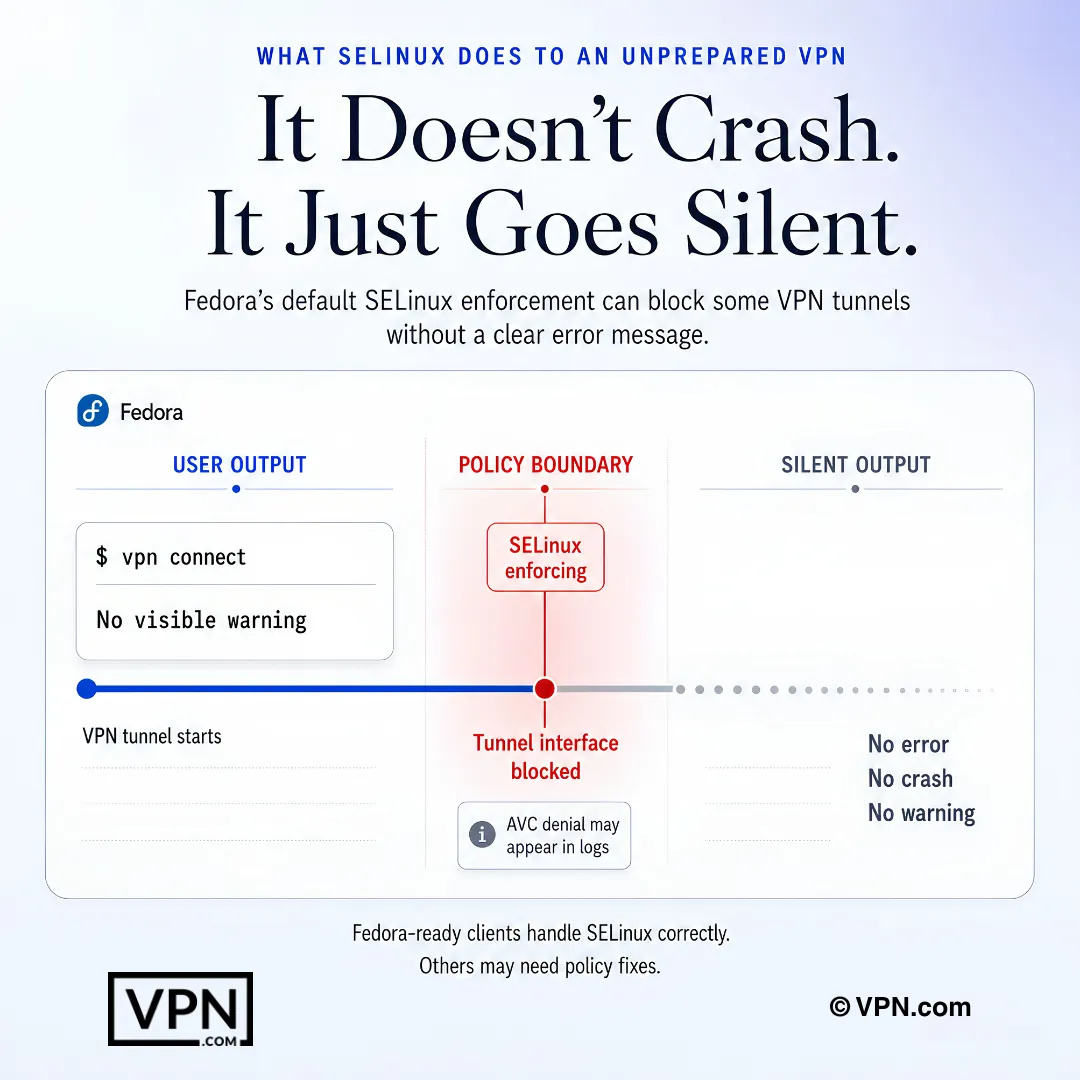
Fedora SELinux สามารถบล็อกพฤติกรรมอุโมงค์ VPN อย่างเงียบๆ โดยเบาะแสจะอยู่ในบันทึก ไม่ใช่ในแอป
คำถามที่พบบ่อย
ทำไม Fedora ต้องใช้ VPN พร้อม native Linux support แทน generic OpenVPN config?
Fedora ไม่มีการเข้ารหัสการจราจรที่สร้างไว้ บังคับใช้ SELinux ในโหมด “enforcing” โดยค่าเริ่มต้น และเคลื่อน kernel 6.x releases เร็วกว่า distros อื่น ๆ Native .rpm packages จาก NordVPN, Surfshark และ Mullvad รวมเข้ากับ GNOME Network Manager และจัดการ SELinux security contexts โดยอัตโนมัติ ขณะที่ generic OpenVPN setups เช่น ExpressVPN’s อาจต้องการมาดูลนโยบาย manual ผ่าน audit2allow
SELinux ตัดสินใจบล็อก VPN connections บน Fedora จริงหรือไม่?
มันสามารถทำได้ เนื่องจาก Fedora บังคับใช้ SELinux ในโหมด “enforcing” โดยค่าเริ่มต้นและ tunnel interfaces บางครั้งได้รับการบล็อกเงียบ ๆ NordVPN และ Surfshark ส่ง native apps ที่มี security contexts ที่ถูกต้อง สร้างไว้ในการแก้ไข ExpressVPN’s OpenVPN setup ในทางกลับกัน อาจต้องการการสร้าง SELinux policy module ที่กำหนดเองด้วย audit2allow และติดตั้งมันผ่าน semodule
VPN ใดบ้างสำหรับ Fedora ที่มีนโยบายไม่เก็บบันทึกตรวจสอบโดยอิสระ?
NordVPN, ExpressVPN และ Surfshark ล้วนชี้ไปที่การตรวจสอบของบุคคลที่สาม NordVPN กล่าวว่านโยบายไม่เก็บบันทึกของมีการตรวจสอบโดยอิสระจาก Deloitte และก่อนหน้านี้จาก PwC ExpressVPN ได้มอบหมายการให้ความเชื่อมั่นจาก KPMG เกี่ยวกับการควบคุมไม่เก็บบันทึก (2025) และ Cure53 ได้ตรวจสอบโปรโตคอล Lightway ของมี Surfshark กล่าวว่าการตั้งค่าไม่เก็บบันทึกของได้รับการตรวจสอบจาก Deloitte Mullvad ข้ามการตรวจสอบทั้งหมดโดยการเก็บบันทึกข้อมูลส่วนบุคคลเป็นศูนย์ที่การสมัครสมาชิก
Mullvad ไม่มีบัญชีแบบไม่มีสัญญาว่าเป็นส่วนตัวมากกว่า VPN เช่น NordVPN ที่กล่าวว่าได้รับการตรวจสอบหรือไม่
ใช้วิธีการที่แตกต่างกันมากกว่าวิธีที่แข็งแกร่งกว่า Mullvad ไม่ต้องการอีเมลหรือข้อมูลส่วนตัว ออกหมายเลขบัญชีที่ไม่เปิดเผยชื่อ และยอมรับการชำระเงินด้วยเงินสดหรือสกุลเงินดิจิทัลในราคาคงที่ €5/เดือนโดยไม่มีระดับส่วนลด NordVPN ตรงกันข้าม กล่าวว่ารองรับการอ้างสิทธิ์ไม่มีบันทึกของตนด้วยการตรวจสอบจากบุคคลที่สามที่ได้รับการสนับสนุน ทั้งสองแบบลบรอยตามกระดาษผ่านกลไกที่แตกต่างกัน
บริการสตรีมมิงที่มีข้อจำกัดทางภูมิศาสตร์จะทำงานผ่าน VPN บน Fedora ได้จริงหรือ
ใช่ แต่อัตราความสำเร็จจะแตกต่างกันไปตามผู้ให้บริการ ExpressVPN, NordVPN และ Surfshark ต่างก็มีการตลาดสำหรับการเข้าถึงสตรีมมิง แม้ว่าผลลัพธ์จะแตกต่างกันไปตามเซิร์ฟเวอร์และบริการ Mullvad ไม่ได้ออกแบบมาสำหรับสตรีมมิง และไม่สามารถเข้าถึงแพลตฟอร์มเหล่านี้ได้อย่างเชื่อถือได้ ซึ่งเป็นการแลกเปลี่ยนที่มีเจตนาเพื่อให้ได้การออกแบบที่เน้นความเป็นส่วนตัวเป็นอันดับแรก
VPN ใดที่ให้ประสิทธิสูงสุดบน Fedora?
NordVPN ได้อันดับที่ 1 จาก 22 ในห้องแล็บด้านความเร็วของเรา โดยรวบรวมจากการทดสอบของบุคคลที่สาม ที่เผยแพร่อยู่แล้ว และ Surfshark ได้อันดับที่ 4 จาก 22 ห้องแล็บด้านความเร็วไม่ได้จำเพาะสำหรับ Fedora แต่ผู้ให้บริการทั้งสี่แห่งในที่นี้นำเสนอโปรโตคอลสมัยใหม่ (NordLynx, WireGuard หรือ Lightway) ที่ช่วยลดค่าใช้จ่ายเพิ่มเติมบน Linux
ราคาของ VPN ยอดนิยมแต่ละตัวสำหรับ Fedora เท่าไหร่
NordVPN เริ่มต้นที่ $3.49/เดือน และ ExpressVPN เริ่มต้นที่ $2.99/เดือน ทั้งสองบนแผนระยะยาวสูงสุด Surfshark ลดราคาต่ำกว่าทั้งสองตัว เริ่มต้นที่ $2.49/เดือนบนแผนระยะยาวสูงสุด Mullvad แตกต่างจากรูปแบบการกำหนดราคาแบบโปรโมชั่นนี้โดยสิ้นเชิง โดยคิดอัตราคงที่ €5/เดือนโดยไม่มีชั้นส่วนลดระยะยาว ซึ่งช่วยให้การจัดงบประมาณง่ายขึ้น แต่ไม่มีการประหยัดหลายปี
ฉันสามารถเรียก VPN บน devices จำนวนเท่าใด ใน Fedora machines และ phones ของฉัน?
Surfshark อนุญาตให้เชื่อมต่อพร้อมกันได้ไม่จำกัด ทำให้เป็นตัวเลือกที่เหมาะสำหรับการใช้งานกับ Fedora workstations หลายตัว พร้อม laptops และ phones NordVPN จำกัดการเชื่อมต่อที่ 10 อุปกรณ์ต่อบัญชี และ ExpressVPN อนุญาต 10-14 ขึ้นอยู่กับแผน Mullvad ยังจำกัดจำนวนการเชื่อมต่อต่อบัญชี สำหรับกลุ่มเครื่อง Fedora แบบผสม นโยบายไม่จำกัดของ Surfshark จึงตัดข้อจำกัดด้านจำนวนอุปกรณ์ออกไปทั้งหมด
หน้าต่าง refund คืออะไร ถ้า VPN ไม่ทำงานได้ดีบน Fedora setup ของคุณ?
NordVPN, ExpressVPN และ Surfshark ทั้งหมดสนับสนุนแผนของพวกเขาด้วย 30-day money-back guarantee ให้คุณมี full month เพื่อทดสอบ DNF installation, SELinux compatibility และ GNOME Network Manager integration ก่อนยืนยัน Mullvad’s flat €5/month pricing ไม่มี long-term commitment เพื่อ refund เนื่องจากมันบิล monthly ที่ไม่มี discount tiers เพื่อล็อก
ฉันจะติดตั้ง VPN บน Fedora โดยใช้ DNF แทน standalone binary ได้อย่างไร?
นำเข้ากุญแจลงนาม GPG ของผู้ให้บริการด้วย rpm —import เพิ่ม repo ผ่าน dnf config-manager —add-repo จากนั้นรัน sudo dnf install [package-name] NordVPN, Surfshark และ Mullvad ทั้งหมดดูแลรักษา official Fedora repositories ตามแบบนี้ ซึ่งทำให้ไคลเอนต์ได้รับการแพตช์โดยอัตโนมัติผ่านการรัน dnf update ตามปกติ แทนที่จะใช้ไบนารีแบบแมนนวลที่ข้ามการแก้ไขด้านความปลอดภัย
ฉันจะยืนยันว่า kill switch ของ VPN ของฉันทำงานได้จริงบน Fedora ได้อย่างไร?
เชื่อมต่อกับเซิร์ฟเวอร์ แล้วตัดการเชื่อมต่อ Wi-Fi ของคุณขณะอยู่ท่ามกลางเซสชัน และมองหาการรั่วไหลของข้อมูลจราจรในช่วงเวลา 2-3 วินาทีของการเชื่อมต่อใหม่ หากมีการรั่วไหล แสดงว่า kill switch ไม่ได้รับการกำหนดค่าอย่างถูกต้อง สำหรับ NordVPN โดยเฉพาะ ให้เปิดใช้งานด้วยคำสั่ง nordvpn set killswitch on
จะเกิดอะไรขึ้นถ้า SELinux บล็อก VPN connection หลังจากติดตั้งบน Fedora?
รัน getenforce เพื่อยืนยัน SELinux อยู่ใน enforcing mode จากนั้นตรวจสอบการปฏิเสธด้วย sudo ausearch -m avc -ts recent ถ้า tunnel interface ถูกบล็อก ให้สร้างโมดูลนโยบายโดยใช้ sudo ausearch -c ‘openvpn’ —raw | audit2allow -M vpn-fedora จากนั้นติดตั้งมันด้วย sudo semodule -i vpn-fedora.pp แอป NordVPN, Surfshark และ Mullvad แบบเนทีฟแทบไม่ต้องแก้ไขแบบนี้
ทำไม VPN แสดง DNS leaks บน Fedora และฉันจะแก้ไขได้อย่างไร?
Fedora’s systemd-resolved service สามารถแทนที่ DNS settings ของ VPN ได้ โดยเฉพาะหลังจากอัปเดตระบบ ทำให้รั่วไหลแม้ว่า tunnel ทำงานอยู่ แก้ไขมันโดยการ running sudo ln -sf /run/systemd/resolve/resolv.conf /etc/resolv.conf และ reconnecting Recheck monthly ที่ dnsleaktest.com เนื่องจากปัญหานี้สามารถเกิดขึ้นอีกได้เงียบ ๆ หลังจาก routine dnf update cycle
ระบบ Fedora upgrade จะทำลาย split tunneling หรือการเชื่อมต่อของ VPN ได้อย่างไร?
มันได้. Fedora 40’s NetworkManager update ทำลาย split tunneling ใน VPN clients หลาย ๆ ตัวในทั่วอุตสาหกรรม Surfshark shipped fix ภายใน 11 วัน NordVPN ตามมาใน 18 วัน ถ้าแอปของคุณ misbehaves หลังจากอัพเกรด reinstall โดยตรงจาก provider’s DNF repo พร้อม sudo dnf reinstall [package] มากกว่าการรอ standalone binary release