Can ISP See VPNs? Here’s the Real Breakdown on VPNs vs. ISPs
Wondering, “Can ISP see VPNs' activity”? You’re not alone. Discover what your provider actually knows and how to take back control. Hit this to stay invisible.
Day by day, our online activity is being monitored more and more. From targeted adverts to worries over data retention and monitoring, knowing what can be seen by whom we access online is essential in preserving our anonymity.
At the center of it all is your Internet Service Provider (ISP). As the doorway to the internet, your ISP deals with every piece of your online traffic. Of course, questions occur: What do they see? And if you’re using a VPN, does that make a difference?
Most users opt for VPNs to have better security and privacy, hoping it makes them totally invisible to their ISP. Although a VPN can be a fantastic tool, the reality is more complex. Your ISP’s view also changes dramatically when you get connected to a VPN, but it doesn’t become invisible.
This piece explores the connection between your VPN and your ISP in-depth, detailing what your internet provider can and cannot see, and how VPNs provide an essential layer of protection in the hunt for online anonymity.
Understanding Your Internet Service Provider (ISP)
Before we look at how a VPN affects things, it’s good to know what your ISP does and what data it usually gathers. It might be a cable provider such as Spectrum or Comcast, a telephone company such as AT&T or Verizon, a satellite firm, or a neighborhood fiber provider.
If you’re specifically using Comcast and concerned about monitoring or throttling, choosing the best VPN for Comcast can help improve privacy and connection stability. They own and operate the network equipment, cables, routers, and servers that link your home or device to the global internet.
Each and every packet of data that you send or receive on the internet traverses their network.
Who is My ISP?
For most, it is just the company that they pay for their monthly internet subscription.
You can generally see their name on your bill, or do a quick web search for “What is my IP address?” and then check with a site like whois.net or other IP lookup sites, which tend to list the organization (your ISP) that owns that block of IP addresses.
Your WiFi provider tends to be your ISP, especially if you’re using the router they gave you. Even if you are using your own router, your connection to the internet still passes through the ISP’s network.
What Does My ISP Know About Me?
When I’m directly connected to the internet with no extra privacy aids like a VPN? A lot.
Consider your ISP having a kind of unobstructed view of all the traffic passing across their network from your particular point of connection (determined by your IP address).
Without a VPN, your ISP can normally observe:
- Your IP Address: This is your personal address on the internet, provided by your ISP.
- Sites You Visit: They can observe the IP addresses of the sites you visit. By doing a trivial DNS lookup, they can convert those IP addresses into the domain names.
- How Long You’re on Websites: They can observe how long you’ve been connected to certain servers.
- What Time You’re Online: They track connection times and lengths.
- How Much Data You Use: They track your data usage (upload and download).
- Your Geographic Location: Your IP address is tied to a general geographic location, which your ISP knows exactly.
- The Services You Use: Although they may not be able to view the content of encrypted traffic (such as HTTPS sites), they can view you accessing particular service providers (e.g., online video streams, games, social media sites) based on IP addresses and patterns of traffic.
- Unencrypted Data: For sites or services on older HTTP versions (as opposed to HTTPS), your ISP will see everything, including what particular pages you are visiting, data you fill out on forms, etc. Though less popular these days, it still happens.
Basically, without a VPN, your ISP gets an extensive log of your internet use trail, functioning as an expansive directory of the digital destinations you’ve been to and when.
How a VPN Works to Protect Your Data
That is where a VPN comes in as a privacy lifesaver. VPN is an acronym for Virtual Private Network.
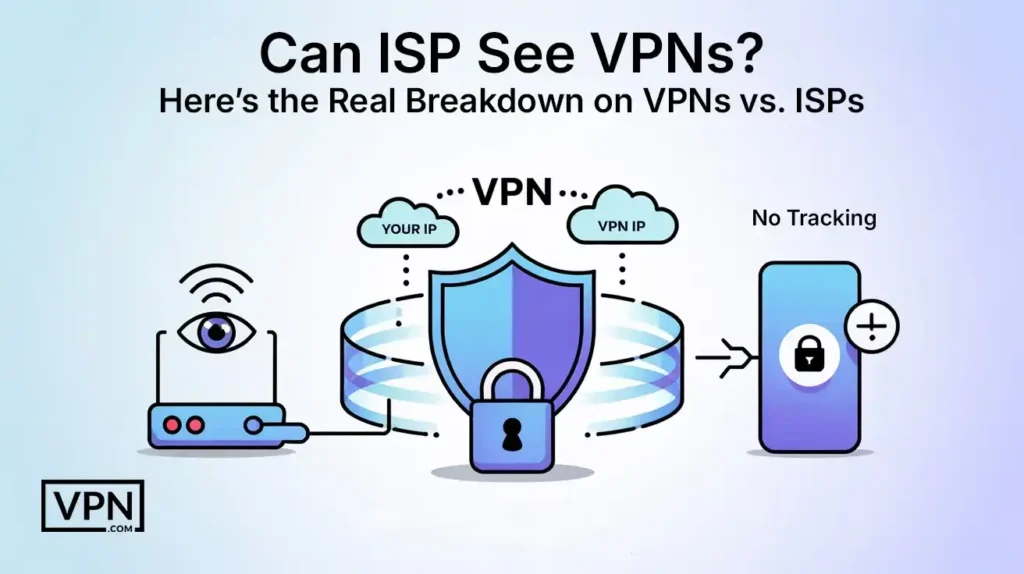
Its main job is to provide a secure, encrypted link, which is commonly termed a “tunnel”, between your computer and a server run by the VPN provider.
When you connect to a VPN
- Encryption: Your computer encrypts all your internet traffic. It’s not just for browsing; it’s everything: web requests, downloads, streaming data, email, etc. This encrypted data is not readable to anyone who intercepts it without the decryption key.
- Tunneling: This encrypted data is then wrapped inside another data packet. This is what forms the “tunnel.” Your ISP can see this outer packet, but it cannot see the encrypted data within.
- Routing: The encrypted, tunneled data passes through your normal internet connection (which is provided by your ISP) to your selected VPN server.
- Exit Server: The VPN server decrypts the encrypted traffic, then forwards it on to its final destination on the internet (e.g., the site you wish to visit).
- IP Masking: To the outside world (including the websites you visit), your traffic seems to be originating from the VPN server’s IP address, rather than your actual IP address provided by your ISP.
This process successfully redirects your internet traffic and encrypts it, causing it to look like it comes from the location of the VPN server and obscuring the true nature of your online activity from anyone listening in on your local network or your ISP connection.
Can ISP See VPN that You are Using?
Let’s tackle one of the fundamental questions now: Can ISP see VPNs? The answer to that is, most often, yes. Your ISP will generally be able to detect that you are using a VPN.
Although they cannot access the content of your encrypted traffic, they can see some aspects of the connection:
- Encrypted Traffic: Your ISP only gets to see a flow of encrypted data between your IP address and the VPN server’s IP address. Encrypted traffic can look very different from normal unencrypted traffic.
- Linking with a Familiar VPN Server IP: Quality VPN providers have designated servers with specific IPs. Such IPs tend to be familiar with being linked to VPN services. Your ISP has the potential to detect that you’re connecting with an IP belonging to a commercial VPN company.
- Persistent Connection to a Single IP: In contrast to browsing multiple sites, a VPN connection often comprises a lasting, persistent connection to a single VPN server’s IP address. This behavior can be characteristic of VPN use.
- Specific Protocols: Certain VPN protocols may exhibit distinguishable patterns, though this is diminishing as VPN technology improves and employs common ports such as 443 (utilized by HTTPS) to fit in.
So, while your ISP cannot observe what you are doing within the tunnel, they will in many instances see that you have connected to a server which they may recognize as a VPN endpoint.
This is within the scope of, Can ISP see VPN? The VPN internet provider, ISP VPN, VPN ISP, and VPN and internet provider all speak to this exchange, where the ISP will know about the VPN connection itself, even though the specifics within are not known.
What Your ISP Cannot See When You Use a VPN
This is where the key privacy advantages of a VPN start to become relevant. After your connection is set up inside the encrypted tunnel, your ISP’s power to view your specific online activity is greatly diminished.
This solves most of the major concerns individuals have regarding ISP monitoring. Let’s break down what your ISP cannot see:
Can your internet provider see your history with a VPN?
No. Your browsing history, in the order in which you have visited websites, is entirely kept from your ISP. The requests to websites and the information returned are all encrypted inside the VPN tunnel.
The ISP only gets encrypted packets to the VPN server, not the particular destination IP addresses of the websites you’re browsing past the VPN server.
Can my internet provider see what I search with VPN?
No. As detailed in the history point, the call to a website passes through the encrypted tunnel to the VPN server. The VPN server subsequently accesses the website on your behalf. The ISP sees traffic to the VPN server but not the destination website.
Your DNS requests are also typically resolved by the DNS servers of the VPN provider, so your ISP cannot see what domain names you’re resolving.
Can my ISP see what I download with VPN?
No. The files that you download, whether it’s a document, video, software, or whatever, are downloaded as encrypted information inside the VPN tunnel.
Your ISP is seeing the encrypted packets traveling from the VPN server to your computer, but they can’t open or read the actual files that are being downloaded.
Can ISP see torrenting with VPN?
No. Torrenting includes peer-to-peer connections, which can be easily tracked by ISPs in the absence of a VPN. But with a VPN, your torrenting traffic is encrypted and passed through the VPN tunnel.
The ISP will only observe encrypted data transfer from and to the VPN server, but they will be unable to discern that it is torrenting traffic, nor will they be able to see what the exact files you are sharing or downloading are.
Technically, a VPN is like a cloak of privacy. Your ISP will notice that you are wearing a cloak and where exactly you are headed (connecting to the VPN server), but they will not be able to tell what you are doing or carrying under this cloak.
How VPNs Protect You From ISP Tracking
With the extensive logs ISPs are able to retain, the protection a VPN can provide is considerable.
By encrypting your data and sending it through an external server, a VPN basically severes the connection between your IP address and what you do online.
Does VPN protect you from Internet providers?
Yes. The first protection a VPN provides against your internet provider is the hiding of your online activities. They do not know what sites you visit, what searches you perform, what content you download, or what services you use.
Does VPN hide from ISP?
Yes, it conceals the aspects of your online activity from your ISP.
It is necessary to make the words does VPN block internet provider or does a VPN block your internet provider. A VPN doesn’t prevent your ISP from noticing any traffic whatsoever. Your data still passes through your ISP’s network.
What the VPN accomplishes is that it renders that traffic incomprehensible and untraceable to your individual actions once it exits the VPN server.
Can Your ISP Track Your VPN Connection?
A VPN conceals your actions, but it does not render you completely invisible. Your ISP will still be able to notice a connection between your home IP and the VPN server IP.
Can your ISP track you with a VPN?
They trace you as far as your traffic entering the VPN tunnel. After that, your activity is linked to the IP address of the VPN server, not yours.
Imagine it this way: The ISP can track your VPN connection to the server, but once you exit the “vehicle” at the server’s endpoint, they lose visibility, and your online activity blends with others using the same server.
So, your ISP can tell that you are using a VPN and what VPN server you are connecting to (by its IP address), but they can’t see what you are doing through the VPN connection.
Limitations and Possible Problems
VPNs provide very strong protection against snooping by your ISP, but they are not completely perfect and have limitations.
- ISP blocking VPN: A few ISPs, especially where there is harsh internet censorship or on specific networks (such as corporate or school networks), may try to block or slow down VPN connections. They do this by detecting typical VPN server IP addresses or patterns of traffic.
- IP and DNS Leaks: A technical error or misconfiguration might allow your actual IP address or your DNS queries to leak outside the encrypted tunnel for a moment, exposing your activity to your ISP or others. Good VPN software has leak protection methods built in to block this.
- Being Able to Know You’re using a VPN still: While an ISP can detect VPN usage, they can’t see your specific activities. For most users seeking privacy, this minimal detection is acceptable, as it doesn’t reveal their online behavior.
Enhancing Your Privacy Further
Although a VPN is an anchor of internet privacy, it’s just one component of an overall system of tools and techniques.
How to Hide Your Internet Activity from ISP?
How to prevent your internet company from monitoring you involves more than employing a VPN. Some other steps include:
- Use HTTPS Everywhere: Make sure websites you browse use HTTPS. HTTPS encrypts the connection between the website server and your browser, so your ISP can’t view the exact pages you browse or information you post on that site.
- Privacy-Oriented Search Engines and Browsers: Opt for browsers such as Firefox (with increased tracking protection), Brave, or Tor Browser. Utilize search engines such as DuckDuckGo or Startpage that do not trace your search history.
- Tor Network: For higher anonymity, the Tor network routes your traffic through multiple encrypted layers, making it hard to trace. However, it’s slower than a VPN and not ideal for streaming or large file downloads.
- Manage Smart Devices: Pay attention to the information gathered by smart home devices, apps, and operating systems, since the information gathered could also outline your behaviors, some of which may be accessible to ISPs or partners.
- Review Privacy Settings: On a regular basis, verify the privacy settings in your online accounts, social media, and devices.
Putting a good VPN together with these habits builds an even stronger protection against tracking and monitoring, both by your ISP and other parties on the net.
Can ISP See VPN: FAQs
Yes, they can trace the fact that there is a connection between your IP and the IP of the VPN server.
Yes, notably from their capacity to monitor and log your particular online activities.
They can know you are connecting to the VPN, but not your history inside the encrypted tunnel. If you are connected to public Wi-fi, they will be able to see you connecting to the VPN server.
But when the VPN connection is established, your torrenting activity and other browsing history are encrypted and sent through the VPN, which cannot be tracked by the WiFi provider either.
No. As detailed in the history point above, the call to a website passes through the encrypted tunnel to the VPN server. The VPN server subsequently accesses the website on your behalf.
The ISP sees traffic to the VPN server but not the destination website. Your DNS requests are also typically resolved by the DNS servers of the VPN provider, so your ISP cannot see what domain names you’re resolving.
Yes, it prevents the type of in-depth monitoring that records your every online move. While they monitor the link to the VPN, they cannot monitor your route or activity past the VPN server.
The Bottom Line
Although your Internet Service Provider is generally able to recognize the existence of a VPN connection between your IP address and a VPN server, they are essentially in the dark about the destination and content of your encrypted internet traffic.
A VPN is an essential privacy utility, effectively concealing your browsing history, search terms, visited websites, downloads, and torrenting from ISP monitoring.
While the VPN connection is traceable, the specifics of your online activity within the encrypted tunnel are hidden, and substantial protection from ISP monitoring is provided.
–