Proxy vs VPN: Which One’s Cap & Which One’s Clutch?
Forget the hype. We’re breaking down proxy vs VPN with real talk. Want faster speeds, full privacy & zero tracking? This guide's got your back.
 Michael Gargiulo
Find your VPN
What will you mostly use a VPN for?
Pick one, then answer a few quick questions. We name the VPN that fits, and say why.
VPN for streaming
Question 1 of 3
What made you look for a streaming VPN?
27,210 VPN picks made through VPN.com in the last 30 days

Your match

NordVPN
NordVPN's privacy and security record is strong on process and mixed on proof
93 out of 100, built from two weighted parts
App store ratings, part of the score
4.664.59
Researched Oct 3, 2026Claims checked: 31Separate source groups: 23Scores updated Oct 8, 2026

ProtonVPN
85 out of 100, built from two weighted parts
App store ratings, part of the score
4.614.70
Researched Oct 3, 2026Claims checked: 23Separate source groups: 19Scores updated Oct 8, 2026
VPN for privacy
Question 1 of 3
What made you look for a privacy VPN?
27,210 VPN picks made through VPN.com in the last 30 days
Your match
NordVPN
NordVPN's privacy and security record is strong on process and mixed on proof
93 out of 100, built from two weighted parts
App store ratings, part of the score
4.664.59
Researched Oct 3, 2026Claims checked: 31Separate source groups: 23Scores updated Oct 8, 2026
ProtonVPN
85 out of 100, built from two weighted parts
App store ratings, part of the score
4.614.70
Researched Oct 3, 2026Claims checked: 23Separate source groups: 19Scores updated Oct 8, 2026
VPN for gaming
Question 1 of 3
What made you look for a gaming VPN?
27,210 VPN picks made through VPN.com in the last 30 days
Your match
NordVPN
NordVPN's privacy and security record is strong on process and mixed on proof
93 out of 100, built from two weighted parts
App store ratings, part of the score
4.664.59
Researched Oct 3, 2026Claims checked: 31Separate source groups: 23Scores updated Oct 8, 2026
ProtonVPN
85 out of 100, built from two weighted parts
App store ratings, part of the score
4.614.70
Researched Oct 3, 2026Claims checked: 23Separate source groups: 19Scores updated Oct 8, 2026
VPN for free plans
Question 1 of 3
What made you look for a free VPN?
27,210 VPN picks made through VPN.com in the last 30 days
Your match
ProtonVPN
85 out of 100, built from two weighted parts
App store ratings, part of the score
4.614.70
Researched Oct 3, 2026Claims checked: 23Separate source groups: 19Scores updated Oct 8, 2026
NordVPN
NordVPN's privacy and security record is strong on process and mixed on proof
93 out of 100, built from two weighted parts
App store ratings, part of the score
4.664.59
Researched Oct 3, 2026Claims checked: 31Separate source groups: 23Scores updated Oct 8, 2026
NordVPN7,115 serversNordVPN's privacy and security record is strong on process and mixed on proof
93 out of 100, built from two weighted parts
App store ratings, part of the score
4.664.59
Researched Oct 3, 2026Claims checked: 31Separate source groups: 23Scores updated Oct 8, 2026
 ExpressVPN3,000+ servers
86 out of 100, built from two weighted parts
App store ratings, part of the score
4.684.69
Researched Oct 3, 2026Claims checked: 27Separate source groups: 27Scores updated Oct 8, 2026
 Surfshark4,500+ servers
Surfshark's evidence mixes real, readable third-party documents with provider assertions
85 out of 100, built from two weighted parts
App store ratings, part of the score
4.714.64
Researched Oct 3, 2026Claims checked: 32Separate source groups: 19Scores updated Oct 8, 2026
Bottom Line: Proxies hide your IP address for specific apps or browsers but do not encrypt your traffic. Anyone monitoring the network can still see what you are doing. A VPN encrypts all traffic from every app on your device. For anything beyond basic geo-accessing, a VPN is the stronger choice.
Online tracking has become harder to escape with each passing year. Ads follow you across sites. Apps collect more data than you expect. Even streaming platforms block content based on your location.
That is why more people want to protect their online activity. The debate around proxy vs VPN keeps growing. Both hide your IP. Both help you get around blocks. But they are not the same thing.
One might be enough for streaming. The other is better for complete privacy. The problem is, picking the right tool is not always obvious.
This guide keeps it simple. No jargon, just honest answers. You will see how each tool works, what they can do together, and why people choose one over the other. If you want to keep your data safe or just access content from another region, you are in the right place.
What Is a Proxy Server and How Does It Work?
A proxy server sits between your device and the internet. The IETF’s HTTP specification defines a proxy as a message-forwarding agent chosen by the client[1]. When you use a proxy, your web traffic goes through that server first. The proxy requests the website on your behalf and returns the content to you.
This process hides your IP address. Websites see the proxy’s IP instead of yours. That makes it harder for sites to track your real location.
Proxies also help you access content across regions. If content is only available in certain countries, a proxy in that region can give you access.
However, proxies do not encrypt your internet connection. An HTTP proxy only forwards your requests. For HTTPS sites, the browser asks the proxy to open a CONNECT tunnel[2] and any encryption comes from TLS between you and the site, not from the proxy. Everything else you send through the proxy can still be exposed to anyone monitoring traffic on the network. They also only cover the specific app or browser you configure, not your entire device.
Common Types of Proxy Servers
Proxy servers come in many forms. Each type serves a different purpose. Here are the most common ones:
Forward Proxy
A forward proxy acts as a gateway between users and the internet. It sends requests to websites on behalf of the user. Organizations often use forward proxies within internal networks to manage internet access and increase security. The HTTP specification notes that proxies are used for security services, annotation services, or shared caching[1].
Example: An office forward proxy filters internet traffic and blocks unauthorized websites for employees.
Transparent Proxy
A transparent proxy intercepts and redirects traffic without the user’s knowledge. Users do not need to configure anything. The HTTP specification says an interception (transparent) proxy is not chosen by the client and is commonly found on public network access points and within corporate firewalls[1] to enforce usage policies, which is why schools and businesses use them for content filtering and monitoring.
Example: A school monitors student internet activity through a transparent proxy without students configuring anything.
Anonymous Proxy
An anonymous proxy hides your IP address while you browse. It prevents websites from tracking your browsing history or identifying your real location.
Example: A user connects through an anonymous proxy so websites cannot trace activity back to their real IP.
High Anonymity Proxy
A high anonymity proxy goes further than a standard anonymous proxy. It masks all identifying details and does not reveal itself as a proxy to the destination server. Journalists and researchers use this type when complete anonymity is critical.
Distorting Proxy
A distorting proxy hides your real IP and replaces it with a false one. It still identifies itself as a proxy server, but the fake IP makes your location appear different.
Example: A user appears to browse from another country by connecting through a distorting proxy.
Data Center Proxy
A data center proxy operates from a data center rather than through an ISP. It offers fast speeds at low cost but provides weaker anonymity than residential proxies.
Example: A data analyst gathers publicly available web data quickly using a data center proxy.
Residential Proxy
A residential proxy uses a real IP address assigned by an ISP. This makes it harder for websites to detect proxy usage. It is more trustworthy than data center proxies for tasks that require appearing as a regular user.
Example: An advertiser verifies ad placements using a residential proxy that looks like a normal home connection.
Public Proxy
A public proxy is free and accessible to everyone. It is easy to find but often slow because many users share it. Security is a concern since public proxies may not protect your data.
Shared Proxy
A shared proxy lets multiple users share the same IP address. It costs less than a dedicated proxy but runs slower. If one user gets flagged, everyone on that IP may be affected.
SSL Proxy
An SSL proxy handles encrypted HTTPS traffic between a user and a website. Businesses use SSL proxies to inspect encrypted traffic for security threats.
Example: An e-commerce company uses an SSL proxy to secure payment data during transactions.
How a Proxy Server Processes Your Traffic
A proxy server intercepts your requests and forwards them to the target website. Here is what happens step by step:
- Request handling: You try to access a website. The proxy receives your request and sends it to the site on your behalf.
- Data forwarding: The website returns data to the proxy. The proxy then sends that data back to you.
- IP masking: The website sees the proxy’s IP address, not yours.
- Content filtering: Some proxies block access to certain websites or filter out specific content types.
- Caching: A proxy may store copies of web pages, and HTTP defines caches[3] for exactly this. This speeds up loading when the same page is requested again.
- accessing restricted content: Proxies help users reach websites blocked in their region.
Proxies work in different settings:
- Public proxies: Available to anyone, usually free.
- Private proxies: Restricted to specific users, offering better privacy.
- Corporate proxies: Used by businesses to control network access and protect internal systems.
While proxies improve anonymity, they do not encrypt your internet traffic by default. They mask your IP address but leave your data readable.
What Is a VPN and How Does It Protect You?
A VPN creates an encrypted connection between your device and the internet. NIST describes a VPN as a virtual network built on top of existing physical networks that provides a secure communications mechanism[4]. It protects sensitive information from hackers, trackers, and other third parties. This matters especially on public Wi-Fi networks.
When you connect to a VPN, your real IP address is hidden. Your internet traffic routes through a secure server. This keeps your activity private from your ISP and network monitors.
Unlike proxies, VPNs encrypt all traffic from your browser and every app on your device. That adds a much stronger layer of protection.
VPNs also reduce tracking by websites and internet service providers. They limit how much of your browsing behavior can be monitored, whether you are shopping, streaming, or browsing.
However, VPNs have limitations. Encryption can reduce connection speed slightly. Certain services actively block VPN IP addresses. Understanding these trade-offs helps you pick the right tool for your situation.
Types of VPNs for Different Use Cases
VPNs come in several forms. Each type serves a specific purpose, from individual privacy to enterprise networking.
Remote Access VPN
A remote access VPN lets individual users connect to a private network over the internet. Businesses use this type so employees can access company resources from home or while traveling.
Example: A remote employee connects to the company’s internal network through a remote access VPN from home.
Site-to-Site VPN
A site-to-site VPN connects entire networks across different locations. Companies use it to link headquarters with branch offices over a secure connection.
Example: A company’s headquarters and its regional offices share resources securely through a site-to-site VPN.
SSL VPN (Secure Sockets Layer)
An SSL VPN uses SSL/TLS encryption and works through a standard web browser. NIST’s guide describes SSL VPN users as connecting with their Web browsers, with traffic encrypted by SSL or its successor TLS[5]. That makes it convenient for quick, secure access.
Example: Employees access the company network through a browser-based SSL VPN from any device.
IPSec VPN (Internet Protocol Security)
IPsec is designed to provide security services for traffic at the IP layer[6], and NIST calls it the most common network layer security control[4]. It is popular in enterprise environments for both site-to-site and remote access connections.
Example: An organization secures communication between two branches using IPSec encryption.
MPLS VPN (Multiprotocol Label Switching)
Large enterprises use MPLS VPNs to connect multiple offices over a service provider’s backbone. In the IETF’s BGP/MPLS design[7], each customer route carries an MPLS label that keeps one customer’s traffic separate from another’s. The same document notes these methods do not by themselves encrypt the data[7].
Example: A multinational company connects international offices for fast, secure data transfer through MPLS.
L2TP VPN (Layer 2 Tunneling Protocol)
L2TP provides the tunnel but not the encryption: NIST notes that for confidentiality and integrity of the data plane it depends on IPsec[4], which is why it is paired with IPsec. It is used for both site-to-site connections and remote access scenarios.
Example: A business allows remote employees to connect securely using L2TP paired with IPSec.
PPTP VPN (Point-to-Point Tunneling Protocol)
PPTP is one of the oldest VPN protocols, documented in 1999[8]. NIST’s IPsec VPN guide says PPTP should not be used, and if it is, it should be treated as a plaintext protocol[4] with no functional confidentiality or integrity protection.
OpenVPN
OpenVPN is open-source, highly flexible, and supports strong encryption algorithms. Its reference manual[9] lists SSL/TLS security and TCP or UDP tunnel transport through proxies or NAT, which helps it work on restrictive networks, and it works for both remote access and site-to-site configurations. Many top VPN providers use OpenVPN as a default protocol option.
WireGuard
WireGuard is a newer protocol whose authors say it can be implemented for Linux in less than 4,000 lines of code[10], and the same paper describes OpenVPN as far more complex because it carries the full range of TLS functionality. A smaller codebase is easier to audit for security flaws. In the project’s own benchmarks[11], WireGuard reached higher throughput than OpenVPN, though the project notes those tests are dated, so your speed will vary.
Mobile VPN
A mobile VPN maintains a secure connection even when your device switches between Wi-Fi and cellular networks. It prevents connection drops that could expose your data.
Example: A field worker accesses company data securely while traveling across different network connections.
How a VPN Encrypts and Routes Your Data
A VPN creates a secure, encrypted tunnel between your device and the internet. Here is how the process works:
- Encrypted tunnel: The VPN wraps your data in encryption before it leaves your device. This prevents anyone from reading your traffic in transit.
- IP masking: Your traffic routes through a VPN server. Websites see the server’s IP address, not yours.
- Secure data transfer: Encrypted data travels through the tunnel. Even if intercepted, it is unreadable without the decryption key.
- Access to restricted content: VPNs let you change your virtual location. You can reach websites and streaming services blocked in your region.
- Full device protection: VPNs protect all internet traffic on your device, including browsers, apps, email clients, and games.
Key benefits of using a VPN:
- Privacy: Your ISP cannot see which sites you visit or what you download.
- Security: Your data stays encrypted, especially on public Wi-Fi networks. For more on staying safe while using public networks, check out this guide on protecting yourself on public Wi-Fi.
- Geo-accessing: VPNs let you access content restricted to other regions.
Proxy vs VPN: Similarities, Differences, and How to Choose
Both proxy servers and VPNs protect your online identity by hiding your real IP address. They also help you access geographically restricted content. But the way they work and the level of protection they offer differ significantly.
Where Proxies and VPNs Overlap
Anonymity and Privacy
Both tools mask your IP address. This provides a degree of anonymity while browsing and makes it harder for websites to track your location.
access content across regions
Both let you connect to servers in other countries. This helps you access streaming services, news sites, or apps that are blocked in your region.
Traffic Routing Through Intermediary Servers
Both act as intermediaries between your device and the websites you visit. The destination website sees the server’s IP address rather than yours.
Where Proxies and VPNs Differ
Encryption and Security
VPNs encrypt all data you send and receive. Your online activities stay protected from hackers, ISPs, and third parties. For sensitive transactions like online banking, VPNs are the only appropriate choice.
Proxy servers do not encrypt your data. They hide your IP address but leave your traffic readable to anyone monitoring the network.
Traffic Coverage
VPNs work at the operating system level. They encrypt and reroute all internet traffic from every app on your device. Proxy servers only route traffic from the specific app or browser you configure. The rest of your device’s traffic remains unprotected.
Speed and Performance
VPNs add slight latency because of the encryption process. Modern protocols like WireGuard minimize this impact. Your speed depends on your connection and how far away the server is.
Proxies skip encryption, so raw throughput can be faster. However, free proxy servers often suffer from congestion and deliver inconsistent speeds.
Cost
Most reliable VPNs cost between $2 and $7 per month on annual plans. Free VPN options exist but typically limit data, server access, or log user activity.
Proxy servers are often free. But free proxies carry risks including slow speeds, poor reliability, and potential data logging.
Privacy and Data Logging
Reputable VPN providers publish their no-logs policies and say they do not store records of your internet activity. NordVPN and Surfshark say their policies have been independently audited, and ExpressVPN holds a 2025 KPMG assurance report on TrustedServer.
A proxy operator can see every request that is not protected by HTTPS, and free public proxies have a poor record: researchers found 5.15% of tested open proxies modified pages in malicious or unwanted ways[12], including injecting code that collects user information.
Summary Table: Proxy vs VPN
| Feature | Proxy | VPN |
|---|---|---|
| Hides IP address | Yes | Yes |
| Encrypts traffic | No | Yes (all apps) |
| Traffic coverage | Specific app or browser only | Entire device |
| Speed | Fast (no encryption overhead) | Slight reduction (depends on protocol, connection and server distance) |
| Cost | Often free | ~$2–7/month for paid |
| No-logs policy | Rarely | Available from audited providers |
| Kill switch | No | Yes (paid providers) |
| Best for | Browser-level geo-accessing | Full privacy and security |
Business Use Cases for VPNs and Proxies
VPNs and proxy servers serve different roles in business environments based on security requirements.
VPNs for Secure Access and Data Protection
VPNs create encrypted tunnels between employee devices and company servers. This reduces the risk of data breaches when employees work remotely or connect to public Wi-Fi.
Business VPN benefits include:
- Safe access to internal systems from any location.
- Encrypted file transfers between offices and remote workers.
- Protection from cyber threats on untrusted networks.
Proxies for Content Filtering and Network Control
Businesses use proxy servers for tasks that do not involve sensitive data:
- Restricting access to specific websites on the company network.
- Monitoring employee internet usage patterns.
- Allowing anonymous browsing for market research or ad verification.
Since proxies do not encrypt traffic, they are not suitable for handling confidential company data.
Choosing the Right Tool for Your Organization
Companies handling confidential information should use VPNs. Proxies work for administrative tasks and content control. Many organizations use both: VPNs for security-sensitive operations and proxies for network management.
Security Risks of Free Proxy Services
Free proxy servers may seem like a quick solution, but they carry hidden dangers. If you still plan to use one, choose from verified and reputable providers listed in this guide to the to reduce security risks.
No Encryption by Default
Most free proxies offer zero encryption. Your internet activity travels in plaintext. Hackers and ISPs can intercept login credentials, personal messages, and payment details without effort.
Data Logging and Selling
Free proxy operators need revenue. A proxy sees your unencrypted requests, and the NDSS study found that 39% of the malicious proxies injected code for collecting user information[12] that can be used for tracking and fingerprinting. You trade your privacy for the appearance of anonymity.
Traffic Manipulation and Malware
Some free proxies inject ads into web pages or redirect your traffic to malicious websites. In the same two-month study, 38% of public HTTP proxies modified content, and among the malicious ones 47% injected ads and 12% tried to redirect users to pages that contain malware[12].
Proxy vs VPN: Choosing the Right Tool for Your Needs
Both proxies and VPNs hide your online identity, but they solve different problems.
- Proxies work for accessing restricted content at the browser level. They are cheaper and faster for basic tasks where security is not a priority.
- VPNs encrypt your entire connection across all apps. They are the right choice when privacy and protection from cyber threats matter.
Proxy: Pros
- Fast — no encryption overhead
- Free or low-cost options widely available
- Effective for simple geo-accessing in a browser
- Useful for network-level content filtering in businesses
Proxy: Cons
- No encryption , traffic is visible on the network
- Only routes specific apps or browsers, not all traffic
- Free proxies may inject ads or tracking code
- Unreliable for sensitive tasks like banking or login sessions
VPN: Pros
- Encrypts all traffic from every app on your device
- Hides activity from your ISP and network monitors
- Reputable providers offer audited no-logs policies
- Kill switch prevents accidental exposure if the connection drops
VPN: Cons
- Adds slight latency due to encryption
- Requires a subscription for reliable, private service
- Some streaming platforms actively block VPN IP addresses
A VPN is the stronger choice for most people. Many VPN providers maintain no-log policies that prevent any record of your browsing data. Proxies may still log your activity.
While proxies help you access region-restricted content quickly, a VPN gives you that access plus real encryption. If you are serious about privacy, a VPN wins. If you just need to check a geo-blocked news article once, a proxy does the job.
Final Verdict
Understanding the difference between proxies and VPNs helps you make the right choice for your situation. Both tools can protect your identity and help you access restricted content. But they work differently and offer different levels of protection.
Proxies handle browser-level geo-accessing quickly and cheaply. VPNs protect your entire device with strong encryption. For most people, a VPN provides the security and privacy that a proxy simply cannot match.
Choose based on what matters most to you. If you need fast access to a blocked site, a proxy works. If you want complete protection for banking, remote work, and everyday browsing, invest in a reputable VPN. Your data deserves real encryption, not just a hidden IP address.
References
- R. T. Fielding. n.d. RFC 9110: HTTP Semantics. Retrieved October 16, 2026 from https://www.rfc-editor.org/rfc/rfc9110.html#name-intermediaries.Archived: Wayback Machine snapshot
- R. T. Fielding. n.d. RFC 9110: HTTP Semantics. Retrieved October 16, 2026 from https://www.rfc-editor.org/rfc/rfc9110.html#name-connect.Archived: Wayback Machine snapshot
- R. T. Fielding. n.d. RFC 9110: HTTP Semantics. Retrieved October 16, 2026 from https://www.rfc-editor.org/rfc/rfc9110.html#name-caches.Archived: Wayback Machine snapshot
- NIST. n.d. NIST.SP.800 77r1. Retrieved October 16, 2026 from https://nvlpubs.nist.gov/nistpubs/SpecialPublications/NIST.SP.800-77r1.pdf.Archived: Wayback Machine snapshot
- NIST. 2008. NIST SP 800-113, Guide to SSL VPNs. Retrieved October 16, 2026 from https://nvlpubs.nist.gov/nistpubs/Legacy/SP/nistspecialpublication800-113.pdf.Archived: Wayback Machine snapshot
- Rfc-editor. n.d. Rfc4301. Retrieved October 16, 2026 from https://www.rfc-editor.org/rfc/rfc4301.html.
- Rfc-editor. n.d. Rfc4364. Retrieved October 16, 2026 from https://www.rfc-editor.org/rfc/rfc4364.html.Archived: Wayback Machine snapshot
- Rfc-editor. n.d. Rfc2637. Retrieved October 16, 2026 from https://www.rfc-editor.org/rfc/rfc2637.html.Archived: Wayback Machine snapshot
- OpenVPN. n.d. OpenVPN 2.6 Manual. Retrieved October 16, 2026 from https://openvpn.net/community-resources/reference-manual-for-openvpn-2-6/.Archived: Wayback Machine snapshot
- J. A. Donenfeld. 2017. WireGuard: Next Generation Kernel Network Tunnel. Proceedings 2017 Network and Distributed System Security Symposium. DOI: https://doi.org/10.14722/ndss.2017.23160.
- J. A. Donenfeld. n.d. Performance. Retrieved October 16, 2026 from https://www.wireguard.com/performance/.
- Ndss-symposium. 2017. Ndss2018 04A 1 Tsirantonakis Paper. Retrieved October 16, 2026 from https://www.ndss-symposium.org/wp-content/uploads/2018/02/ndss2018_04A-1_Tsirantonakis_paper.pdf.Archived: Wayback Machine snapshot
Resources for this page
Charts and reference images from our research, free to view and share.
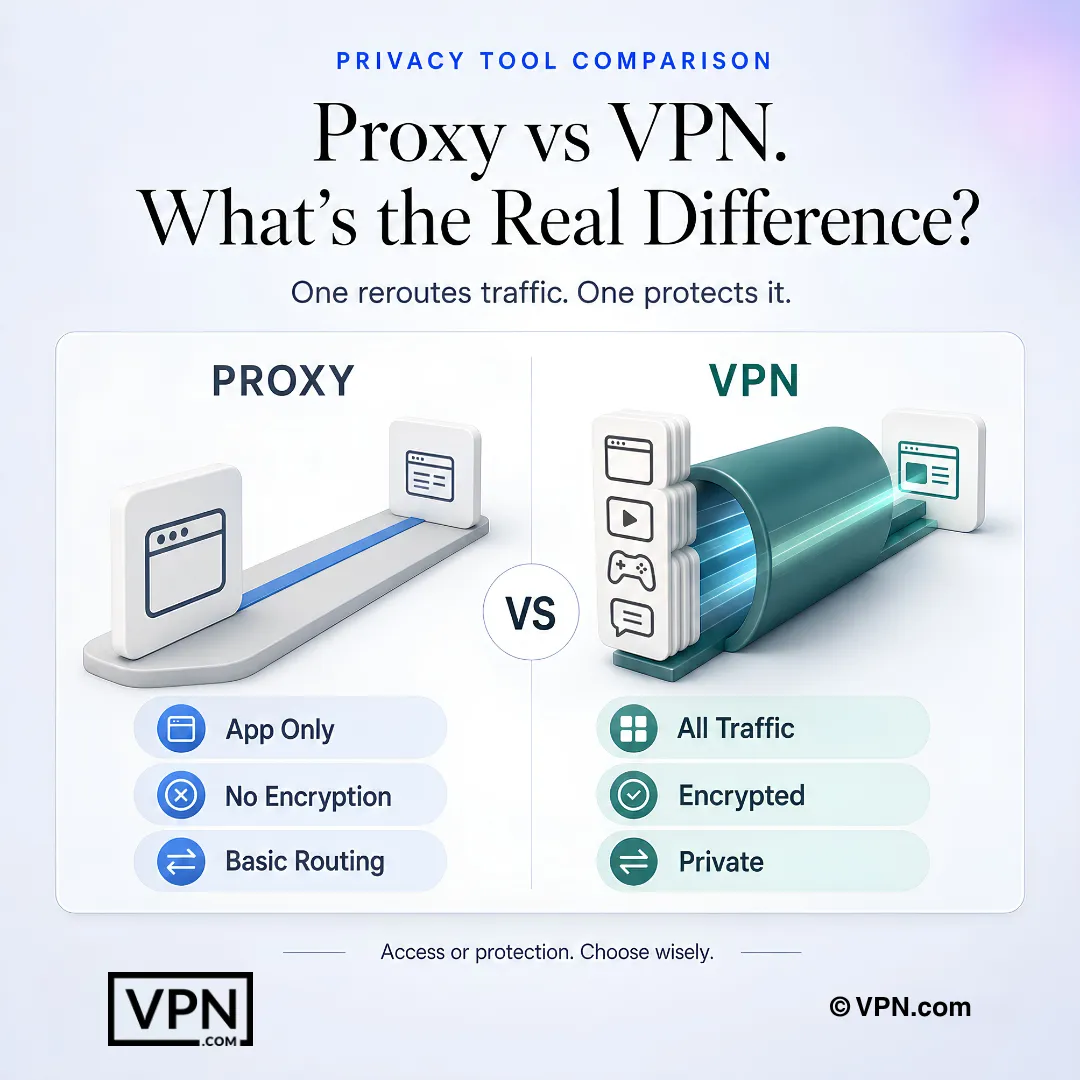
A proxy reroutes selected app traffic, while a VPN encrypts and protects traffic across the device.
Frequently Asked Questions
What’s the actual technical difference between a proxy and a VPN?
A proxy sits between your device and the internet, forwarding requests for a specific app or browser so websites see the proxy’s IP instead of yours, but it never encrypts your traffic. A VPN operates at the operating system level, wrapping every app’s traffic in encryption before it leaves your device. That full-tunnel coverage is why VPNs handle sensitive tasks proxies can’t.
Is a proxy safe enough to use for online banking or logging into accounts?
No. Proxies mask your IP but leave your data readable to anyone monitoring the network, since they don’t encrypt traffic. For sensitive transactions like banking, only a VPN’s encrypted tunnel is appropriate. Reputable VPN providers like NordVPN, ExpressVPN, and Surfshark also publish audit material on their no-logs policies, adding a privacy layer proxies simply don’t offer.
Do free proxy servers actually log and sell my browsing data?
There is no way to verify what a given free proxy logs, and the documented risk is real. Free proxy operators need revenue, and a two-month study of public HTTP proxies found some inject ads or tracking code into pages and others redirect traffic to malware pages. Free proxies carry real risk beyond just weaker anonymity.
What’s the difference between a residential proxy and a data center proxy?
A data center proxy runs from a data center rather than an ISP, delivering fast speeds at low cost but weaker anonymity, useful for tasks like bulk public data gathering. A residential proxy uses a real ISP-assigned IP address, making it much harder for websites to detect proxy use, which is why advertisers rely on it to verify ad placements as a normal user would see them.
How does an SSL proxy differ from what a VPN encrypts?
An SSL proxy handles only encrypted HTTPS traffic between a user and a website, and businesses often use it to inspect that encrypted traffic for security threats like payment fraud. A VPN encrypts your entire device’s traffic across every app and protocol, not just web browser HTTPS sessions, which is a fundamentally broader scope of protection.
Is a proxy actually faster than a VPN in practice?
Proxies skip encryption entirely, so raw throughput can be quicker in theory, but free proxies are frequently congested with inconsistent speeds since many users share the same server. VPNs add slight latency from encryption, though modern protocols like WireGuard minimize that impact significantly. NordVPN, for instance, ranks #1 of 22 on our Trust Score, aggregated from published third-party tests.
Can a proxy reliably access Netflix or other streaming platforms the way a VPN can?
A proxy works at the browser level and can reach geo-blocked content quickly, but reliability is inconsistent since it only covers one app. VPNs pair full-device encryption with dedicated streaming tools: NordVPN’s SmartPlay auto-selects streaming-ready servers, ExpressVPN uses Smart Location for platforms like Disney+ and Hulu, and Surfshark’s fast connections auto-select servers for services like Max and Prime Video.
Should I use a free proxy or a free VPN for basic privacy?
Free proxies can inject ads or tracking code since operators need revenue, and they offer zero encryption by default, leaving traffic readable to anyone monitoring the network. Paid VPNs like NordVPN, ExpressVPN, and Surfshark publish audit material on their no-logs policies and include a kill switch, protections no free proxy service provides.
How much more expensive is a VPN compared to using a proxy?
Proxies are frequently free, while paid VPNs charge a monthly subscription. Surfshark starts from $2.49/month on its longest-term plan, while NordVPN starts from $3.49/month and ExpressVPN from $2.99/month, both on their longest-term plans. That cost buys full-device encryption, a no-logs policy, and a kill switch, none of which free proxy servers include.
If I switch from a proxy to a paid VPN and it’s not for me, can I get a refund?
Yes. NordVPN, ExpressVPN, and Surfshark all back their paid plans with a 30-day money-back guarantee, so testing full-device encryption against your old proxy setup carries no financial risk. Request the refund within the 30-day window through the provider’s support channel before the guarantee period closes.
Does a VPN cover every device I own, unlike a proxy?
Yes, that’s the core coverage difference. A proxy only protects the specific app or browser you configure it in, leaving the rest of your device unprotected. A VPN encrypts traffic device-wide: NordVPN covers 10 simultaneous devices, ExpressVPN covers 10 to 14 depending on plan, and Surfshark allows unlimited simultaneous connections on one account.
How do I move from using a proxy to running a VPN without losing my geo access?
Install a VPN app instead of configuring a browser proxy setting, then connect to a server in the region whose content you want to reach, the same basic concept as a proxy but applied device-wide. Unlike a proxy, the VPN also adds a kill switch, so accidental exposure doesn’t happen if the connection drops mid-session.
What do I do if a proxy suddenly stops accessing a geo-blocked site?
Sites can detect and block known proxy IPs, especially shared or data center ones, which is a common failure point. Switching to a VPN and connecting to a different server in the target region often restores access, since VPN providers rotate and expand their IP ranges. Note that streaming platforms also actively block some VPN IPs, so no tool guarantees access every time.