Best VPN for Enterprise: Compared and Ranked for Business
The best VPN for enterprise does more than encrypt traffic. Compare our top picks by security depth management tools and compliance support right now.
 Michael Gargiulo
Bottom Line: Consumer VPNs can’t handle the sprawling attack surface of enterprise environments. The right enterprise VPN adds centralized management, compliance tooling, and security depth that scales across distributed teams and branch offices.
Enterprise teams operate across home offices, coworking spaces, and branch locations spanning multiple time zones. That sprawl creates an attack surface consumer VPNs cannot address. A dedicated enterprise VPN platform provides centralized policy enforcement, granular access control, and audit-ready logging across thousands of endpoints.
For a broader overview of business VPN options, see our best VPN for business guide. This page focuses on platforms built for organizations with 200+ employees, multi-site deployments, and strict regulatory requirements. Choosing the right solution touches compliance, productivity, IT overhead, and incident response.
Best VPN for Enterprise (Quick Picks)
- Best Overall: NordLayer
- Best for Cisco environments: Cisco Secure Client
- Best for deep security inspection: Palo Alto GlobalProtect
- Best for Zero Trust: Zscaler Private Access
- Best for hardware-accelerated performance: Fortinet FortiClient
Top Enterprise VPN Solutions Compared
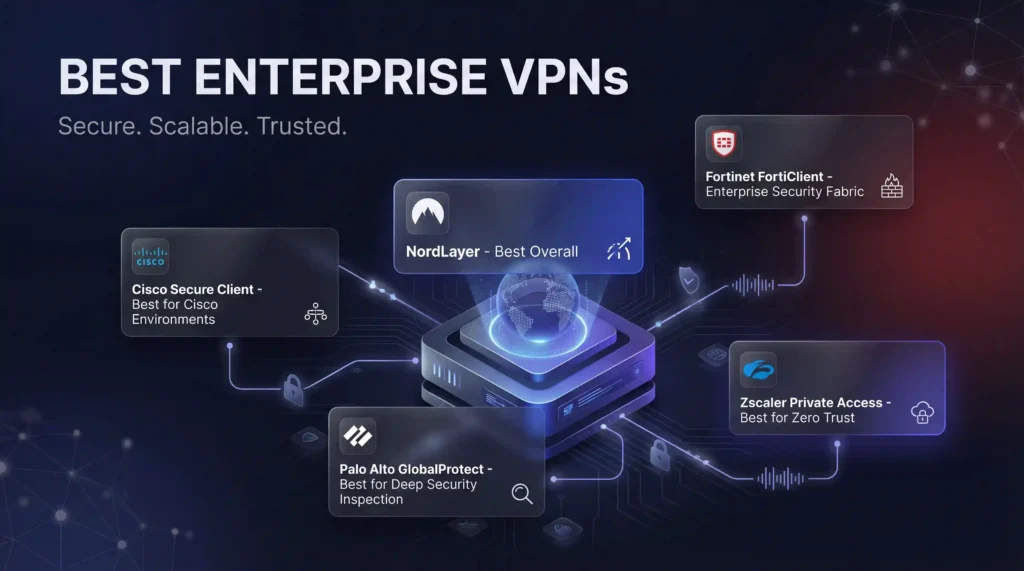
We evaluated the leading enterprise VPN platforms based on security depth, management tools, protocol support, compliance capability, performance, and independent user reviews.
| Provider | Best For | Key Differentiator | Deployment Model | Compliance Support |
|---|---|---|---|---|
| NordLayer | Cloud-first enterprises | SSO, SCIM, NordLynx protocol | Cloud | SOC 2, HIPAA, GDPR |
| Cisco Secure Client[1] | Cisco environments | Pre-connection compliance checks | On-premise / Cloud | SOC 2, PCI DSS, HIPAA, FedRAMP |
| Palo Alto GlobalProtect[2] | Deep security inspection | Real-time traffic inspection via App-ID | Hybrid | SOC 2, ISO 27001, PCI DSS |
| Fortinet FortiClient[3] | Hardware-accelerated performance | Unified VPN, firewall and endpoint protection | On-premise / Hybrid | SOC 2, PCI DSS, HIPAA |
| Zscaler ZPA[4] | Zero Trust | App-level access, no network exposure | Cloud-only | SOC 2, ISO 27001, FedRAMP |
NordLayer
Best for cloud-first enterprises and hybrid teams. NordLayer encrypts traffic with AES-256 and its proprietary NordLynx protocol. It integrates with SSO providers like Azure AD, Okta, and Google Workspace. SCIM-based provisioning automates user onboarding and offboarding. Device posture checks and DNS filtering add endpoint-level controls. Speeds reach 237 Mbps down and 221 Mbps up.
NordLayer offers per-user monthly licensing starting at $8/user for teams of 5+. Enterprise tiers access dedicated servers, priority support, and custom gateway configurations. SOC 2 Type 2 compliance covers audit requirements for mid-market and enterprise buyers.
Cisco Secure Client
Best for large enterprises with existing Cisco infrastructure. Cisco Secure Client runs pre-connection device compliance checks. It blocks non-compliant devices before the tunnel opens. Split tunneling is disabled by default, keeping all traffic within the corporate security stack.
Cisco licenses through its Enterprise Agreement (EA), bundling Secure Client with other security products. Organizations running ASA or Firepower appliances get the tightest integration. Cisco also offers 24/7 TAC support with guaranteed 15-minute response times on Severity 1 tickets.
Palo Alto GlobalProtect
Best for security-first organizations needing deep traffic inspection. GlobalProtect connects to Palo Alto’s next-generation firewall and Prisma Access cloud platform. It inspects all traffic continuously using App-ID, User-ID, and real-time content inspection.
Palo Alto provides multi-tenant administration through Panorama, its centralized management console. Panorama handles policy distribution across hundreds of firewalls and branch offices from a single pane. ISO 27001 and SOC 2 certifications satisfy most enterprise audit requirements.
Fortinet FortiClient
Best for enterprises needing hardware-accelerated performance with built-in endpoint protection. FortiClient unifies VPN, firewall, endpoint protection, and threat intelligence under one management plane. It supports IPSec and SSL tunneling. Free trial available.
FortiClient integrates with FortiGate appliances, which use custom ASIC chips to accelerate encryption at line speed. FortiManager supports multi-tenant administration for managed service providers. Licensing follows a per-device model with volume discounts above 500 seats.
Zscaler Private Access (ZPA)
Best for cloud-native enterprises committed to Zero Trust. ZPA connects users directly to specific applications without exposing the underlying network. Application IPs remain invisible to the public internet. Cloud-only deployment means heavy on-premises environments will need a phased migration.
ZPA differs from traditional enterprise VPN in one critical way: it never places users on the network. Traditional VPNs authenticate a user, then grant broad Layer 3 access. ZPA brokers individual connections between users and apps through Zscaler’s cloud. If an attacker compromises a user’s credentials, they reach only the specific app the user accessed, not the full network. Zscaler publishes SLA guarantees of 99.999% uptime for its security cloud.
Enterprise-Specific Features to Compare
Enterprise buyers evaluate VPN platforms differently than small business teams. These decision factors separate enterprise-grade solutions from mid-market options.
Licensing and Pricing Models
Enterprise VPN vendors use three common licensing models. Per-user licensing (NordLayer, Zscaler) scales predictably with headcount. Per-device licensing (Fortinet) suits organizations with shared workstations or IoT endpoints. Bundled enterprise agreements (Cisco) combine VPN with broader security suites at volume discounts.
Request quotes for your actual seat count. List prices rarely reflect negotiated enterprise rates. Most vendors discount 20-40% for commitments above 500 users.
Deployment Flexibility: Cloud vs. On-Premise vs. Hybrid
Cloud-only platforms like Zscaler ZPA and NordLayer deploy in hours. They require no on-site hardware. On-premise solutions like Cisco ASA and FortiGate appliances give IT teams full control over data paths. Hybrid deployments (Palo Alto Prisma Access + on-premise firewalls) bridge both models.
Match your deployment model to your architecture. Organizations with 50+ branch offices often need on-premise appliances at each site. Fully remote teams with SaaS-heavy toolchains benefit from cloud-native platforms.
Compliance Frameworks: HIPAA, SOC 2, ISO 27001
Every enterprise VPN in this guide holds SOC 2 Type 2 certification. Healthcare organizations need HIPAA-compliant platforms with BAA (Business Associate Agreement) availability. Government contractors should confirm FedRAMP authorization, which Cisco and Zscaler both hold.
Ask vendors for their compliance documentation before your proof of concept. Verify audit dates. A SOC 2 report older than 12 months may not satisfy your auditors.
Admin Controls and Audit Trails
Enterprise platforms must log every connection event, policy change, and admin action. NordLayer logs connection timestamps, user identity, and gateway location. Palo Alto Panorama records granular admin activity across all managed devices. Cisco ISE integrates with SIEM tools for real-time correlation.
Look for role-based access control (RBAC) with at least three admin tiers. Global admin, regional admin, and read-only auditor roles prevent privilege creep across large IT teams.
SLA Guarantees and Support Tiers
Downtime costs enterprise organizations an average of $9,000 per minute. Demand SLA commitments in writing. Zscaler guarantees 99.999% uptime. Cisco offers 15-minute response on critical tickets. Palo Alto provides dedicated TAM (Technical Account Manager) assignments for enterprise accounts.
Evaluate support quality during your proof of concept. Submit a test ticket. Measure response time. Check whether you reach an engineer or a chatbot.
Multi-Tenant and MSP Administration
Organizations managing subsidiaries or client environments need multi-tenant capabilities. Palo Alto Panorama and Fortinet FortiManager both support multi-tenant administration natively. NordLayer offers team segmentation through its admin panel. Zscaler supports tenant isolation for managed security service providers.
How to Select the Right Platform for Your Organization
Choosing the right enterprise VPN starts with matching your requirements to platform strengths:
- Map security priorities: Cloud application security favors ZTNA. Multiple physical offices need site-to-site VPN support.
- Confirm compliance alignment: Verify your platform supports HIPAA, PCI DSS, GDPR, or whichever frameworks apply. Request the latest SOC 2 report.
- Assess team scale: Platforms that handle 50 users well may struggle at 5,000. Ask vendors for reference customers at your scale.
- Run a proof of concept: Deploy to 25–50 users before committing. Test reliability, failover, and support responsiveness across at least two office locations.
- Evaluate total cost of ownership: Factor in licensing, hardware (if on-premise), admin labor, and training. Cloud platforms reduce hardware costs but may increase per-user fees at scale.
Final Verdict
NordLayer suits most organizations with fast deployment and ZTNA integration. Cisco Secure Client fits large Cisco shops with existing infrastructure investments. Palo Alto GlobalProtect serves security-first teams needing deep traffic inspection across branch offices.
Fortinet FortiClient delivers hardware-accelerated performance for on-premise-heavy environments. Zscaler ZPA works for cloud-heavy enterprises ready to eliminate the traditional VPN attack surface entirely.
With the average data breach costing $4.56 million, the cost of deploying the wrong enterprise VPN is far less than deploying none. Start with a 30-day proof of concept. Measure latency, admin overhead, and compliance coverage before committing.
References
- Cisco. 2026. Secure Client (including AnyConnect). Retrieved September 30, 2026 from https://www.cisco.com/site/us/en/products/security/secure-client/index.html.Archived: Wayback Machine snapshot
- Palo Alto Networks. n.d. Secure Remote Access | GlobalProtect. Retrieved September 30, 2026 from https://www.paloaltonetworks.com/sase/globalprotect.Archived: Wayback Machine snapshot
- Fortinet. n.d. Product Downloads | Fortinet Product Downloads | Support. https://www.fortinet.com/support/product-downloads.Archived: Wayback Machine snapshot
- Zscaler. n.d. Transforming secure access with Zscaler Private Access (ZPA). Retrieved September 30, 2026 from https://www.zscaler.com/products-and-solutions/zscaler-private-access.Archived: Wayback Machine snapshot
- E. Barker, Q. Dang, S. Frankel, K. Scarfone, and P. Wouters. 2020. Guide to IPsec VPNs. NIST Special Publication (SP) 800-77 Rev. 1. National Institute of Standards and Technology. DOI: https://doi.org/10.6028/NIST.SP.800-77r1.Archived: Wayback Machine snapshot
- S. Frankel, P. Hoffman, A. Orebaugh, and R. Park. 2008. Guide to SSL VPNs. NIST Special Publication (SP) 800-113. National Institute of Standards and Technology. DOI: https://doi.org/10.6028/NIST.SP.800-113.Archived: Wayback Machine snapshot
- Cybersecurity and Infrastructure Security Agency CISA. n.d. Enterprise VPN Security. Retrieved September 30, 2026 from https://www.cisa.gov/news-events/cybersecurity-advisories/aa20-073a.Archived: Wayback Machine snapshot
- Fortinet. n.d. Enterprise VPN Solutions - Security, Control, and Flexibility at Scale. https://www.fortinet.com/resources/cyberglossary/enterprise-vpn-solutions.Archived: Wayback Machine snapshot
Resources for this page
Charts and reference images from our research, free to view and share.
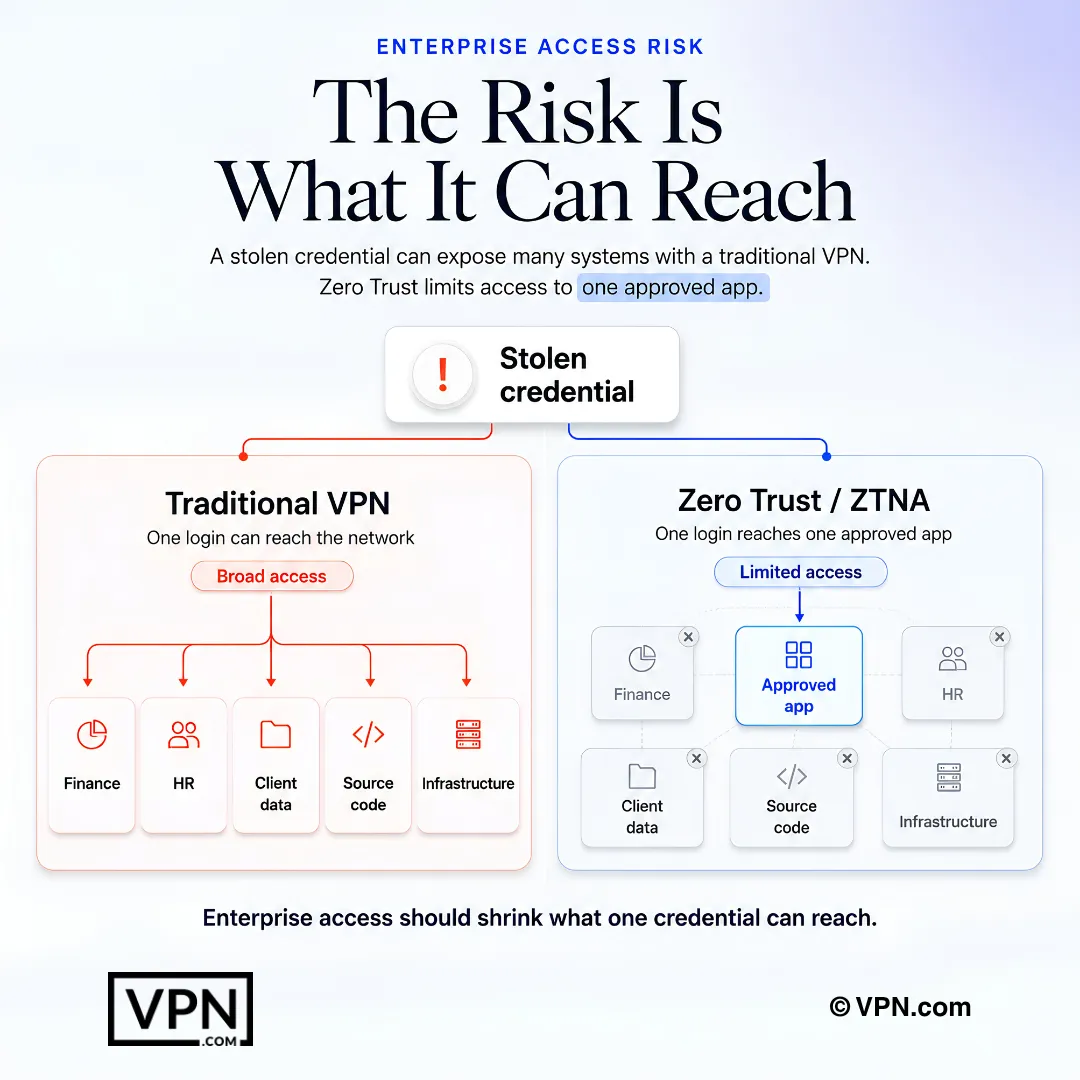
Enterprise access risk shrinks when one credential cannot reach the broader network.
Frequently Asked Questions
What makes an enterprise VPN fundamentally different from a standard business VPN?
An enterprise VPN adds centralized policy enforcement, granular access control, and audit-ready logging across thousands of endpoints spanning home offices, coworking spaces, and branch locations. Consumer and small-business VPNs can’t address that sprawl. Platforms like NordLayer, Cisco Secure Client, and Palo Alto GlobalProtect are built specifically for organizations with 200+ employees and multi-site deployments.
How does Zscaler Private Access differ architecturally from a traditional VPN?
ZPA never places a user on the network at all. Traditional VPNs authenticate a user then grant broad Layer 3 access, while ZPA brokers individual connections between users and specific applications through Zscaler’s cloud, keeping application IPs invisible to the public internet. If credentials are compromised, an attacker reaches only the one app accessed, not the full network.
Which enterprise VPN platform offers the deepest real-time traffic inspection?
Palo Alto GlobalProtect, which connects to Palo Alto’s next-generation firewall and Prisma Access cloud platform and continuously inspects traffic using App-ID, User-ID, and real-time content inspection. Its Panorama console handles centralized policy distribution across hundreds of firewalls and branch offices from one pane, backed by ISO 27001 and SOC 2 certifications.
What compliance certifications should enterprise buyers verify before signing?
Confirm SOC 2 Type 2 status first since every platform in this comparison holds it, then check for HIPAA BAA availability if you’re in healthcare and FedRAMP authorization if you’re a government contractor (Cisco and Zscaler both hold FedRAMP). Request the vendor’s latest SOC 2 report directly, since a report older than 12 months may not satisfy your auditors.
How do enterprise VPN vendors typically structure licensing?
Three models dominate: per-user licensing (NordLayer, Zscaler) that scales predictably with headcount, per-device licensing (Fortinet) suited to shared workstations or IoT endpoints, and bundled enterprise agreements (Cisco) that combine VPN with broader security suites. Most vendors discount licensing 20 to 40 percent for commitments above 500 users, so always request a quote against your actual seat count.
Which platform fits organizations with shared workstations or heavy IoT deployments?
Fortinet FortiClient, which licenses per-device rather than per-user and offers volume discounts above 500 seats. It integrates with FortiGate appliances that use custom ASIC chips to accelerate encryption at line speed, and unifies VPN, firewall, endpoint protection, and threat intelligence under one management plane, with a free trial available to test first.
How should we structure a proof of concept before committing to an enterprise VPN?
Deploy to 25 to 50 users for 30 days before signing a contract. Test reliability, failover, and support responsiveness across at least two office locations, and measure latency, admin overhead, and compliance coverage during that window. Submit a test support ticket too, to confirm whether you reach an engineer or a chatbot.
What happens to an attacker who steals a user’s credentials under Zscaler ZPA versus a traditional VPN?
Under a traditional VPN, stolen credentials typically grant broad Layer 3 network access. Under Zscaler ZPA, the attacker reaches only the specific application the compromised user had accessed, since ZPA brokers app-level connections through Zscaler’s cloud rather than exposing the underlying network. Zscaler backs the platform with a published 99.999% uptime SLA.
What admin controls and audit trail depth should IT teams demand?
Look for role-based access control with at least three admin tiers: global admin, regional admin, and read-only auditor, to prevent privilege creep across large IT teams. NordLayer logs connection timestamps, user identity, and gateway location; Palo Alto Panorama records granular admin activity across all managed devices; Cisco ISE integrates with SIEM tools for real-time correlation.
Which enterprise VPN platforms hold FedRAMP authorization for government contractors?
Cisco Secure Client and Zscaler Private Access both hold FedRAMP authorization according to the compliance comparison, making them the two options here suited to government contract requirements. Palo Alto GlobalProtect instead holds ISO 27001 and SOC 2, and NordLayer holds SOC 2, HIPAA, and GDPR, so contractors should confirm FedRAMP status directly with the vendor before a POC.
Which enterprise VPN is built specifically for hardware-accelerated performance?
Fortinet FortiClient, which integrates with FortiGate appliances that use custom ASIC chips to accelerate encryption at line speed. It unifies VPN, firewall, endpoint protection, and threat intelligence under a single FortiManager console, making it best suited to on-premise-heavy environments that need throughput without offloading everything to the cloud.
How does NordLayer integrate with an organization’s existing identity infrastructure?
NordLayer connects to SSO providers including Azure AD, Okta, and Google Workspace, with SCIM-based provisioning that automates user onboarding and offboarding automatically. It encrypts traffic with AES-256 and its proprietary NordLynx protocol, and adds device posture checks plus DNS filtering for endpoint-level control, all backed by SOC 2 Type 2 certification.
What SLA and support guarantees should we require before signing an enterprise contract?
Demand SLA commitments in writing rather than verbal assurances. Zscaler publishes a 99.999% uptime guarantee for its security cloud, Cisco offers 24/7 TAC support with 15-minute response times on Severity 1 tickets, and Palo Alto assigns dedicated Technical Account Managers to enterprise accounts. Test these claims during your proof of concept by submitting a real ticket and timing the response.
