How to Choose a VPN: The Only Factors That Actually Matter
How to choose a VPN without falling for marketing hype. Learn which features matter, which ones don't and how to spot shady providers before subscribing.
 Michael Gargiulo
Our Top VPN Picks



Bottom Line: Choosing a VPN comes down to one question: can you verify the provider’s claims? Look for a no-logs policy backed by an independent audit, AES-256 encryption with WireGuard or OpenVPN, a kill switch, and a jurisdiction outside aggressive surveillance alliances. Everything else is marketing.
The number of people worldwide who use VPNs has exceeded 1.75 billion. The global VPN market is projected to reach 86 billion dollars and continues to grow. Remote work, escalating cybercrimes, and rising awareness of digital privacy fuel that growth every year.
Here is the problem. Hundreds of VPN providers compete for your attention. Some make flashy promises while extracting your data in the background. Others sell features you will never need at premium prices.
This guide strips away the marketing and focuses on what actually counts. Whether you need a VPN for personal privacy or business protection, this breakdown points you in the right direction.
What Does a VPN Actually Do
A Virtual Private Network (VPN) creates an encrypted tunnel between your device and a remote server. All internet traffic passes through this tunnel before reaching its final destination. This achieves two things.
- First, it hides your IP address. Websites and services see the VPN server’s IP instead of yours. This masks your physical location and makes it harder for third parties to identify you.
- Second, it encrypts your data in transit. Your Internet Service Provider (ISP) can no longer see which websites you visit or what you do online. All they see is an encrypted connection to the VPN server.
This makes VPNs useful for two core purposes. You can bypass geographic restrictions on content blocked in your region. You can also prevent your ISP, advertisers, and network snoops from monitoring your browsing activity.
VPN Limitations You Need to Know
Understand what VPNs do not do before selecting one. Too many providers position themselves as complete security solutions. That is not accurate.
A VPN will not block malware or phishing attacks. It will not prevent websites from tracking you through cookies, browser fingerprinting, or GPS data. It will not make you completely anonymous on the internet. And it will not protect you from legal consequences should the VPN provider receive a valid court order and comply with it by handing over whatever data they hold.
With realistic expectations set, here is what to evaluate when selecting a VPN.
Key Factors to Evaluate Before Picking a VPN
| Feature | Why It Matters | What to Look For |
|---|---|---|
| No-logs policy | Without this, your data is handed to a third party | Independent audit by Deloitte, PwC, or Cure53 |
| Encryption | Protects traffic from interception | AES-256 as baseline |
| Protocol | Determines speed and security balance | WireGuard for most users; OpenVPN for restrictive networks |
| Kill switch | Prevents IP exposure if VPN drops | Must be available and on by default |
| DNS leak protection | Stops browsing activity leaking to ISP | Confirmed via ipleak.net test |
| Jurisdiction | Governs what data governments can demand | Outside 5/9/14 Eyes (Panama, Switzerland, BVI) |
| Server network | Affects speed and content access | Physical servers in 60+ countries |
| Simultaneous connections | How many devices are covered | At least 5; some providers offer unlimited |
| Price transparency | Prevents surprise rebilling | Clear renewal rates, published refund policy |
Your final decision should prioritize security, speed, and transparency. The following sections detail each factor in depth.
A Verified No-Logs Policy
This is the single most important factor. A no-logs policy means the VPN company does not store your browsing history, connection logs, or IP addresses. Without this policy, you are simply redirecting your data from your ISP to the VPN company. That defeats the entire purpose.
A claim on a website is not enough. Many providers say they keep no logs while their privacy policies tell a different story. Look for providers that back up their claims with independent third-party audits conducted on a regular basis. Even better is a provider whose no-logs policy has been tested in court. If a legal subpoena produced zero records, you know the policy is real.
Also pay attention to what “no logs” actually covers. Some providers avoid storing browsing data but still log connection metadata like timestamps and bandwidth usage. That metadata can still identify you in certain situations.
Strong Encryption and Modern Protocols
Encryption is the backbone of any VPN. Your provider should use AES-256 encryption as a baseline. This is the same standard used by governments and financial institutions worldwide.
Equally important is the VPN protocol. A protocol determines how your data travels through the encrypted tunnel. It directly affects both speed and security. Three protocols are worth considering.
- WireGuard has rapidly become the industry default. Its codebase is roughly 4,000 lines compared to OpenVPN’s 70,000+ lines. Fewer lines mean faster speeds, easier auditing, and fewer bugs. It uses ChaCha20 encryption and Poly1305 authentication. WireGuard suits most users for browsing, streaming, and gaming.
- OpenVPN offers the greatest flexibility. It operates on both TCP and UDP. It excels at bypassing strict firewalls in restrictive environments. Running OpenVPN on TCP port 443 disguises your connection as normal HTTPS traffic.
- IKEv2/IPSec is mobile-friendly. It reconnects quickly when switching between Wi-Fi and cellular data without dropping the VPN. This makes it ideal for users constantly on the move.
Avoid any VPN that relies on PPTP. That protocol has known vulnerabilities and provides no real security.
Server Network and Locations
Your VPN experience depends directly on the size and distribution of the server network. More servers in more countries means less congestion and faster connections. A provider with a small server fleet forces you to share bandwidth with thousands of other users. That leads to slow speeds and unreliable connections.
Quantity alone is not enough. Ask whether the provider uses physical servers in advertised locations. Some VPNs use virtual server locations that claim to be in one country while the hardware sits elsewhere. This can add latency and create privacy issues if the physical server falls under a jurisdiction with strict data retention laws.
If you plan to use a VPN for streaming, confirm the provider has servers in your target content regions. For raw speed, always connect to a server geographically close to you. Less distance means faster connections.
Transparent Business Model and Pricing
A VPN service costs money to operate. Servers, bandwidth, security audits, and development all require funding. If a VPN is completely free, ask how it stays in business. In most cases, it collects and sells your data to advertisers and third parties.
According to surveys, 28% of VPN users still rely on free options. We strongly recommend against this for anything beyond casual browsing. Free VPNs frequently impose data caps, limit server access, throttle speeds, and inject intrusive ads. Some have been caught distributing malware.
Paid VPNs typically offer monthly or annual subscription plans. Annual plans almost always deliver significant savings per month. Read the fine print carefully. Watch for automatic rebilling at higher rates after the initial discount period ends. A provider with transparent pricing and a published refund policy is always a safer choice.
Cross-Platform Compatibility
A VPN should cover all your devices. That means native apps for Windows, macOS, iOS, and Android at minimum. Linux support and browser extensions for Chrome or Firefox are strong bonuses. Some providers also support router installation, letting you protect every device on your home network through one setup.
Check how many simultaneous connections the plan allows. A good provider protects at least five devices at once. Some now offer unlimited device connections on a single subscription, which is especially valuable for families or small teams.
Kill Switch and Leak Protection
A kill switch is non-negotiable. It automatically disconnects your internet if the VPN tunnel drops unexpectedly. Without one, your device reverts to your normal unprotected connection and exposes your real IP address.
DNS and IP leak protection are equally critical. These features ensure your browsing data does not accidentally escape the encrypted tunnel, even while the VPN is active. A single DNS leak reveals every site you visit to your ISP.
Jurisdiction and Legal Framework
Where a VPN company is incorporated directly affects your privacy. Providers based in countries with aggressive data retention laws or intelligence-sharing agreements may be compelled to store and surrender user data when governments demand it.
Privacy-friendly jurisdictions give providers a stronger legal basis to reject these requests and protect users. Review the provider’s transparency reports and terms of service before subscribing. A provider should clearly explain what happens if they receive a government data request. Vague language here is a red flag.
Reputation and Independent Reviews
Never rely solely on a VPN provider’s own marketing materials. Seek reviews from reputable, independent technology publications. User feedback on platforms like Reddit and app store reviews can reveal patterns that official marketing will never mention.
Watch out for affiliate-driven review sites that rank VPNs by commission rates rather than quality. If every VPN on a list earns a top rating and every review reads like an advertisement, the recommendations likely lack credibility.
How to Spot a Shady VPN Provider
Not every VPN has your best interests at heart. Watch for these warning signs before handing over your money or your data.
- Vague or missing privacy policies. If a provider does not clearly explain what data they collect and how they use it, walk away. A trustworthy VPN always publishes a detailed, readable privacy policy.
- No information about company leadership. If the website has no “about” page, no named founders, and no team members, that is a concern. Legitimate companies put their reputation on the line.
- Overpromising on security. Any VPN that claims “100% anonymity” or “completely hack-proof” protection is exaggerating. No tool delivers that. Honest providers acknowledge the limitations of their service.
- App store presence does not equal safety. A VPN app on the Google Play Store or Apple App Store is not automatically trustworthy. Some VPN apps on official storefronts have been caught logging user data and distributing malicious software.
Final Verdict
Selecting a VPN is a trust decision. You are redirecting your internet traffic from one third party (your ISP) to another (the VPN provider). That choice deserves careful evaluation.
Prioritize verified no-logs policies, modern encryption protocols, transparent pricing, and an established reputation. Skip the free alternatives. Test your chosen service with leak detection tools like ipleak.net. Remember that a VPN is one piece of the puzzle. Combine it with strong passwords, two-factor authentication, and disciplined browsing habits for a security setup that actually works.
NordVPN, Surfshark, and Proton VPN each meet the criteria outlined in this guide. NordVPN stands out with verified no-logs audits, WireGuard-based speeds, 7,000+ physical servers, and a jurisdiction with zero data retention laws. All three offer 30-day money-back guarantees, so you can test their claims risk-free before committing.
Your privacy is worth the effort. Make sure the VPN you choose has earned the privilege of defending it.
References
- J. A. Donenfeld. n.d. WireGuard: fast, modern, secure VPN tunnel. Retrieved September 30, 2026 from https://www.wireguard.com.Archived: Wayback Machine snapshot
- OpenVPN. n.d. Secure VPN Solutions for Business & Remote Access. Retrieved September 30, 2026 from https://openvpn.net.Archived: Wayback Machine snapshot
- Deloitte. n.d. Deloitte US | Together Makes Progress. Retrieved September 30, 2026 from https://www2.deloitte.com.Archived: Wayback Machine snapshot
- PricewaterhouseCoopers. n.d. US PwC. https://www.pwc.com.Archived: Wayback Machine snapshot
- HackerOne. n.d. HackerOne | Leader in Continuous Threat Exposure Management | Security for AI. Retrieved September 30, 2026 from https://www.hackerone.com.Archived: Wayback Machine snapshot
Resources for this page
Charts and reference images from our testing, free to view and share.
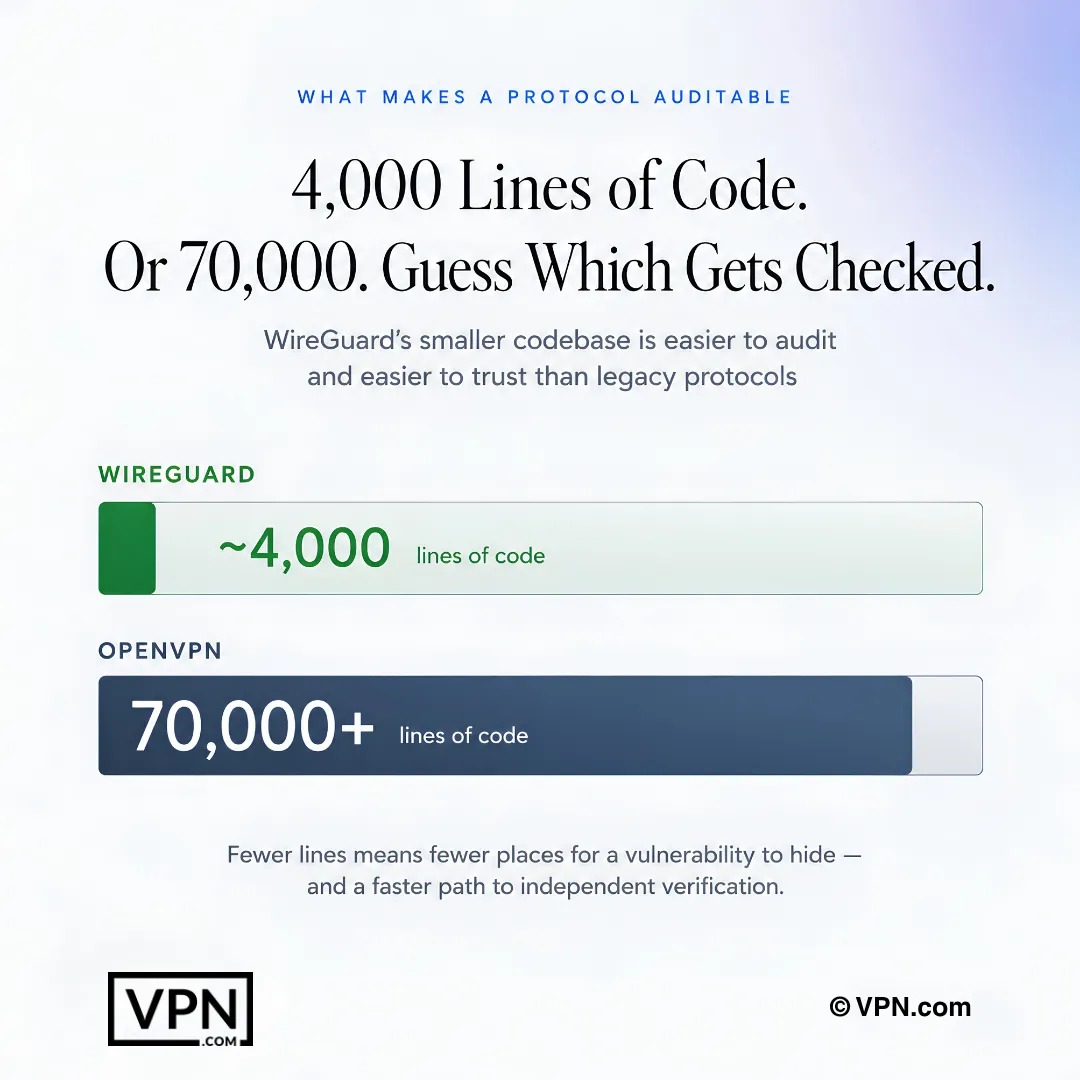
A smaller protocol codebase can be easier to review, making auditability an important factor when choosing a VPN.
Frequently Asked Questions
What does a VPN actually do, and what can’t it protect against?
A VPN encrypts traffic between your device and a remote server, hiding your IP address so websites see the server’s location instead of yours, and blocking your ISP from seeing which sites you visit. It won’t stop malware, phishing, cookie or browser-fingerprint tracking, or protect you if a provider is legally compelled to hand over data it holds. Treat it as one layer, not a complete solution.
What’s the single most important factor when choosing a VPN?
A verified no-logs policy, independently audited by a firm like Deloitte, PwC, or Cure53, matters more than any other factor. Without it, you’re simply redirecting your data from your ISP to the VPN provider instead of protecting it. The strongest proof is a no-logs claim tested by a real legal subpoena that produced zero records, not just a statement on a marketing page.
How do I verify a VPN’s “no logs” claim isn’t just marketing?
Check for an independent audit from a firm such as Deloitte, PwC, or Cure53, since an audit confirms what the privacy policy asserts. Then look at what “no logs” actually covers. Some providers avoid storing browsing history but still log connection metadata like timestamps and bandwidth. The strongest evidence is a policy that survived a real subpoena with zero records produced.
Which VPN protocol should I choose: WireGuard, OpenVPN, or IKEv2?
WireGuard suits most users, running on a roughly 4,000-line codebase versus OpenVPN’s 70,000+, with ChaCha20 encryption and Poly1305 authentication for faster, more easily audited connections. OpenVPN runs on TCP port 443 to disguise traffic as regular HTTPS, useful on restrictive networks. IKEv2/IPSec reconnects quickly when switching between Wi-Fi and cellular. Avoid PPTP entirely; it has known, documented vulnerabilities.
Why does a VPN provider’s jurisdiction matter when I’m choosing one?
Jurisdiction determines whether a government can legally compel a provider to log and hand over your data. Countries with aggressive data retention laws or intelligence-sharing agreements create more pressure to comply, while privacy-friendly jurisdictions give stronger legal grounds to refuse. NordVPN operates from Panama, Surfshark from the Netherlands, and ProtonVPN from Switzerland, each outside the most aggressive surveillance-sharing alliances.
Is it ever safe to rely on a free VPN long-term?
Rarely, beyond casual browsing. Running a VPN costs money for servers, bandwidth, and audits, so a fully free provider usually recoups that cost by collecting and selling user data. Free VPNs frequently impose data caps, limit server access, throttle speeds, inject ads, and some have been caught distributing malware. Roughly 28% of VPN users still rely on free options despite these documented risks.
Does a larger server network actually translate into faster speeds?
Generally yes. More servers spread across more countries reduce how many users share each server’s bandwidth, cutting congestion. NordVPN ranks #1 of 22 in our Speed Lab with 8,900+ servers across 129+ countries, illustrating that link. Connecting to a server geographically close to you further shortens the distance your traffic travels, which improves speed regardless of a provider’s total network size.
How many simultaneous connections should I look for in a VPN plan?
At minimum five, since fewer forces you to choose which devices stay protected. NordVPN and ProtonVPN both cover 10 simultaneous devices per account, while Surfshark allows unlimited connections on one subscription, useful for families or small teams. Router installation is another route, since it protects every device on the network as a single connection instead of counting each one.
What pricing red flags should I watch for before subscribing to a VPN?
Watch for automatic rebilling at a much higher rate once an introductory discount period ends, since annual and multi-year plans often advertise steep first-term savings. A transparent provider publishes both its regular and discounted price alongside a clear refund policy. NordVPN, Surfshark, and ProtonVPN all pair their plans with a 30-day money-back guarantee, giving you a window to test the service before renewal pricing kicks in.
How does a money-back guarantee actually protect me while evaluating a VPN?
It gives you a no-risk window to test real performance, streaming access, and kill switch behavior before committing long-term. NordVPN, Surfshark, and ProtonVPN each back paid plans with a 30-day money-back guarantee. Use that window to run a leak check at ipleak.net and confirm the kill switch fully cuts your connection, rather than trusting sales-page claims alone.
How do I confirm a VPN’s kill switch and DNS leak protection actually work?
Connect to a server, then check ipleak.net to confirm your real IP and DNS requests aren’t escaping the tunnel. Next, force-disconnect your Wi-Fi or unplug ethernet while connected. A working kill switch cuts your internet entirely instead of reverting to your unprotected connection, and DNS leak protection should already be enabled by default rather than needing manual configuration.
What should I do if a VPN I subscribed to doesn’t behave as advertised?
Run a leak check at ipleak.net immediately, then force-disconnect your network to confirm the kill switch blocks traffic rather than failing open. If DNS leaks appear, metadata seems logged, or performance doesn’t match audited claims, act inside the refund window: NordVPN, Surfshark, and ProtonVPN all offer 30 days, and switch to a verified alternative rather than assuming the issue is a one-off.
What warning signs suggest a VPN provider isn’t trustworthy?
Vague or missing privacy policies, no named founders or leadership on an About page, and marketing claims of “100% anonymity” or “completely hack-proof” protection are all red flags, since no tool delivers absolute security. Treat affiliate-heavy review sites skeptically if every VPN gets a top rating with no real differentiation. A trustworthy provider publishes a detailed privacy policy and admits its own limitations.