



We do not run our own speed or performance tests. Our rankings combine our Trust Score with published results from selected third-party review sites, including Security.org[1], TechRadar[2], and eSecurity Planet[3].
How a business VPN protects your organization
A business VPN encrypts your company’s internet traffic and shields sensitive data from cyberattacks. If your team works remotely, accesses cloud services, or handles confidential information, a VPN is a security requirement.
This page is the hub for all VPN.com business coverage. It covers small and mid-sized teams (5–500 users) that need multi-seat licensing, centralized admin controls, and compliance support. For organizations with 500+ seats, dedicated compliance teams, or custom SLAs, see our enterprise VPN guide. For teams focused purely on connecting remote workers to a private network, our remote access VPN guide narrows the field further.
Unlike consumer VPN roundups, every recommendation on this page is evaluated against business-specific criteria: admin consoles, multi-seat licensing, SSO and MFA support, device compliance checks, and regulatory framework alignment. A provider that scores well for personal browsing may fail entirely for organizational use.
What the FBI says about paying for a VPN
“Consider paying for a VPN service. Many VPN apps are free to you because they make money by sharing your information with third parties.”
FBI Portland Field Office, October 29, 2019[4]
The FBI publishes criteria and does not endorse any provider.
How business VPNs differ from consumer VPNs
Consumer VPNs hide your IP and help you browse privately. Business VPNs protect an entire organization.
A business VPN supports multiple users under one account. It provides a centralized admin dashboard for managing devices, permissions, and security policies. It typically includes SSO, MFA, and device compliance checks.
Business VPNs also offer dedicated servers and IP addresses. These keep your company traffic separate from public traffic. They prevent your IPs from getting blacklisted by banks or cloud platforms.
| Feature | Consumer VPN | Business VPN |
|---|---|---|
| User accounts | Single user | Multi-seat licensing (5–500+) |
| Admin controls | None | Centralized dashboard |
| Authentication | Username/password | SSO, MFA, device compliance |
| IP addresses | Shared pool | Dedicated or static IPs |
| Compliance support | None | HIPAA, GDPR, SOC 2 |
| Billing | Per-individual | Per-seat invoicing, volume discounts |
| Support | Email/chat | Priority SLA, dedicated account manager |
Types of business VPNs
-
Remote access VPN: The most common type. It lets individual employees connect securely to your company network from anywhere. Think of it as a private tunnel between their device and your office. Our remote access VPN guide covers the top picks and setup steps.
-
Site-to-site VPN: This connects entire office networks to each other. If your company has branches in different cities or countries, a site-to-site VPN links them so they function like one unified network. It runs continuously and requires no action from employees.
-
Cloud VPN: Instead of routing traffic through physical hardware, a cloud VPN runs through a provider’s cloud infrastructure. It scales faster, requires less in-house setup, and works well for companies already relying on SaaS platforms.
-
Zero Trust Network Access (ZTNA): ZTNA verifies every user and device before granting access to specific resources. It does not grant blanket network access. Gartner projected that by 2025, 70% of new remote-access deployments would use ZTNA over traditional VPNs. NordLayer markets zero-trust access control alongside its VPN. If your team needs granular per-app permissions rather than full network tunnels, check its zero-trust features against your needs. Pure-play ZTNA vendors like Zscaler Private Access and Cloudflare Access target larger deployments, but they fall outside the scope of this guide.
What to evaluate when choosing a VPN for your team
Choosing the right VPN matters. Every provider promises speed and 99.9% uptime. Reality varies. Here is what to prioritize:
Encryption and protocols
AES-256 encryption is the standard. Stick with modern protocols like WireGuard or OpenVPN. Avoid providers still using PPTP or L2TP. Both have known vulnerabilities that put business data at risk.
Scalability for growing teams
A solution that works for 10 employees should also handle 100. Cloud-based VPNs scale more smoothly than on-premise setups. For teams scaling beyond 100 users, enterprise VPN solutions cover dedicated infrastructure and advanced management options.
Speed and performance impact
Every VPN introduces some slowdown due to encryption overhead and routing. A good provider keeps the effect small enough that staff do not notice it, and anything noticeable hurts productivity. We do not run our own speed tests, so we rely on published third-party test results for comparable figures.
Centralized management and admin controls
Your IT admin needs one dashboard to onboard employees, set permissions, monitor activity, and enforce policies. Without this, managing a VPN becomes a burden. A VPN only works if every employee uses it. Clear usage policies are essential.
Compliance and jurisdiction
If you handle sensitive data, your VPN should support relevant frameworks: HIPAA for healthcare, GDPR for European operations, and a SOC 2 report or ISO 27001 certificate when clients or insurers ask for third-party assurance. Providers headquartered in Five Eyes countries (the US, UK, Canada, Australia and New Zealand) can be legally compelled to hand over data they hold, so weigh the provider’s no-logs policy, and any outside audit of it, alongside headquarters location; PIA, for example, is US-based, while Proton VPN is Swiss-based. Understanding where VPNs are legal also matters if your team operates across multiple jurisdictions.
Split tunneling
Split tunneling lets employees route only business traffic through the VPN. Personal traffic goes directly to the internet. This preserves bandwidth and reduces latency for non-sensitive tasks.
Pricing and total cost of ownership
Compare providers on total value, not sticker price alone. A slightly more expensive provider with better speed, security, and management tools saves money by preventing costly breaches. Never use a free VPN for business. Free providers often monetize your data, offer weak encryption, and lack management features.
How we rank business VPNs
We do not run our own speed or performance tests. Our rankings combine our Trust Score with published results from selected third-party review sites, and for business we then compare each provider’s published documentation on the categories below.
| Category | What we compare |
|---|---|
| Security & Encryption | Protocol support, encryption standard, kill switch availability, independent audit history |
| Admin & Management | Dashboard features, SSO/MFA options, device compliance enforcement, per-user permission granularity |
| Speed & Reliability | Published published third-party test results on speed and uptime; we run no speed tests of our own |
| Compliance & Privacy | Supported frameworks (HIPAA, GDPR, SOC 2, ISO 27001), headquarters jurisdiction, no-logs audit status |
| Value & Scalability | Per-seat cost at different team sizes, contract flexibility, free trial availability, team-size fit |
Where a provider’s claims matter for your team, such as a kill switch or a no-logs audit, check the provider’s own documentation and run a test of your own during the trial or money-back window.
Top business VPN picks
These are the four providers we recommend for business, based on the criteria above.
| Provider | Best for | Monthly price (per user) | Servers | Admin dashboard | Compliance |
|---|---|---|---|---|---|
| NordLayer | Overall | See current pricing | See provider | Control Panel, SSO, MFA | See NordLayer’s Trust Center |
| Surfshark | Security bundles (10–100 users) | See current pricing | 4,500+ | Basic team management | GDPR |
| Proton VPN | Dedicated infra (25–200 users) | See current pricing | 20,000+ | Moderate (dedicated IP management) | ISO 27001, SOC 2 Type II, GDPR |
| PIA | Small business (2–25 users) | $2.03 | 35,000+ | Minimal | GDPR |
NordLayer: best overall for business teams
NordLayer is a business network-security platform from Nord Security. It pairs a VPN with an admin Control Panel and SSO integration, and its apps run on Windows, macOS, Linux, iOS and Android, plus a browser extension.
Admin controls decide this pick. The Control Panel lets IT managers add and remove people from one place, and sign-in works with SSO providers such as Okta, Entra ID, OneLogin, Google Workspace and JumpCloud, with MFA included on every plan. NordVPN’s consumer plan is the wrong product for a team, because it is built for individuals, not for central administration.
Speed is not something we measure ourselves, and any VPN usually adds some latency, so test it on your own network during the money-back window.
Pricing is per user across four plans: Lite, Core, Premium and Enterprise. See current pricing on NordLayer’s site. A 14-day money-back guarantee applies to every plan, and a card is needed to buy.
Team-size fit: built for teams rather than individuals. Larger organizations should ask NordLayer’s sales team about the Enterprise plan.
Limitations: it is a business product, so it is not meant for one person, and like any VPN it can add latency.
Surfshark: best for security bundles

Surfshark
Best security bundles
Surfshark's evidence mixes real, readable third-party documents with provider assertions
85 out of 100, built from two weighted parts
App store ratings, part of the score
4.714.64
Researched Oct 3, 2026Claims checked: 32Independent sources: 5Scores updated Oct 22, 2026
Surfshark pairs its VPN with built-in antivirus and a data breach monitoring service. The breach monitor tracks exposed emails, payment cards, and employee IDs across dark web databases.
Security architecture runs on RAM-only servers that wipe all data on reboot. This eliminates persistent storage risks. Surfshark says its no-logs policy has been independently audited.
Speed is not something we measure ourselves, so check upload performance on your own network during the trial if your team moves large files, video assets, or database backups.
Pricing is per user, with a VPN-only plan and the Surfshark One bundle (VPN + antivirus + breach alerts + private search). See current pricing.
Team-size fit: 10–100 users. The admin dashboard handles basic team management but lacks the granular per-user controls and SSO depth of NordLayer. Teams above 100 may outgrow it.
Limitations: No dedicated IP option at the business tier. Admin controls are thinner than NordLayer or Proton VPN.
Proton VPN: best for dedicated infrastructure

ProtonVPN
Best dedicated infrastructure
85 out of 100, built from two weighted parts
App store ratings, part of the score
4.614.70
Researched Oct 3, 2026Claims checked: 23Independent sources: 3Scores updated Oct 22, 2026
Proton VPN offers dedicated servers and IP addresses in 15 countries. Dedicated IPs prevent blacklisting, reduce spam-flagging of business emails, and give cloud services a consistent identity to trust.
Compliance credentials are the deepest in our lineup. Proton is Swiss-based with no data retention requirements. It reports ISO 27001 and SOC 2 Type II certifications and states GDPR compliance. For healthcare companies, financial firms, or legal practices, this matters.
Speed is not something we measure ourselves. Proton VPN supports WireGuard, which keeps protocol overhead low.
Pricing ranges from the VPN Plus tier to the Proton Business Suite, which bundles encrypted email, calendar, and cloud storage. See current pricing. Special pricing is available for journalists and nonprofits. Minimum 5 seats on business plans.
Team-size fit: 25–200 users. Below 25, PIA offers similar functionality at lower cost. Above 200, NordLayer’s dashboard scales better.
Limitations: Dedicated IPs available in only 15 countries. Dashboard is functional but less polished than NordLayer’s. No ZTNA features.
Private Internet Access (PIA): best for small business

PIA
Best for small business
85 out of 100, built from two weighted parts
App store ratings, part of the score
4.694.48
Researched Oct 3, 2026Claims checked: 24Independent sources: 2Scores updated Oct 22, 2026
PIA has the largest server network of any provider in our roundup at 35,000+ servers across 113 countries. All software is open source, so your team can audit the code independently.
Value proposition is clear: $2.03/user/month makes PIA the cheapest option by a wide margin. Each account covers unlimited simultaneous device connections, which stretches further for micro-teams.
Security uses AES-256 with WireGuard and OpenVPN support. A verified no-logs policy has been tested in court (twice). PIA is US-based, a Five Eyes country, so weigh that against its no-logs record. Its apps include a kill switch.
Speed is not something we measure ourselves. For email, document collaboration, and web browsing most mainstream VPNs are fine, so test video conferencing and large file transfers on your own network during the money-back window.
Team-size fit: 2–25 users. PIA lacks a centralized admin dashboard, SSO integration, and per-user permission controls. For teams above 25, managing individual accounts becomes impractical.
Limitations: No admin dashboard. No SSO or MFA enforcement at the platform level.
Team-size recommendation matrix
| Team size | Primary recommendation | Why |
|---|---|---|
| 2–10 users | PIA | Lowest cost, unlimited devices per account, open-source audit trail |
| 10–50 users | NordLayer | Admin console, SSO and MFA; see current pricing |
| 50–200 users | NordLayer or Proton VPN Business | Zero-trust features (NordLayer) or deep compliance stack (Proton) |
| 200–500 users | NordLayer Enterprise | Ask NordLayer sales about SLAs and account management |
| 500+ users | See enterprise VPN guide | Dedicated infrastructure, custom deployment, compliance-first |
References
- Security.org. 2026. Best VPNs for Business in 2026: The Most Secure Connections. Retrieved September 30, 2026 from https://www.security.org/vpn/best/business/.Archived: Wayback Machine snapshot
- B. Collins and D. Athow. 2025. Best business VPN of 2025. TechRadar (January 23, 2025). Retrieved September 30, 2026 from https://www.techradar.com/vpn/best-vpn-for-business.Archived: Wayback Machine snapshot
- M. Gonzales. 2026. 5 Enterprise VPN Solutions Every Business Should Know. eSecurity Planet (April 27, 2026). Retrieved September 30, 2026 from https://www.esecurityplanet.com/products/enterprise-vpn-solutions/.Archived: Wayback Machine snapshot
- Federal Bureau of Investigation. 2019. Oregon FBI's Tech Tuesday: Building a Digital Defense Using Virtual Private Networks. FBI Portland Field Office, press release (October 29, 2019). Retrieved September 30, 2026 from https://www.fbi.gov/contact-us/field-offices/portland/news/press-releases/oregon-fbis-tech-tuesday-building-a-digital-defense-using-virtual-private-networks.Archived: Wayback Machine snapshot
Resources for this page
Charts and reference images from our research, free to view and share.
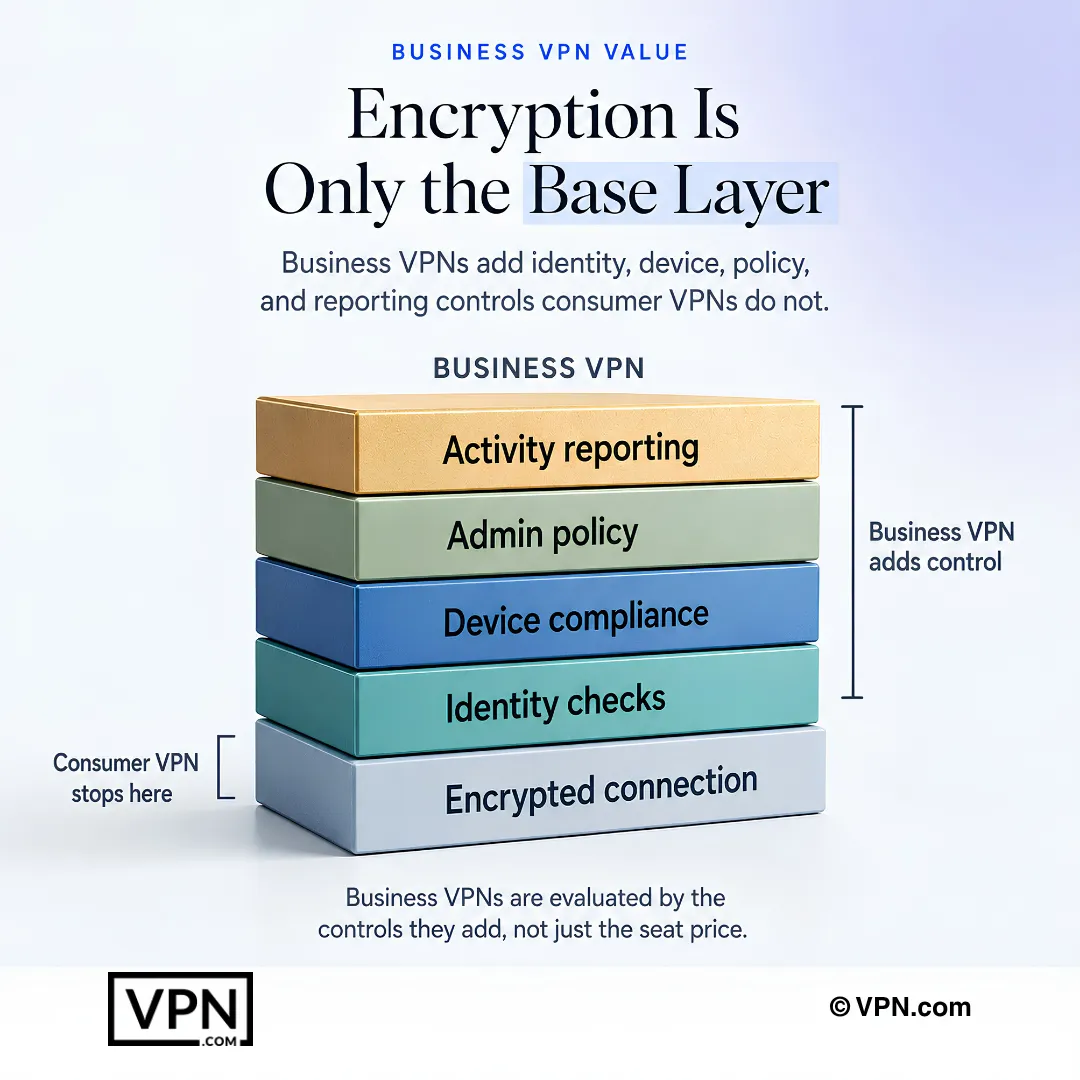
Business VPNs are evaluated by the control layers they add, not only by seat price.