Best VPN for Debian: Secure Linux Setup
Find the best VPN for Debian with native Linux support, reliable long-term compatibility, and strong encryption. Protect your IP and traffic today.
 Michael Gargiulo
Find your VPN
What will you mostly use a VPN for?
Pick one, then answer a few quick questions. We name the VPN that fits, and say why.
VPN for streaming
Question 1 of 3
What made you look for a streaming VPN?
24,965 VPN picks made through VPN.com in the last 30 days

Your match

NordVPN
App store ratings, part of the score
4.664.59

ProtonVPN
App store ratings, part of the score
4.614.70
VPN for privacy
Question 1 of 3
What made you look for a privacy VPN?
24,965 VPN picks made through VPN.com in the last 30 days
Your match
NordVPN
App store ratings, part of the score
4.664.59
ProtonVPN
App store ratings, part of the score
4.614.70
VPN for gaming
Question 1 of 3
What made you look for a gaming VPN?
24,965 VPN picks made through VPN.com in the last 30 days
Your match
NordVPN
App store ratings, part of the score
4.664.59
ProtonVPN
App store ratings, part of the score
4.614.70
VPN for free plans
Question 1 of 3
What made you look for a free VPN?
24,965 VPN picks made through VPN.com in the last 30 days
Your match
ProtonVPN
App store ratings, part of the score
4.614.70
NordVPN
App store ratings, part of the score
4.664.59
NordVPN7,213 serversNordVPN's privacy and security record is strong on process and mixed on proof
93 out of 100, built from two weighted parts
App store ratings, part of the score
4.664.59
Researched Oct 3, 2026Claims checked: 31Independent sources: 11Scores updated Oct 22, 2026
 ExpressVPN3,000+ servers
86 out of 100, built from two weighted parts
App store ratings, part of the score
4.684.69
Researched Oct 3, 2026Claims checked: 27Independent sources: 13Scores updated Oct 22, 2026
 Surfshark4,500+ servers
Surfshark's evidence mixes real, readable third-party documents with provider assertions
85 out of 100, built from two weighted parts
App store ratings, part of the score
4.714.64
Researched Oct 3, 2026Claims checked: 32Independent sources: 5Scores updated Oct 22, 2026
ProtonVPN20,000+ servers85 out of 100, built from two weighted parts
App store ratings, part of the score
4.614.70
Researched Oct 3, 2026Claims checked: 23Independent sources: 3Scores updated Oct 22, 2026
Bottom Line: Debian’s built-in security can’t stop ISP surveillance, geo-restrictions, or public Wi-Fi threats. A VPN closes those gaps by encrypting traffic and masking your IP through tools Debian already supports natively.
Debian is the rock-solid base behind Ubuntu, Linux Mint, and dozens of otherLinux distributions. It has earned loyalty from system administrators and privacy-conscious users for over two decades. But Debian’s stability focus creates a specific challenge: its conservative package cycle means VPN clients must work reliably across long-term releases without breaking dependencies.
This guide focuses on what separates Debian from other distros when choosing a VPN. You’ll find providers that ship native .deb packages, integrate with APT and systemd, and respect Debian’s philosophy of stability over bleeding-edge features. If you run Debian on a headless server or a daily desktop, the setup paths differ. We cover both.
Why Debian Users Have Unique VPN Requirements
Debian’s stable branch ships older but tested packages. That means VPN clients compiled for Ubuntu’s latest release sometimes fail on Debian Stable due to library mismatches. Choosing a VPN that packages specifically for Debian avoids broken installs.
Beyond compatibility, Debian users face the same threats as everyone else:
- ISP monitoring: Your internet provider logs every connection. A VPN encrypts that traffic so your ISP sees nothing useful.
- Public Wi-Fi exposure: Coffee shops and airports run unsecured networks. A VPN adds an encrypted tunnel between your device and the exit server.
- Geo-restrictions: Streaming libraries and regional content locks disappear when you route through a server in the target country.
- Censorship bypass: Restrictive networks block sites at the DNS or IP level. VPN tunnels route around those blocks.
- Server environments: Many Debian installs run headless. Acommand-line VPN client is essential for these setups.
Debian’s long support cycles also mean your VPN must receive updates through a stable repository. A provider that only distributes manual .ovpn files forces you to manage updates yourself.
How Debian Compatibility Actually Works
When we call a VPN “Debian-compatible,” that means one of three things:
- Native .deb package via APT: The provider hosts a Debian repository. You add their GPG key, add the repo to
/etc/apt/sources.list.d/, and install withsudo apt install. Updates arrive throughapt upgradelike any other package. - Manual .deb download: The provider offers a .deb file on their website. You install it with
sudo dpkg -i package.deband resolve dependencies withsudo apt -f install. Updates require downloading new files manually. - OpenVPN or WireGuard configuration files: You install OpenVPN or WireGuard from Debian’s own repositories, then import the provider’s .ovpn or .conf files. This works on every Debian release but requires more setup.
Native APT repository support is the gold standard. It provides automatic updates, dependency resolution, and integration with Debian’s package management. Manual .deb files work but create maintenance overhead. Raw config files offer maximum control at the cost of convenience.
For headless Debian servers, systemd integration matters. A VPN that installs a systemd service unit lets you run sudo systemctl enable --now vpn-client and have the tunnel start at boot. NordVPN and ProtonVPN both ship systemd units in their .deb packages.
Best VPNs With Native Debian Support
1. NordVPN
NordVPN ships a dedicated .deb package with a fullCLI tool. Installation takes three commands: download the .deb, install via dpkg, and log in through the terminal.
Key specs:
- 7,213 servers across 150 countries
- AES-256 encryption with NordLynx (WireGuard-based) protocol
- No-logs policy that NordVPN says was audited by Deloitte
- Automatic kill switch at the system level
- DNS leak protection built into the client
Debian setup path: NordVPN’s Linux client registers a systemd service. After installation, nordvpn connect establishes the tunnel. The client is lightweight and does not conflict with Debian’s network manager. It runs cleanly on Debian 11 (Bullseye) and Debian 12 (Bookworm).
NordLynx is built on WireGuard, so it adds little overhead, which makes NordVPN practical for both desktop browsing and server-side traffic routing. Actual speeds depend on your connection and distance to the server.
2. ExpressVPN
ExpressVPN does not ship a graphical Linux client. Instead, it provides a .deb package that installs a CLI tool and manages OpenVPN connections behind the scenes.
Key specs:
- Servers in 105 countries
- TrustedServer technology (RAM-only, wiped on reboot)
- Split tunneling to route only selected apps through the VPN
- Private DNS on every server
- 8 simultaneous device connections
Debian setup path: Download the .deb from ExpressVPN’s site, install with dpkg -i, then activate with expressvpn activate. The CLI handles server selection, protocol switching, and connection status. ExpressVPN also provides standalone .ovpn files for users who prefer managing OpenVPN directly.
ExpressVPN’s Lightway protocol is designed for fast, stable connections, and the client runs on Debian 12. The RAM-only server architecture means no persistent data survives a reboot.
3. ProtonVPN
ProtonVPN offers a native .deb package and an open-source CLI tool. The client’s source code is publicly auditable on GitHub.
Key specs:
- Servers in 63+ countries (paid plans)
- Open-source client apps
- Secure Core routing through privacy-friendly countries (Switzerland, Iceland, Sweden)
- Built-in Tor integration
- NetShield ad and tracker blocking
Debian setup path: ProtonVPN maintains an APT repository. Add their repo and GPG key, then sudo apt install protonvpn-cli. The CLI integrates with systemd for persistent connections. ProtonVPN also supports WireGuard and OpenVPN protocols natively.
ProtonVPN’s open-source approach aligns with Debian’s free software values. Secure Core adds some latency and lowers speeds, but routes traffic through two servers for stronger anonymity.
4. Mullvad
Mullvad requires no email address or personal information to create an account. You receive a randomly generated account number and pay with cash, cryptocurrency, or card.
Key specs:
- Strict no-logs policy
- Cash and cryptocurrency payments accepted
- MultiHop for routing through two servers
- Port forwarding support
- Built-in ad and tracker blocking
Debian setup path: Mullvad provides a .deb package and also publishes detailed OpenVPN and WireGuard configuration guides for Debian. Their WireGuard implementation is lightweight, and speeds depend mainly on your connection. For headless setups, you can configure WireGuard directly through wg-quick and Debian’s native WireGuard kernel module (available since Debian 11).
Mullvad’s anonymous account system appeals to privacy-focused Debian users who want zero identity linkage.
5. AirVPN
AirVPN targets technically skilled users. Their open-source Eddie client provides granular control over routing, DNS, and firewall rules.
Key specs:
- Open-source Eddie client
- Configurable encryption options (AES-256-GCM, ChaCha20)
- Port forwarding on all servers
- Transparent real-time server status dashboard
- Support for OpenVPN, WireGuard, and SSH/SSL tunneling
Debian setup path: Eddie is available as a .deb package. AirVPN also publishes raw OpenVPN and WireGuard configs. Eddie lets you define custom routes, lock DNS to specific servers, and manage firewall rules from within the client. This level of control suits Debian power users who want to fine-tune their tunnel.
| VPN | Debian Support Method | Servers | Standout Feature | Best For |
|---|---|---|---|---|
| NordVPN | Native .deb package + CLI | 7,213 servers in 150 countries | Lightweight client, Double VPN | Easy setup, large network |
| ExpressVPN | .deb CLI package + OpenVPN configs | 113 countries | TrustedServer (RAM-only), split tunneling | Fast speeds on Debian |
| ProtonVPN | APT repository + open-source CLI | 140+ countries (paid) | Open-source, Secure Core, Tor support | Privacy-first Debian users |
| Mullvad | .deb package + OpenVPN/WireGuard guides | Multiple countries | No email required, cash/crypto accepted | Maximum anonymity |
| AirVPN | Eddie client (.deb) | Multiple countries | Open-source Eddie client, port forwarding | Tech-savvy Debian users |
Installing a VPN on Debian: APT, .deb, and CLI Methods
Method 1: APT Repository (Recommended)
This method works with NordVPN and ProtonVPN. The provider maintains a signed repository that integrates with Debian’s package manager.
# Example: ProtonVPN
wget -q -O - https://protonvpn.com/download/protonvpn-stable-release_1.0_all.deb -O protonvpn-repo.deb
sudo dpkg -i protonvpn-repo.deb
sudo apt update
sudo apt install protonvpn-cli
protonvpn-cli login <username>
protonvpn-cli connect --fastest
Updates arrive automatically through sudo apt upgrade. This is the cleanest approach for Debian Stable users.
Method 2: Manual .deb Package
Download the .deb file from the provider’s website. Install it directly:
sudo dpkg -i vpn-client.deb
sudo apt -f install   # resolves missing dependencies
This works reliably but requires you to check for updates manually.
Method 3: OpenVPN or WireGuard Config Files
For headless servers or users who want full protocol control:
# OpenVPN
sudo apt install openvpn
sudo openvpn --config /path/to/provider.ovpn

# WireGuard (Debian 11+)
sudo apt install wireguard
sudo wg-quick up /etc/wireguard/provider.conf
To start WireGuard at boot via systemd:
sudo systemctl enable --now wg-quick@providerThis method gives you direct control over routing tables, DNS resolution, and firewall rules. It’s ideal forremote access setups where the Debian machine acts as a VPN gateway.
Troubleshooting Common Issues
- Dependency errors after dpkg: Run
sudo apt -f installto pull missing libraries. - DNS leaks after connecting: Edit
/etc/resolv.confor configure the VPN client to push its own DNS. Test at ipleak.net. - Connection drops on resume from sleep: Restart the VPN service with
sudo systemctl restart vpn-client. - Kernel module missing for WireGuard: On Debian 10 (Buster), install
wireguard-dkmsfrom backports. Debian 11+ includes WireGuard in the mainline kernel. - Conflicting firewall rules: Check
iptables -Lornft list rulesetfor rules that block VPN traffic.
Choosing the Right VPN for Your Debian Setup
Desktop vs. Headless Server
Desktop Debian users benefit from native .deb packages with CLI or network manager integration. NordVPN and ProtonVPN cover this well. Headless server administrators should prioritize WireGuard or OpenVPN configs with systemd service units for unattended operation.
Stability Across Debian Releases
Debian Stable (Bookworm) receives security patches but rarely updates core libraries. Your VPN client must compile against these older libraries. Providers with dedicated Debian repositories handle this automatically. If you run Debian Testing or Sid, you’ll face fewer library issues but may encounter untested VPN client builds.
Privacy and Logging
All five providers listed above maintain no-logs policies. NordVPN and ProtonVPN say they have commissioned third-party no-logs audits. Mullvad’s anonymous account system removes identity from the equation entirely. For Debian users running privacy-focused setups, Mullvad or ProtonVPN with Secure Core offer the strongest anonymity chain.
Protocol Selection
- WireGuard: Fastest option. Built into Debian’s kernel since version 11. NordVPN (via NordLynx), Mullvad, and ProtonVPN all support it.
- OpenVPN: Most widely supported. Works on every Debian release. Slightly slower than WireGuard but battle-tested.
- Proprietary protocols: ExpressVPN’s Lightway and NordVPN’s NordLynx wrap WireGuard concepts in custom implementations. Both perform well on Debian.
Open-Source Alignment
Debian’s social contract prioritizes free software. ProtonVPN and AirVPN publish open-source clients. Mullvad’s app is also open-source. If alignment with Debian’s philosophy matters to you, these three stand out.
Final Verdict
The right VPN for Debian depends on how you use the system. For straightforward desktop protection with minimal setup, NordVPN’s native .deb package and NordLynx protocol deliver strong speeds and one-command connections. ProtonVPN matches that convenience while offering open-source transparency and Secure Core routing.
Server administrators and privacy purists should look at Mullvad. Its anonymous accounts, WireGuard kernel integration, and systemd-friendly design fit headless Debian deployments. AirVPN serves power users who want granular tunnel control through an open-source client.
Whichever provider you choose, install through APT or a .deb package when possible. Enable automatic updates. And test for DNS leaks after every major system upgrade to confirm your tunnel stays intact.
Resources for this page
Charts and reference images from our research, free to view and share.
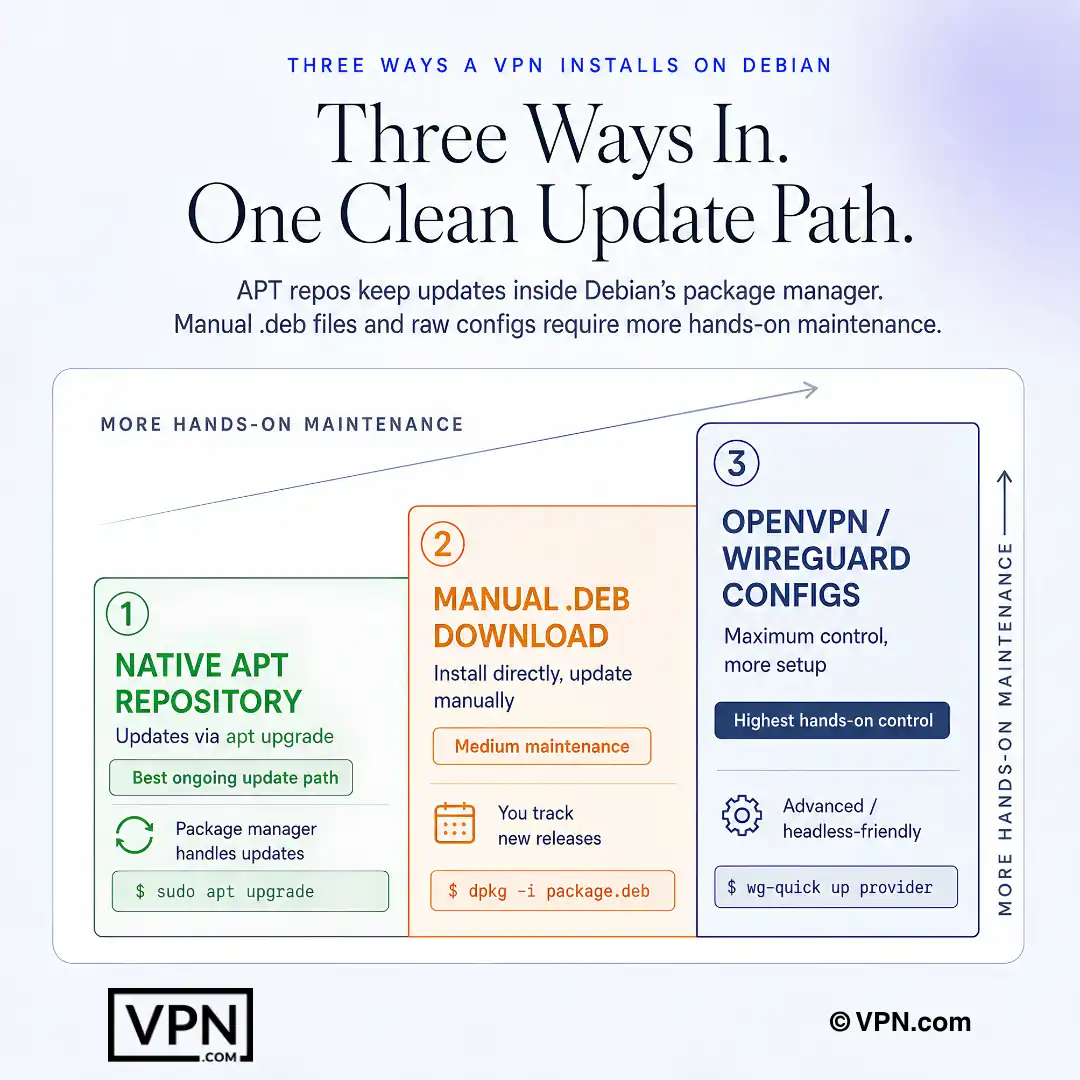
On Debian, APT repositories usually provide the cleanest long-term VPN update path.
Frequently Asked Questions
What actually makes a VPN “Debian-compatible” rather than just Linux-compatible?
A VPN is Debian-compatible if it ships a native .deb package installable via APT, or works cleanly with OpenVPN/WireGuard, both of which Debian supports natively. NordVPN and ProtonVPN maintain signed APT repositories with GPG keys, letting apt upgrade handle updates automatically, while ExpressVPN and Mullvad ship manual .deb files requiring you to check for new versions yourself.
Does WireGuard work natively on Debian, or do I need extra drivers?
WireGuard has been included in Debian’s mainline kernel since Debian 11 (Bullseye), so no extra kernel module is needed on Bullseye or Bookworm. On Debian 10 (Buster) you must install wireguard-dkms from backports first. NordVPN (via its NordLynx implementation), Mullvad, and ProtonVPN all support WireGuard directly, alongside Debian’s own wg-quick tooling for managing connections.
How do I install a VPN through APT on Debian Stable?
Download the provider’s signed repository .deb, install it with dpkg, run apt update, then apt install the CLI package. ProtonVPN’s process is: wget the repo file, sudo dpkg -i, sudo apt update, sudo apt install protonvpn-cli, then protonvpn-cli login and connect —fastest. NordVPN follows the same repository pattern and registers a systemd service automatically during install.
How do I keep a VPN running automatically on a headless Debian server?
Enable the systemd service the client installs, or configure WireGuard’s own unit, so the tunnel starts at boot without a logged-in session. For WireGuard configs, run sudo systemctl enable —now wg-quick@provider using the .conf file placed in /etc/wireguard/. NordVPN and ProtonVPN both ship systemd units in their .deb packages for this exact unattended startup.
What if WireGuard won’t start because the kernel module is missing?
This happens on Debian 10 (Buster), which predates WireGuard’s inclusion in the mainline kernel. Install wireguard-dkms from the backports repository to add the module manually. Debian 11 (Bullseye) and Debian 12 (Bookworm) include WireGuard natively, so this step is unnecessary on those releases, and wg-quick up should work immediately after installing the wireguard package.
How do I confirm my VPN isn’t leaking DNS requests on Debian?
Connect to the VPN, then test at ipleak.net to see whether your real DNS resolver appears instead of the provider’s. If it leaks, edit /etc/resolv.conf directly or configure the client to push its own DNS on connect. Also check iptables -L or nft list ruleset for firewall rules that might route DNS traffic outside the tunnel.
Which VPNs align with Debian’s free-software philosophy?
ProtonVPN and AirVPN both publish open-source clients, and Mullvad’s app is open-source as well, matching Debian’s social contract preference for auditable software. ProtonVPN’s source is publicly available on GitHub, AirVPN’s Eddie client exposes granular routing and DNS controls, and Mullvad requires no email or personal information, issuing a randomly generated account number instead.
Is it safe to trust a closed-source .deb package like NordVPN’s on a Debian system?
Yes, based on the provider’s audit claims rather than source transparency. NordVPN’s Linux client isn’t open-source, but NordVPN says its no-logs policy has been audited by Deloitte, and the client runs a systemd service with a kill switch and DNS leak protection without conflicting with Debian’s network manager. It tests clean on both Debian 11 and Debian 12.
How many devices can one VPN subscription cover across multiple Debian machines?
It depends on the provider. NordVPN allows 10 simultaneous connections, ExpressVPN allows 10 to 14 depending on plan tier, and ProtonVPN allows 1 to 10 depending on plan, with its free tier capped at a single device. Surfshark is the outlier with unlimited simultaneous connections, useful if you’re running several Debian servers plus a desktop under one account.
What’s the cheapest way to get a Debian-compatible VPN with native APT support?
ProtonVPN’s long-term plan starts from $3.49/month and ships a native APT repository, matching NordVPN’s cheapest rate from $3.49/month on its longest-term plan, also with full APT support. Surfshark starts even lower at from $2.49/month but relies on a manual .deb package rather than a signed repository, so weigh that maintenance tradeoff.
If a VPN’s Linux client doesn’t work well on my Debian setup, can I get a refund?
Yes. NordVPN, ExpressVPN, Surfshark, and ProtonVPN all back their plans with a 30-day money-back guarantee, so you can test the .deb package or APT repository on your specific Debian release and request a refund if the client conflicts with your library versions or systemd configuration. Confirm the exact process through the provider’s support channel first.
Which VPN performs best for Debian users running demanding server workloads?
NordVPN ranks #1 of 22 on our Trust Score, aggregated from published third-party tests, and its NordLynx protocol runs cleanly on Debian’s systemd without conflicting with the network manager. ExpressVPN ranks #2 of 22 and relies on its Lightway protocol through a CLI-only Linux client. For headless routing tasks, NordVPN’s rank makes it the stronger default pick.
Can a CLI-only VPN like ExpressVPN on Debian still access geo-restricted streaming content?
Yes, geo-restrictions are bypassed at the connection level, not through a graphical interface, so ExpressVPN’s Debian CLI tool still routes you through a server in the target country to access region-locked streaming libraries. Run expressvpn activate, then select a server through the command line, the same as choosing a country in the GUI app on other platforms.