Best VPN for Command Line: CLI Tools for Sysadmins
Find the best VPN for command line use with dedicated CLI tools built for scripting, automation, and headless server deployments. Compare top providers now.
 Michael Gargiulo
Find your VPN
What will you mostly use a VPN for?
Pick one, then answer a few quick questions. We name the VPN that fits, and say why.
VPN for streaming
Question 1 of 3
What made you look for a streaming VPN?
24,965 VPN picks made through VPN.com in the last 30 days

Your match

NordVPN
App store ratings, part of the score
4.664.59

ProtonVPN
App store ratings, part of the score
4.614.70
VPN for privacy
Question 1 of 3
What made you look for a privacy VPN?
24,965 VPN picks made through VPN.com in the last 30 days
Your match
NordVPN
App store ratings, part of the score
4.664.59
ProtonVPN
App store ratings, part of the score
4.614.70
VPN for gaming
Question 1 of 3
What made you look for a gaming VPN?
24,965 VPN picks made through VPN.com in the last 30 days
Your match
NordVPN
App store ratings, part of the score
4.664.59
ProtonVPN
App store ratings, part of the score
4.614.70
VPN for free plans
Question 1 of 3
What made you look for a free VPN?
24,965 VPN picks made through VPN.com in the last 30 days
Your match
ProtonVPN
App store ratings, part of the score
4.614.70
NordVPN
App store ratings, part of the score
4.664.59
NordVPN7,213 serversNordVPN's privacy and security record is strong on process and mixed on proof
93 out of 100, built from two weighted parts
App store ratings, part of the score
4.664.59
Researched Oct 3, 2026Claims checked: 31Independent sources: 11Scores updated Oct 22, 2026
 ExpressVPN3,000+ servers
86 out of 100, built from two weighted parts
App store ratings, part of the score
4.684.69
Researched Oct 3, 2026Claims checked: 27Independent sources: 13Scores updated Oct 22, 2026
ProtonVPN20,000+ servers85 out of 100, built from two weighted parts
App store ratings, part of the score
4.614.70
Researched Oct 3, 2026Claims checked: 23Independent sources: 3Scores updated Oct 22, 2026
Bottom Line: VPN CLI tools give sysadmins and power users the ability to connect, automate, and script VPN tasks faster and with less overhead than GUI clients. They are essential for headless servers, remote infrastructure, and automated deployment pipelines.
For sysadmins and power users, managing VPN connections through a terminal offers speed and precision that GUI clients cannot match. You can script connections, deploy configurations across fleets of servers, and troubleshoot without ever opening a graphical window. This guide compares five VPN providers with dedicated CLI tools, breaks down their features, and walks through practical setup steps.
What VPN CLI Tools Do and Why They Matter
A VPN CLI tool lets you control your VPN connection through typed commands in a terminal emulator. Instead of clicking through menus, you issue direct instructions. The terminal responds with status output, error codes, and connection data.
Why Use a Terminal Instead of a GUI?
Typed commands beat point-and-click interfaces in several scenarios:
- Speed: A single command connects you. No loading screens, no splash pages.
- Low overhead: CLI clients use less RAM than GUI equivalents. This matters on resource-constrained VPS instances.
- Scriptability: You can chain VPN commands into bash scripts, cron jobs, or Ansible playbooks.
- Headless compatibility: Servers without a display still need VPN protection. CLI is the only option.
Practical Scenarios for CLI-Based VPN Management
- Developers testing geo-restricted APIs can switch server locations in one command.
- System administrators can push VPN configs to 50+ machines using shell scripts.
- Automated pipelines can activate VPN tunnels before running scraping or monitoring tasks.
- Privacy-conscious users can verify exact connection parameters without trusting a GUI abstraction layer.
Top VPNs with Dedicated CLI Tools
Five providers stand out for their CLI support. Each one targets a slightly different use case. Here is a full breakdown.
1. NordVPN
NordVPN operates 7,213 servers in 150 countries. Its CLI tool, nordvpn, ships as a native Linux package and is also available on Windows and macOS.
CLI features:
- Connect by country, city, or server number (
nordvpn connect us2435) - Toggle kill switch, auto-connect, and DNS settings
- Check connection status and current IP
- List server groups (P2P, Double VPN, Onion over VPN)
Supported platforms: Windows, macOS, Linux (Debian, Ubuntu, Fedora, RHEL, SUSE)
Pricing: Plans start at $3.59/month on a two-year commitment. The monthly rate is $13.99. CLI access is included in all tiers.
2. ExpressVPN
ExpressVPN runs 3,000+ servers in 113 countries. Its CLI tool focuses on simplicity with clean, readable output.
CLI features:
- Connect and disconnect with
expressvpn connect - List server locations with real-time latency data
- Check current IP address and connection status
- Run built-in speed tests from the terminal
Supported platforms: Linux (Ubuntu, Debian, Fedora, Arch, Raspberry Pi OS)
Pricing: Plans start at $6.67/month on a 12-month plan. Monthly rate is $14.99. CLI is included.
3. Mullvad
Mullvad requires no email address, no name, and no personal data to sign up. You get a random account number. Its CLI tool reflects this privacy-first approach.
CLI features:
- Connect to VPN with
mullvad connect - List servers filtered by country, city, or provider
- Check account status and expiry date
- Generate and manage WireGuard keys directly
Supported platforms: Linux, macOS
Pricing: Flat rate of €5/month (approximately $5.48). No discounts, no tiers, no upsells. CLI is included.
4. ProtonVPN
ProtonVPN comes from the team behind ProtonMail. Its open-source CLI client (protonvpn-cli) runs on Linux and offers Secure Core routing through privacy-friendly countries.
CLI features:
- Connect to servers by country or profile (P2P, Tor, Secure Core)
- View server load percentages and connection speeds
- Update the client from the terminal
- Configure kill switch and DNS leak protection
Supported platforms: Linux (Ubuntu, Debian, Fedora, Arch, Manjaro)
Pricing: Free plan includes 3 servers in 3 countries. Paid plans start at $4.99/month. CLI works with all plans including free.
5. AirVPN
AirVPN targets advanced users who want granular control. Its CLI tool, Eddie-CLI, exposes more configuration options than most competitors.
CLI features:
- Connect to servers with custom protocol and port settings
- View real-time server bandwidth, load, and latency
- Configure port forwarding from the terminal
- Switch between OpenVPN and WireGuard protocols
Supported platforms: Windows, macOS, Linux
Pricing: Plans start at €2.75/month (approximately $3.02) on a three-year plan. Monthly rate is €7/month (approximately $7.66). CLI is included.
Side-by-Side CLI Feature Comparison
| Feature | NordVPN | ExpressVPN | Mullvad | ProtonVPN | AirVPN |
|---|---|---|---|---|---|
| Platforms | Win/Mac/Linux | Linux | Linux/Mac | Linux | Win/Mac/Linux |
| WireGuard support | Yes (NordLynx) | Yes (Lightway) | Yes | Yes | Yes |
| OpenVPN support | Yes | No | Yes | Yes | Yes |
| Split tunneling | Yes | Yes | No | Yes | No |
| Kill switch via CLI | Yes | Yes | Yes | Yes | Yes |
| Port forwarding | No | No | No | Paid plans | Yes |
| Open-source client | No | No | Yes | Yes | Yes |
| Lowest monthly cost | $3.59 | $6.67 | $5.48 | Free | $3.02 |
Protocol Options Explained
VPN protocols determine how your data travels through the encrypted tunnel. Each protocol trades off speed, security, and compatibility:
- OpenVPN: Mature, audited, runs on TCP or UDP. Userspace implementation with higher CPU overhead.
- WireGuard: Lightweight kernel module with ~4,000 lines of code. Typically faster than OpenVPN.
- IKEv2/IPsec: Strong on mobile. Reconnects fast after network changes.
AirVPN and Mullvad expose the most protocol options in their CLI tools. NordVPN wraps WireGuard in its proprietary NordLynx implementation.
Kill Switch and Split Tunneling
A kill switch blocks all traffic if the VPN tunnel drops. Every provider listed here supports CLI-based kill switch activation. NordVPN and ProtonVPN use single-command toggles (nordvpn set killswitch on). Mullvad enables it by default.
Split tunneling routes selected apps outside the VPN tunnel. ExpressVPN and ProtonVPN offer this through their CLI. It is useful when you need local network access while routing sensitive traffic through the tunnel.
Installation and Configuration Walkthrough
Setting up a CLI VPN follows a predictable pattern across providers. Here is the general process.
Step-by-Step Installation
- Create an account with your chosen provider.
- Add the provider’s repository to your package manager. For Debian-based systems, this usually means adding a
.debsource. - Install the CLI package. Example:
sudo apt install nordvpnorsudo dnf install mullvad-vpn. - Authenticate. Some providers use OAuth tokens. Others accept username and password pairs. Mullvad uses only your account number.
- Connect. Run the connect command and verify your new IP.
Troubleshooting Common Problems
- Connection refused: Verify your firewall allows UDP 1194 (OpenVPN) or UDP 51820 (WireGuard).
- DNS leaks: Set your DNS to the provider’s servers. NordVPN handles this automatically with
nordvpn set dns on. - Slow speeds: Switch protocols. WireGuard generally runs faster than OpenVPN.
- Authentication failures: Regenerate your credentials from the provider’s web dashboard. CLI tokens can expire.
Security and Privacy in CLI VPN Tools
Encryption Standards
All five providers use AES-256-GCM for OpenVPN connections. WireGuard implementations use ChaCha20-Poly1305. Both meet current NIST recommendations for symmetric encryption.
No-Logs Verification
NordVPN says it has commissioned independent no-logs audits, and ExpressVPN commissioned KPMG assurance on its no-logs controls (2025). Mullvad passed an infrastructure audit by Assured AB. ProtonVPN says it publishes its no-logs audit reports on its website. AirVPN has not completed a third-party audit as of late 2024.
Open-Source Transparency
Mullvad, ProtonVPN, and AirVPN publish their CLI client source code. Anyone can inspect the codebase for vulnerabilities or telemetry. NordVPN and ExpressVPN keep their clients proprietary. Open-source status does not guarantee security, but it allows independent verification.
Performance: CLI vs. GUI Resource Usage
CLI clients run leaner than their GUI counterparts because they have no graphical interface to render. That matters most on small VPS instances and headless servers with limited RAM.
Speed differences between CLI and GUI modes are negligible. The tunnel itself determines throughput, not the client interface. CLI advantage is purely in system resource consumption.
Final Verdict
CLI VPN tools strip away interface overhead and give you direct control over encrypted connections. For headless servers, scripted deployments, and automated workflows, they are the right choice.
Mullvad wins on privacy and simplicity. Its flat pricing, no-registration signup, and open-source client make it ideal for privacy-focused users. NordVPN offers the broadest platform support and largest server network. ProtonVPN provides the best free tier with CLI access. AirVPN gives advanced users the most granular control. ExpressVPN delivers consistently fast speeds with a clean command interface.
Pick the provider that matches your primary use case. Then run a connect command and verify your setup. The whole process takes under five minutes.
Resources for this page
Charts and reference images from our research, free to view and share.
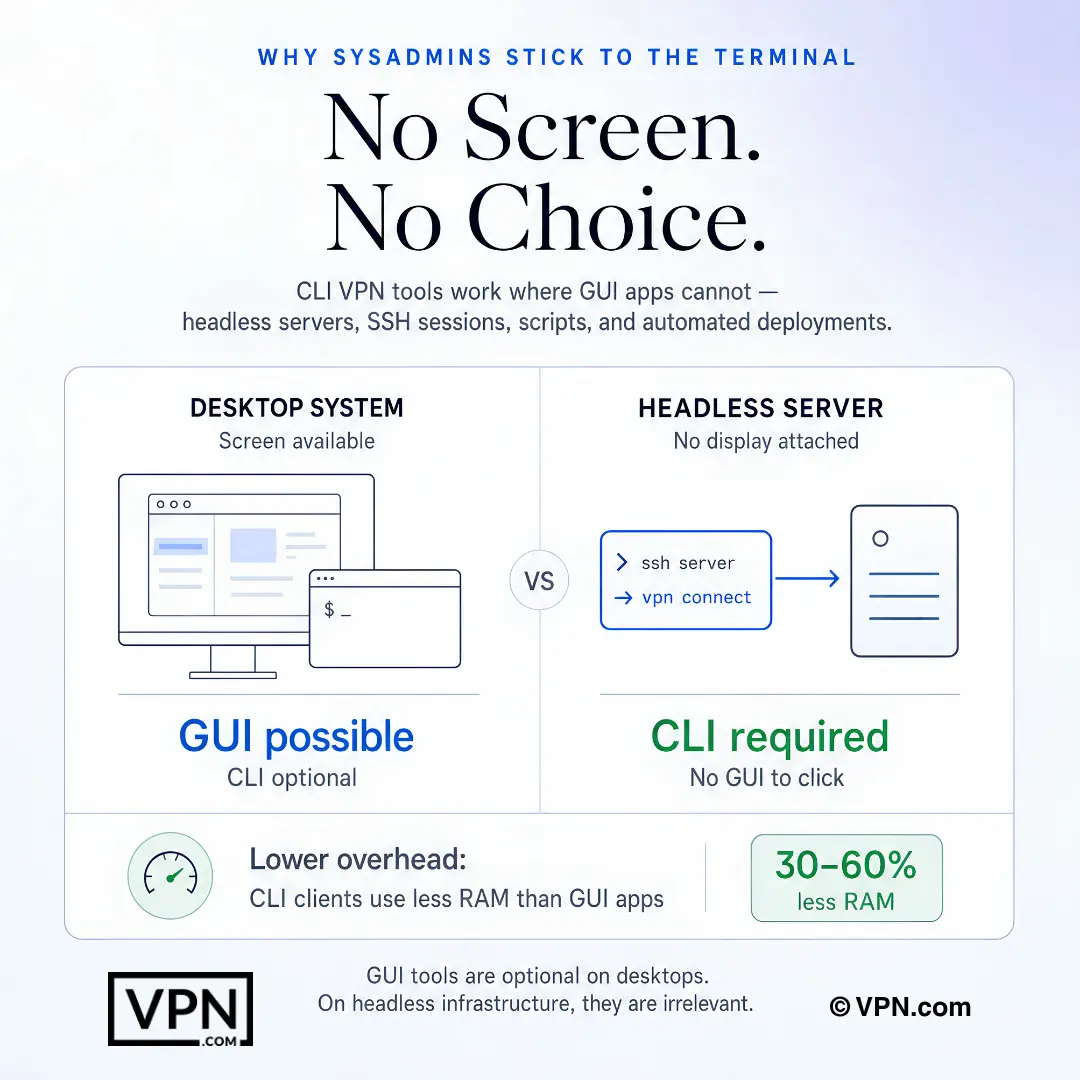
CLI VPN tools matter most when there is no desktop screen, only SSH, scripts, or server automation.
Frequently Asked Questions
What can a VPN CLI tool actually do that a GUI client can’t?
CLI tools let sysadmins connect, script, and automate VPN sessions entirely from a terminal, which matters most on headless servers with no display. Commands like nordvpn connect us2435 chain directly into bash scripts, cron jobs, or Ansible playbooks. A single command connects, and CLI clients use less RAM than GUI apps.
Which of these CLI VPN tools are actually open-source, and why does that matter?
Mullvad, ProtonVPN, and AirVPN publish their CLI client source code, letting anyone inspect the codebase for vulnerabilities or hidden telemetry. NordVPN and ExpressVPN keep their clients proprietary. Open-source status alone doesn’t guarantee security, but it allows independent verification, a feature privacy-conscious sysadmins scripting unattended connections on remote infrastructure tend to weigh heavily.
How does NordVPN’s CLI handle WireGuard differently from Mullvad’s or ProtonVPN’s?
NordVPN wraps WireGuard in its proprietary NordLynx implementation rather than exposing raw WireGuard configuration through its CLI. Mullvad and ProtonVPN’s CLI tools, by contrast, let you generate and manage WireGuard keys directly. AirVPN’s Eddie-CLI goes further still, letting advanced users manually switch between OpenVPN and WireGuard per connection for more granular control.
Have these CLI VPN providers had their no-logs claims independently audited?
Most say so. NordVPN says it has commissioned independent no-logs audits, ExpressVPN commissioned KPMG assurance on its no-logs controls (2025), Mullvad passed an infrastructure audit by Assured AB, and ProtonVPN says it publishes its own audit reports online. AirVPN has not completed a third-party audit as of late 2024, a gap worth weighing against its otherwise granular Eddie-CLI feature set.
How do I set up a VPN CLI tool on a headless Linux server with no display?
Add the provider’s repository to your package manager, typically a .deb source on Debian-based systems, then install with a command like sudo apt install nordvpn or sudo dnf install mullvad-vpn. Authenticate using OAuth tokens, a username and password pair, or in Mullvad’s case just your account number. Run the connect command afterward and verify your new IP address.
How do I script VPN connections into cron jobs or Ansible playbooks?
Chain the provider’s connect and status commands directly into bash scripts, cron entries, or Ansible tasks, since CLI tools return status output and error codes instead of requiring interactive clicks. NordVPN’s nordvpn connect us2435 and ExpressVPN’s expressvpn connect both support this pattern cleanly. Automated pipelines commonly run the connect command as a pre-task before scraping or monitoring jobs execute.
What should I check if my VPN CLI tool refuses to connect on a fresh VPS?
Verify your firewall allows the correct port first: UDP 1194 for OpenVPN or UDP 51820 for WireGuard, since fresh VPS instances often block these by default. If authentication fails, regenerate credentials from the provider’s web dashboard, since CLI tokens can expire. NordVPN, ExpressVPN, Mullvad, ProtonVPN, and AirVPN all support kill switch toggles and connection checks through single CLI commands.
How do I fix DNS leaks when running a VPN from the command line?
Point your DNS explicitly at the provider’s own servers rather than relying on system defaults. NordVPN handles this with a single command, nordvpn set dns on, while ProtonVPN and AirVPN both expose DNS leak protection through their CLI settings directly. Confirm the fix worked by checking that your reported DNS server matches the provider’s, not your ISP’s.
Does using a CLI client instead of a GUI app slow down my VPN connection?
No. Speed differences between CLI and GUI modes are negligible because the encrypted tunnel itself determines throughput, not the client interface. The real CLI advantage is lower RAM usage. NordVPN also ranks #1 of 22 on our Trust Score, aggregated from published third-party tests, for tunnel-level performance regardless of which client you run.
Can I manage VPN connections across a whole fleet of machines with one account?
Yes, within limits that vary by provider. NordVPN allows 10 simultaneous device connections per account, letting you script the same credentials across multiple machines up to that cap. ExpressVPN allows 10 to 14 depending on plan tier, and ProtonVPN scales from 1 to 10 depending on plan. Beyond those caps, most teams provision separate accounts or dedicated server credentials instead.
How do CLI-capable VPN providers compare on price?
NordVPN starts from $3.49/month and ExpressVPN from $2.99/month, both on their longest-term plans, while ProtonVPN starts from $3.49/month and includes a free tier with CLI access built in. Mullvad charges a flat €5/month with no discounts or tiers, and AirVPN starts around €2.75/month on a three-year commitment, rising to €7/month at its regular monthly rate.
If a CLI tool doesn’t fit my scripted setup, can I get a refund?
NordVPN, ExpressVPN, and ProtonVPN each back their paid plans with a 30-day money-back guarantee, giving you time to test CLI scripting against your actual infrastructure before committing. Mullvad and AirVPN’s refund terms aren’t detailed here, so confirm directly with either provider before building a long-term automated deployment around their CLI tool.
Can I use a VPN CLI tool without paying for a subscription at all?
Yes, ProtonVPN’s free plan includes CLI access and connects to servers in several countries, making it the only genuinely free CLI option among these five. NordVPN, ExpressVPN, Mullvad, and AirVPN all require a paid plan for CLI use. ProtonVPN’s paid tier accesses its full server network starting from $3.49/month on its longest-term plan.