Privacy: VPN.com research ledger, cited. Counts, apps, plans: provider-stated, checked Oct 15, 2026. How we score →
Your Android phone knows more about you than most people realize. Every app, network and search leaves a trail that your carrier, ISP and anyone on shared Wi-Fi can read. Android powers over 3.9 billion active devices worldwide, making it the largest target for mobile surveillance and data harvesting.
A study found 40% of public Wi-Fi hotspots in major cities had zero encryption. That is not a minor inconvenience. That is an open door. A VPN closes it.
But not every VPN is built for Android. Some drain your battery within hours. Others strip out features on mobile that exist on desktop. This guide covers the best VPNs for Android phones, tablets and Android TV devices.
Our rankings are consistent with independent testing from Gizmodo[1] and TechRadar[2].
What Makes a VPN Good on Android Phones and Tablets?
Desktop VPN reviews often miss what actually matters on mobile. Android devices face unique constraints around battery life, background app behavior and fragmented OS versions. Here is what separates a solid Android VPN from a mediocre one.
Battery Efficiency Matters Most on Mobile
A constant encrypted tunnel consumes CPU and radio resources around the clock. WireGuard is significantly leaner than OpenVPN and is now the standard protocol for Android VPN apps. OpenVPN TCP, by contrast, can drain noticeably more battery because it maintains persistent TCP connections that prevent the radio from entering low-power states.
Kill Switch and Always-on VPN Integration
The best VPN apps integrate with Android’s native Always-on VPN setting under Settings > Network > VPN and add their own app-level kill switch on top. This creates double protection. If the VPN tunnel drops, the system-level block prevents any unencrypted packet from leaving your device. NordVPN, Surfshark and ExpressVPN all support this dual-layer approach.
Split Tunneling for App-Level Control
Split tunneling lets you choose which apps route through the VPN and which use your direct connection. This matters on mobile when you want your banking app encrypted but your navigation app running on local GPS without overhead. Not every provider supports it on Android. CyberGhost, for example, omits split tunneling from its Android app entirely.
Protocol Selection and Reconnect Speed
Mobile connections switch between Wi-Fi and cellular towers frequently. WireGuard and Lightway handle these transitions quickly. OpenVPN takes noticeably longer to re-establish the tunnel after a network switch, leaving your traffic exposed during the gap.
Best VPNs for Android Compared
VPN
Price
Protocol
Split Tunneling
Connections
Play Store Rating
NordVPN
$3.49/mo
NordLynx
Yes
10
4.5
Surfshark
$2.49/mo
WireGuard
Yes
Unlimited
4.4
ExpressVPN
$2.99/mo
Lightway
Yes
10+
4.7
CyberGhost
$2.19/mo
WireGuard
No
7
4.2
NordVPN: Best Overall Android VPN
NordVPN has one of the most complete Android apps of any provider in this comparison. NordLynx, its proprietary WireGuard implementation, keeps protocol overhead low.
Threat Protection Lite blocks harmful domains at the DNS level before they reach your device. This stops phishing pages and known malware domains without installing a separate ad blocker. The feature runs inside the VPN tunnel, so it works on every app and browser simultaneously.
You get both app-level and system-level kill switches. Split tunneling works on all Android versions from 8.0 and up. The app also supports Android’s native Always-on VPN toggle for persistent protection after restarts.
NordVPN runs 7,213 servers across 150 countries. Dark Web Monitor alerts you if credentials tied to your NordVPN email appear in known data breaches. The Meshnet feature lets you route traffic through another device running NordVPN, which is useful for accessing your home network while traveling.
Android-specific cons: NordLynx is not open-source like standard WireGuard. The app occasionally requests battery optimization exemption, which some users find intrusive.
Pricing: Plans start at $3.49/month on a two-year commitment. All plans include a 30-day money-back guarantee.
Surfshark: Best for Multiple Android Devices
Surfshark offers unlimited device connections. One subscription covers every phone, tablet and TV box in your household. For families with five or more Android devices, no other provider matches this value.
CleanWeb blocks ads and trackers at the network level. CleanWeb can reduce mobile data consumption on ad-heavy websites. The app uses WireGuard as its default protocol.
Surfshark’s Android app includes split tunneling under the name “Bypasser.” You can whitelist specific apps or websites to skip the tunnel. The kill switch integrates with Android’s native VPN settings for persistent protection.
At $2.49 per month on a two-year plan, Surfshark is the most affordable option without sacrificing core features. It also offers a dedicated IP add-on, useful if you need a consistent IP for remote work or banking.
Surfshark says its no-logs policy has been independently audited.
Android-specific pros: Unlimited devices, CleanWeb ad blocking saves mobile data, low price point, Bypasser split tunneling.
Android-specific cons: Speeds can dip on distant servers, and the app can be slow to connect on first launch after a device restart.
Pricing: Plans start at $2.49/month on a two-year commitment. 30-day money-back guarantee included.
ExpressVPN: Best for Simplicity on Android
ExpressVPN focuses on a clean interface and stable connections. Its Lightway protocol is purpose-built for mobile devices, which makes it a strong pick for users who want a simple app that stays connected.
Lightway uses wolfSSL for its cryptographic library. The protocol handles network transitions between Wi-Fi and cellular smoothly.
The app holds a 4.7 rating on the Google Play Store with over 400,000 reviews. Its interface requires exactly two taps to connect: open the app, tap the power button. Server selection defaults to the fastest available location based on latency.
ExpressVPN runs TrustedServer technology, meaning all servers operate on RAM only. No data is written to hard drives. KPMG issued a 2025 ISAE 3000 assurance report on TrustedServer, with no exceptions on the control objective covering user-activity logging, and Cure53 has audited ExpressVPN’s security.
Android-specific cons: More expensive than most competitors. Limited to 10 simultaneous connections. No ad-blocking feature built into the Android app.
Pricing: Plans start at $2.99/month on a two-year commitment. 30-day money-back guarantee included.
CyberGhost: Best for Android VPN Beginners
CyberGhost keeps everything simple. Servers are labeled by purpose, so you can tap “For streaming” or “For browsing” and the app chooses the best match automatically. This removes the guesswork that confuses new VPN users.
CyberGhost runs 9,600+ servers in 100 countries, giving it the largest network in this comparison. WireGuard is enabled by default on Android.
CyberGhost offers a generous 45-day money-back guarantee, the longest of any provider here. That gives new users time to test the VPN across different networks and devices before committing.
The app includes a content blocker that filters out ads, trackers and malicious domains. It also provides dedicated NoSpy servers located in CyberGhost’s Romanian data center for users who want extra privacy assurance.
Android-specific pros: Purpose-labeled servers, 45-day refund window, largest server network, simple one-tap connection.
Android-specific cons: No split tunneling on Android. The app does not integrate with Android’s native Always-on VPN as smoothly as NordVPN or Surfshark. Speeds on distant servers drop more noticeably than competitors.
Pricing: Plans start at $2.19/month on a two-year commitment. 45-day money-back guarantee included.
Split tunneling tip: On Android, use split tunneling to keep your banking app encrypted through the VPN while letting navigation and GPS-dependent apps bypass it. Banking apps sometimes block known VPN IP ranges. Split tunneling solves this without turning off the VPN entirely. Go to your VPN app settings, find Split Tunneling, and add your banking app to the excluded list. Note: CyberGhost does not offer split tunneling on Android; choose NordVPN, Surfshark, or ExpressVPN if this feature matters.
Best VPN Apps for Android TV and Streaming Boxes
Android TV runs a modified version of Android, but VPN apps behave differently on the big screen. Remote-friendly interfaces, server selection speed and buffer-free playback matter more than battery life here. Not every provider builds a proper Android TV interface.
Which Providers Have Dedicated Android TV Apps?
NordVPN and Surfshark both offer purpose-built Android TV apps available directly on the Google Play Store. These apps feature large buttons, D-pad navigation and server lists optimized for remote control input. ExpressVPN also supports Android TV with a dedicated app, though its interface is slightly less polished for remote navigation.
CyberGhost provides an Android TV app, but it lacks the purpose-labeled server categories found in its phone app. You need to manually select servers by country instead.
Setup on Fire TV Stick and Other Devices
Amazon Fire TV Stick runs a forked version of Android. NordVPN, Surfshark and ExpressVPN all have apps in the Amazon Appstore. Download, log in and connect to a nearby server for the lowest latency during playback.
If your streaming device does not support VPN apps natively, set up the VPN on your home router instead. This protects every device connected to your Wi-Fi automatically, including smart TVs, game consoles and older streaming boxes.
Android TV Performance Comparison
VPN
Dedicated TV App
Remote-Friendly UI
Smart DNS Option
NordVPN
Yes
Yes
SmartPlay
Surfshark
Yes
Yes
Smart DNS
ExpressVPN
Yes
Partial
MediaStreamer
CyberGhost
Yes
No
Smart DNS
For detailed streaming VPN recommendations beyond Android TV, see our dedicated guide on the topic.
Android VPN Protocol Comparison
The protocol your VPN uses on Android directly affects speed, battery life and reconnect reliability. Here are the major protocols and which providers use them.
Protocol
Used By
NordLynx (WireGuard)
NordVPN
WireGuard
Surfshark, CyberGhost
Lightway
ExpressVPN
OpenVPN UDP
All (fallback)
OpenVPN TCP
All (fallback)
IKEv2/IPSec
NordVPN, CyberGhost
WireGuard-based protocols dominate Android VPN performance. OpenVPN remains available as a fallback for networks that actively block newer protocols, but it should not be your default choice on mobile devices.
How to Set Up a VPN on Android
On Android Phones and Tablets
Open the Google Play Store and download your chosen VPN app.
Install it, sign in and open the settings.
Enable the kill switch first so your data stays protected if the VPN drops.
Pick a server location and tap Connect.
To confirm it worked, open your browser and search “what is my IP”. You should see the VPN server location instead of your real one.
For stronger protection, turn on Android’s built-in Always-on VPN feature:
Go to Settings > Connections > More Connection Settings > VPN.
Tap the gear icon next to your VPN.
Enable Always-on VPN and Block connections without VPN.
Your phone will stay protected even after restarts.
On Android TV or Fire TV Stick
Open the Google Play Store or Amazon Appstore on your device. Search for your VPN, install it, log in and connect to a nearby server for smooth playback.
If your TV device does not support VPN apps, set up the VPN on your home router instead. This protects every device connected to your Wi-Fi automatically.
Common Android VPN Issues and Quick Fixes
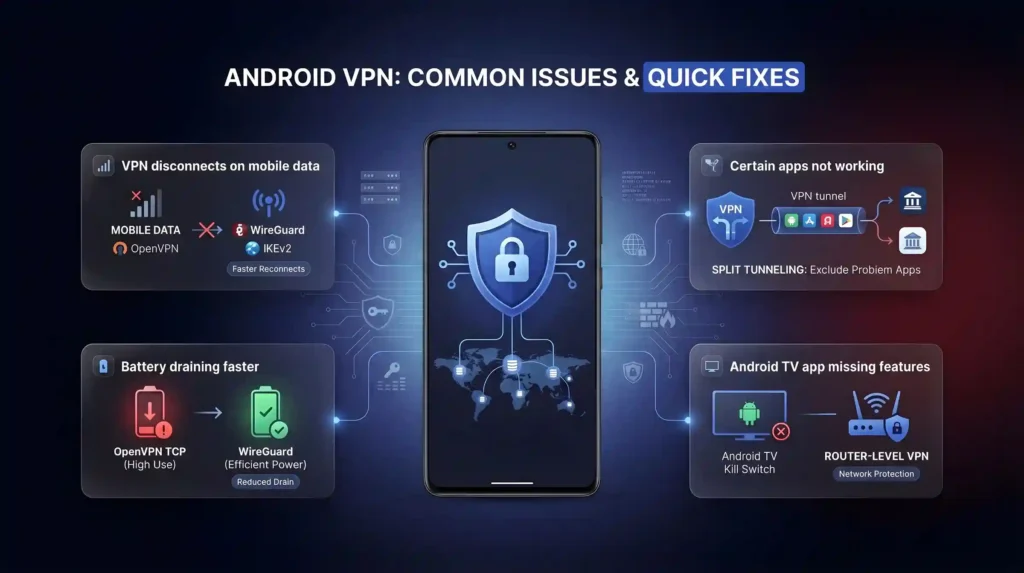
VPN disconnects on mobile data: Switch from OpenVPN to WireGuard or IKEv2. Mobile data connections handle protocol switches differently than Wi-Fi. WireGuard reconnects faster after signal drops, typically within two seconds.
Battery draining faster than usual: Check if the VPN is using OpenVPN TCP. That protocol keeps the radio awake and drains noticeably more battery. Switching to WireGuard cuts background power use.
Certain apps not working through VPN: Use split tunneling to exclude the problem app from the VPN tunnel. Banking apps and some government apps block known VPN IP ranges.
Android TV app missing features: If your VPN’s Android TV app lacks a kill switch, use the router-level VPN method instead. This protects the device at the network level without relying on the app.
VPN slowing down your connection: Connect to a server geographically closer to your actual location. Distance adds latency, so nearer servers feel faster. Also confirm your protocol is set to WireGuard or Lightway rather than OpenVPN.
Google Play Store blocking VPN download: Some regions restrict VPN app availability. Sideload the APK from your provider’s official website. NordVPN, Surfshark and ExpressVPN all offer direct APK downloads.
Final Verdict
NordVPN delivers the most complete Android package with the NordLynx protocol, low battery overhead and a reliable dual kill switch. Surfshark wins on value for multi-device households with unlimited connections at $2.49/month. ExpressVPN is the simplest to use, with its Lightway protocol and two-tap connect.
CyberGhost is the right pick for anyone who wants solid protection with no learning curve and the longest money-back guarantee at 45 days. All four come with refund windows, so there is no risk in testing.
Enable the kill switch on whichever provider you choose. Turn on Android’s native Always-on VPN setting. Test the connection on your home Wi-Fi, your office network and public hotspots. The five minutes of setup protects every byte of data your Android device sends.
For iPhone users, the same providers rank well but the setup process and app behavior differ due to iOS restrictions.
Why does battery efficiency matter more for an Android VPN than a desktop one?
Phones run on limited battery and constant radio use, so a leaner protocol makes a real difference. NordVPN’s NordLynx, built on WireGuard, is lighter on battery than OpenVPN TCP, which holds persistent connections that keep the radio awake. WireGuard-based protocols are the reason modern Android VPN apps sip power instead of draining it.
Which VPN protocol performs best on Android: WireGuard, Lightway, or NordLynx?
Lightway (ExpressVPN), NordLynx (NordVPN) and standard WireGuard are all built for fast reconnects after a network switch and low battery overhead. OpenVPN, still offered as a fallback across providers, reconnects more slowly and should not be your default protocol on mobile.
How many Android devices can one VPN subscription actually cover?
It depends on the provider. Surfshark allows unlimited simultaneous connections, ideal for households with several phones, tablets, and TV boxes. NordVPN and ProtonVPN cap at 10 devices, ExpressVPN allows 10 to 14 depending on plan tier, and CyberGhost limits you to 7. Check your household’s device count against these limits before subscribing.
How do I set up split tunneling on my Android VPN app?
Open your VPN app’s settings and look for split tunneling, called “Bypasser” in Surfshark’s app. NordVPN supports it on Android 8.0 and up, letting you exclude apps like banking or navigation from the tunnel. CyberGhost is the exception here: it omits split tunneling entirely from its Android app, so choose NordVPN, Surfshark, or ExpressVPN if this feature matters to you.
Which VPN has the best dedicated app for Android TV or Fire TV Stick?
NordVPN and Surfshark both offer purpose-built Android TV apps with large buttons and D-pad navigation, available directly through the Google Play Store and Amazon Appstore. ExpressVPN also has a dedicated Android TV app, though its remote navigation is less polished. CyberGhost’s TV app lacks the purpose-labeled server categories found in its phone app, requiring manual country selection instead.
Which VPN is fastest for streaming and downloads on an Android device?
NordVPN ranks #1 of 22 on our Trust Score, aggregated from published third-party tests, running its NordLynx protocol built specifically for low overhead. ExpressVPN’s Lightway protocol, purpose-built for mobile, handles network switches smoothly, though ExpressVPN itself ranks #2 of 22 on our Trust Score.
Are Android VPN apps independently audited the same way desktop apps are?
The major providers publish audit material, though what each covers differs. NordVPN and Surfshark say their no-logs policies have been independently audited, and ExpressVPN holds a 2025 KPMG assurance report on TrustedServer plus Cure53 security audits. All three also layer an app-level kill switch on top of Android’s native Always-on VPN setting, creating double protection if the tunnel drops mid-session.
What should I do if my VPN keeps disconnecting when switching between Wi-Fi and mobile data?
Switch your protocol to WireGuard, NordLynx, or Lightway instead of OpenVPN. OpenVPN TCP takes noticeably longer to re-establish a tunnel after a network switch, leaving traffic briefly exposed, while WireGuard-based protocols typically reconnect within a couple of seconds. If drops persist, confirm Android’s Always-on VPN toggle is enabled under Settings > Network > VPN.
What if a banking or government app on Android refuses to work through my VPN?
Use split tunneling to exclude that specific app from the VPN tunnel rather than disconnecting entirely. Banking apps commonly block known VPN IP ranges. NordVPN, Surfshark, and ExpressVPN all support this on Android; open the app’s split tunneling settings and add the problem app to the excluded list so it routes over your direct connection.
Which VPN gives me the longest trial window to test on my Android devices?
CyberGhost offers a 45-day money-back guarantee, the longest among the providers compared for Android, giving you time to try it across home Wi-Fi, office networks, and public hotspots. NordVPN, Surfshark, and ExpressVPN each back their plans with a standard 30-day money-back guarantee, which is still enough time to confirm battery impact and speed on your specific device.
How much does a good Android VPN cost?
Pricing varies by provider on their longest-term plans. CyberGhost starts from $2.19/month, the cheapest of this group. Surfshark starts from $2.49/month, NordVPN from $3.49/month, and ExpressVPN from $2.99/month, all on their longest terms. All four bundle a kill switch, split tunneling (except CyberGhost), and a money-back guarantee into these entry prices.
How do I confirm Android’s Always-on VPN setting is actually protecting my device?
Go to Settings > Connections > More Connection Settings > VPN, tap the gear icon beside your VPN app, then enable Always-on VPN and Block connections without VPN. This keeps you protected even after a restart. Pair it with your app’s own kill switch for the dual-layer setup NordVPN, Surfshark, and ExpressVPN all support on Android.
Does Android’s built-in VPN setting replace the need to pay for an app like NordVPN?
No. Android’s Settings > Network > VPN menu only manages and enforces connections for VPN apps you install; it doesn’t provide encryption or server access on its own. You still need a provider like NordVPN, Surfshark, or ExpressVPN installed to actually route and encrypt traffic. The built-in toggle just adds a system-level Always-on layer on top of whichever app you choose.
We use cookies to understand how our site is used and, on some pages, to measure our ads. Accept to allow analytics cookies and personalized ads, or decline. If you decline, we only count visits without cookies. Privacy Policy