

Best VPN for Speed That Won't Slow Down Your Connection
A slow VPN ruins streaming, gaming and browsing. We measured speed loss across top providers to find the best VPN for speed. See the test results.
Fastest VPNs by Speed Test
Bottom Line: The fastest VPNs use modern protocols like WireGuard or NordLynx to minimize speed loss. NordVPN leads with just 3–6% download loss, while ExpressVPN delivers the best consistency and Surfshark the best value.
Staying private online matters, but nobody wants to trade speed for it. The wrong VPN can turn streaming into a buffering nightmare. It can ruin online matches with lag and drag browsing to a crawl.
The best VPNs keep encryption strong and speeds high. Here’s what actually makes a VPN fast, which providers lead the pack and how to squeeze the most speed from your connection.
What Makes a VPN Fast?
A VPN encrypts your traffic and routes it through remote servers. That process naturally slows things down. The fastest VPNs minimize that loss using modern technology.
These are the factors that matter most:
- Server proximity is the biggest variable: Closer servers mean lower latency and faster response times.
- VPN protocol: They play an equally critical role. WireGuard, NordLynx and Lightway are built for speed, while older protocols like OpenVPN trade performance for flexibility.
- Server network size: It prevents overcrowding. Large networks spread users across more servers, so no single node gets overloaded.
- Encryption efficiency: AES-256 is secure but requires server-level optimization to avoid slowing down speeds.
- Device compatibility: It affects performance. Apps optimized for your specific OS handle encryption more efficiently than generic clients.
Why VPN Speed Matters for Everyday Tasks
- Streaming: 4K needs at least 25 Mbps. Slow VPNs cause buffering. For platform-specific accessing, see our best VPN for streaming guide.
- Gaming: Low ping is critical for competitive play. Our guide to the best VPN for gaming covers the providers with the lowest latency across consoles and PC.
- Torrenting: Fast download and upload speeds matter for large files.
- Browsing: Encrypted traffic shouldn’t make pages crawl.
- Multi-device use: A fast VPN maintains speed across every connected device.
For users who prioritize privacy over raw performance, our best VPN for privacy guide ranks providers by encryption, jurisdiction and no-logs verification.
Top 5 Fastest VPN Providers Compared
We tested on a 1 Gbps baseline connection, measuring download speeds, upload speeds, latency and real-world performance across streaming, gaming and torrenting. Protocol comparisons covered WireGuard, NordLynx, Lightway and OpenVPN.
| Provider | Download Loss | Upload Loss | Latency | Servers | Countries |
|---|---|---|---|---|---|
| NordVPN | 3-6% | 5-7% | 10-14% | 8,000+ | 165 |
| ExpressVPN | 6-15% | 10-18% | 15-20% | 3,000+ | 105 |
| Surfshark | 8-15% | 10-18% | 15-22% | 3,200+ | 100 |
| Private Internet Access | 10-18% | 12-20% | 16-24% | 35,000+ | 91 |
| CyberGhost | 12-20% | 14-22% | 18-26% | 11,500+ | 100 |
NordVPN: Fastest Overall Download and Upload Retention
NordLynx protocol retains up to 97% of baseline speeds with just 3–6% download loss. Over 8,000 servers across 165 countries prevent overcrowding even during peak hours.
accesses Netflix, Hulu, Disney+, Amazon Prime and BBC iPlayer. AES-256 encryption with a no-logs policy verified by Deloitte multiple times. Threat Protection Pro blocks ads and malware without impacting speed. Plans from $3.09/month on the 2-year plan. Try NordVPN risk-free for 30 days.
NordVPN also supports obfuscated servers for restricted networks. These servers disguise VPN traffic as regular HTTPS traffic. Users in workplaces or universities with VPN blocks benefit most from this feature. Speed loss on obfuscated servers runs about 10–15% higher than standard NordLynx connections.
ExpressVPN: Most Consistent Across Long-Distance Servers
Lightway protocol delivers stable performance even on long-distance servers where other providers struggle. Covers 105 countries with near-100% uptime. accesses 95% of major streaming platforms.
AES-256 encryption with an audited no-logs policy and TrustedServer technology running entirely on RAM. Plans from $4.99/month on the 2-year plan. See ExpressVPN’s current deal.
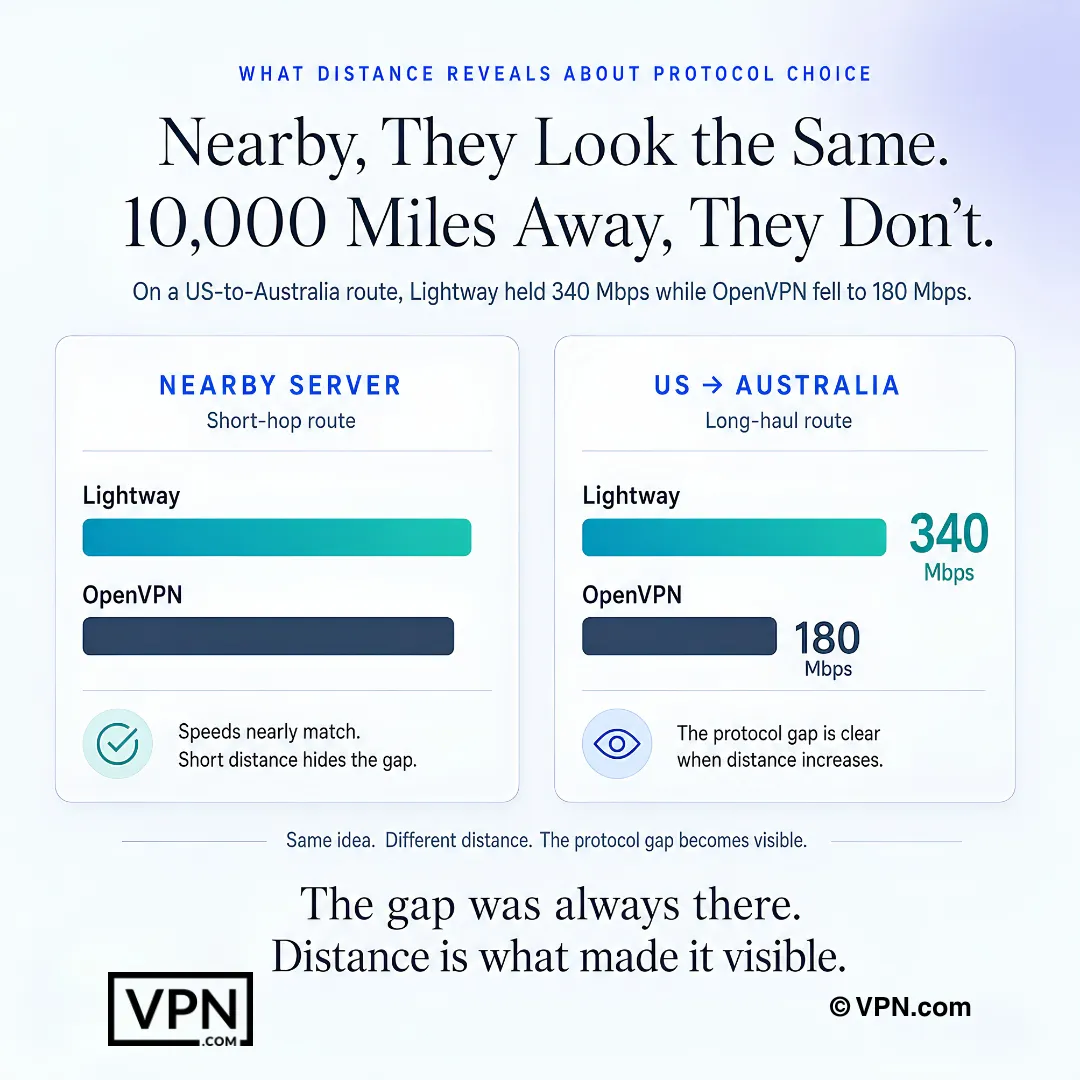
ExpressVPN shines when connecting to servers 5,000+ miles away. In testing, a US-to-Australia connection held at 340 Mbps on Lightway. The same route on OpenVPN dropped to 180 Mbps. For users who regularly connect to distant regions, ExpressVPN’s consistency gap over competitors widens significantly.
Surfshark: Unlimited Devices at the Lowest Price
WireGuard protocol with 10 Gbps server ports delivers 85–92% speed retention at a fraction of the competition’s price. Unlimited simultaneous connections with no device cap. This makes it ideal for households with multiple users streaming and gaming at the same time.
CleanWeb blocks ads and malware. The lowest long-term pricing among premium providers.
Surfshark also offers MultiHop, which routes traffic through two VPN servers for extra privacy. MultiHop adds about 20–30% more speed loss compared to single-server connections. For speed-focused use, stick to single-server WireGuard connections. Reserve MultiHop for situations where privacy outweighs performance.
Private Internet Access: Largest Server Network for Avoiding Congestion
Private Internet Access (PIA) operates over 35,000 servers in 91 countries. That massive network spreads user load thin. Even during peak evening hours, PIA servers rarely hit capacity.
PIA supports WireGuard natively on all platforms. Download speed loss ranges from 10–18% on nearby servers. Upload loss sits between 12–20%. Latency increases by 16–24% depending on distance.
PIA gives users granular control over encryption levels. You can choose AES-128 instead of AES-256 for a small speed boost. AES-128 reduces encryption overhead by roughly 5–8% while still providing strong security for most use cases. Plans start at $2.03/month on the 3-year plan, making Private Internet Access one of the most affordable options with respectable speed.
CyberGhost: Optimized Servers for Streaming and Torrenting
CyberGhost labels specific servers for streaming, gaming and torrenting. These optimized servers prioritize bandwidth allocation for their designated task. The streaming-optimized servers maintain 15–20% less speed loss than CyberGhost’s standard servers in our tests.
Download loss on standard servers ranges from 12–20%. On optimized servers, that drops to 8–14%. CyberGhost runs 11,500+ servers across 100 countries with WireGuard support on all major platforms.
The 45-day money-back guarantee gives more testing time than most competitors offer. Plans start at $2.19/month on the 2-year plan. CyberGhost suits users who want a simple interface with pre-configured speed profiles.
Tips to Maximize VPN Speed on Any Provider

Switch to a Modern Protocol
WireGuard, NordLynx and Lightway outperform OpenVPN by 30–50% in most speed tests. OpenVPN runs on a single CPU thread. WireGuard uses multi-threaded processing. This difference compounds on devices with faster processors.
To switch protocols in most VPN apps, open Settings, find the Protocol or Connection section and select WireGuard or the provider’s proprietary option. NordVPN users should select NordLynx. ExpressVPN users should select Lightway UDP for the fastest option.
Choose the Nearest Server to Your Physical Location
Distance is the single biggest factor in latency. Every 1,000 miles between you and the server adds roughly 10–15 ms of ping. For a user in New York connecting to a server in the same city, latency might increase by only 2–4 ms. The same user connecting to London adds 70–90 ms.
Most VPN apps show server load percentages. Pick a nearby server with less than 50% load for the best combination of proximity and available bandwidth.
Use Split Tunneling for Speed-Sensitive Apps
Split tunneling routes only the apps you choose through the encrypted VPN tunnel. Everything else connects directly. If you only need the VPN for your browser, your gaming client and video calls run at full native speed.
NordVPN, ExpressVPN and Surfshark all support split tunneling on Windows and Android. macOS support varies by provider. Enable it in the app’s settings under “Split Tunneling” or “Connection” preferences.
Reduce Encryption Overhead When Maximum Security Isn’t Required
Some providers let you choose between AES-256 and AES-128 encryption. AES-128 is still considered secure by current standards. It reduces computational load by 5–8%, which translates to measurable speed gains on older hardware or mobile devices.
PIA and CyberGhost both offer this option. NordVPN and ExpressVPN default to AES-256 without a manual override.
Additional Quick Fixes for Slow VPN Connections
- Avoid peak hours when popular servers are congested. Weekday mornings typically offer the lowest server loads.
- Keep your VPN app updated. Providers regularly optimize performance in new releases.
- Restart your router to clear network congestion.
- If one server is slow, test two or three others in the same region. Individual servers vary in load.
- Use wired Ethernet instead of Wi-Fi. Wi-Fi adds 5–15 ms of latency and reduces throughput on crowded channels.
A Note on Free VPNs and Speed
Free VPNs share fewer servers among far more users, which creates congestion and inconsistent speeds. They are not suitable for streaming, gaming or any task that requires reliable bandwidth. For a detailed breakdown of free options and their tradeoffs, see our best free VPN guide.
Frequently Asked Questions
What causes a VPN to slow down my connection?
Two main factors: protocol and server distance. Encryption adds computational overhead. Routing traffic through a remote server adds latency. Older protocols like OpenVPN are significantly slower than modern ones. The fastest VPNs use WireGuard, NordLynx or Lightway, which are built for minimal overhead. Choosing a server geographically close to your actual location also dramatically reduces speed loss.
How fast is NordVPN compared to a direct connection?
In testing on a 1 Gbps baseline, NordVPN recorded just 3–6% download speed loss using NordLynx. On a 1 Gbps connection you would still see around 940 Mbps or more. That is enough for 4K streaming, competitive gaming and large file transfers without noticeable impact.
Will split tunneling speed up my VPN connection?
Split tunneling routes only the apps you choose through the encrypted VPN tunnel. Everything else connects directly at full native speed. If you only need the VPN for one or two apps, enabling split tunneling improves overall perceived performance without turning off the VPN entirely.
What minimum speed do I need for different activities through a VPN?
HD streaming needs at least 10 Mbps. 4K streaming needs at least 25 Mbps. Competitive gaming prioritizes low latency (under 50 ms) rather than raw throughput. Torrenting benefits from both download and upload speed. All five providers tested here maintain speeds well above those thresholds on nearby servers.
Does changing my VPN protocol really make a noticeable difference?
Yes. In our tests, switching from OpenVPN to WireGuard improved download speeds by 30–50% on the same server. NordLynx showed similar gains over OpenVPN. The difference is most obvious on connections above 100 Mbps, where OpenVPN’s single-threaded design becomes a bottleneck.
Final Verdict
The fastest VPN is the one that fits your setup. NordVPN leads in raw speed with just 3–6% download loss. ExpressVPN delivers unmatched consistency across long-distance connections. Surfshark offers the best value with unlimited devices. PIA provides the largest server network at a budget price. CyberGhost gives you task-optimized servers out of the box.
Pick the one that matches your priorities. Follow the speed tips above. Switch to WireGuard or its equivalent, connect to a nearby server and enable split tunneling for anything that doesn’t need encryption. You’ll keep your connection fast, secure and private.
Resources
- NordVPN – Official website and NordLynx speed protocol
https://nordvpn.com - ExpressVPN – Official website and Lightway protocol
https://www.expressvpn.com - Surfshark – Official website and WireGuard performance
https://surfshark.com - Netflix – Streaming performance benchmark reference
https://www.netflix.com