Privacy: VPN.com research ledger, cited. Counts, apps, plans: provider-stated, checked Oct 15, 2026. How we score →
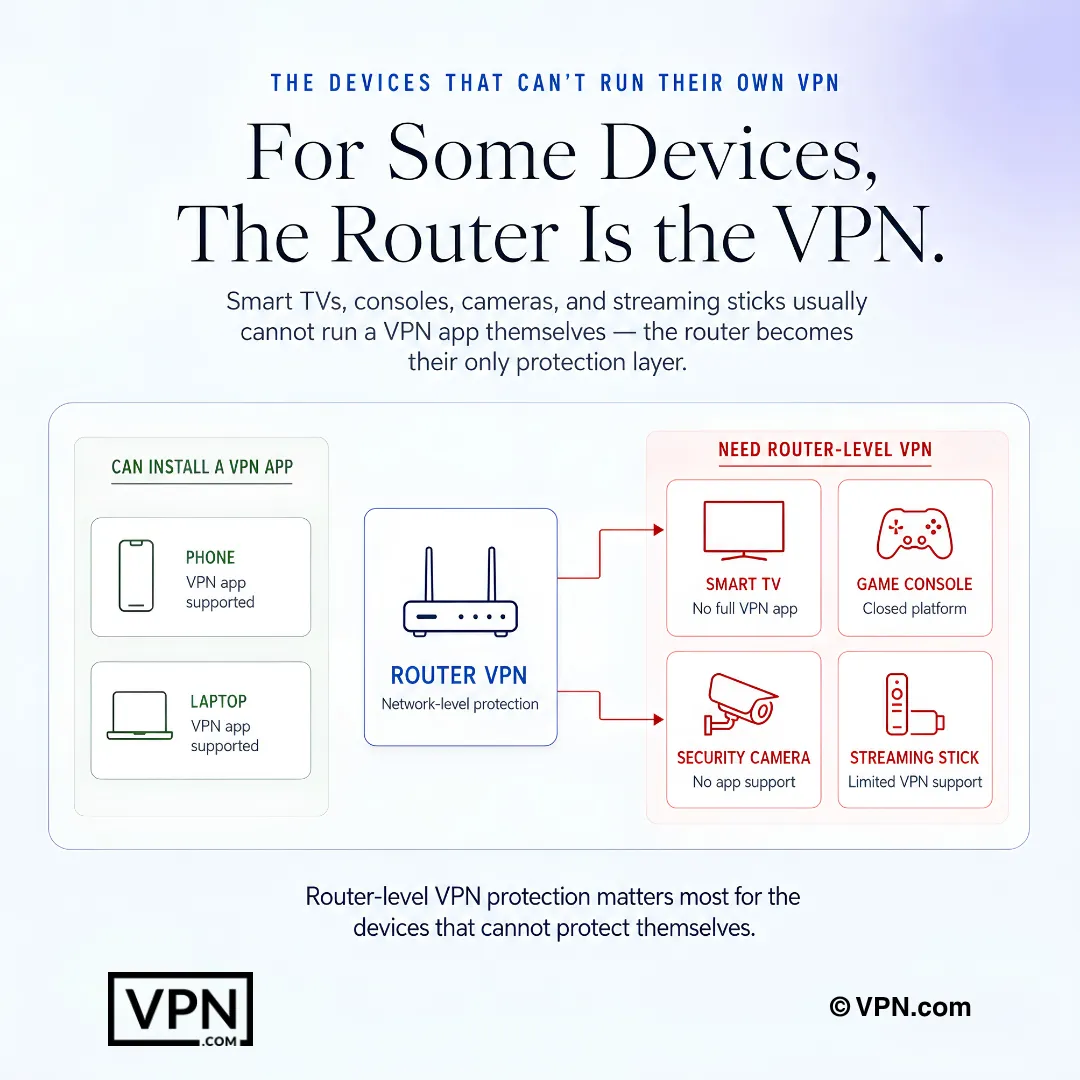
Installing a VPN on your router protects every device in your home at once with a single setup. It’s the easiest way to secure gadgets that don’t support VPN apps natively, like Xbox, PlayStation, Roku and Apple TV.
This guide covers the top router-optimized providers, hardware compatibility and step-by-step setup instructions.
Why Install a VPN on Your Router?
A router VPN encrypts all internet traffic flowing through your network. Every connected device gets protected automatically.
One setup covers every device: No need to install apps on each phone, laptop or console. Smart TVs, gaming consoles and streaming sticks stay secured.
Bypass the device connection limit: Most VPNs cap simultaneous connections. A router counts as one device, so you can protect a whole household from a single slot.
Always-on protection: No manual connection needed. Your network is covered the moment a device joins the Wi-Fi.
access geo-restricted content: Stream region-locked apps on any device, including ones that can’t run VPN software.
Shield your entire smart home: Security cameras, smart thermostats and IoT devices often lack built-in encryption. A router VPN fills the gap.
What to Look for in a Router-Optimized VPN
Before buying, check your VPN’s documentation to confirm firmware and model compatibility. For a broader evaluation framework beyond router-specific features, see our guide on how to choose a VPN.
Router protocol support: OpenVPN, WireGuard or IKEv2. Our WireGuard vs OpenVPN comparison covers which protocol delivers the best speed on router hardware, where processing power is limited.
Pre-configured router options or detailed setup guides for easy installation.
Fast speeds on WireGuard to offset the processing load on your router’s CPU.
Wide server network to access content across regions.
Router-level kill switch that cuts all network traffic if the VPN drops, preventing unencrypted leaks from any device.
Split-tunneling at the router level so you can route specific devices outside the VPN tunnel when needed.
Clear documentation and reliable customer support for troubleshooting firmware issues.
Top 5 VPNs for Router Hardware
These five stand out for their combination of speed, stability and ease of setup on routers.
Provider
Dedicated Router App
Pre-Configured Router
Router Setup Difficulty
Protocol Support
Kill Switch on Router
Split-Tunneling
Starting Price
ExpressVPN
Yes (Aircove)
Yes (Aircove hardware)
Easy (plug-and-play)
Lightway, OpenVPN
Yes (automatic)
Yes (per-device)
$2.99/mo (2-yr)
NordVPN
No
Via FlashRouters
Moderate (manual config)
NordLynx, OpenVPN
Yes (via firmware)
No
$3.49/mo (2-yr)
Surfshark
No
Via FlashRouters
Moderate (manual config)
WireGuard, OpenVPN
Yes (via firmware)
Yes
$2.49/mo (2-yr)
Private Internet Access
No
Via FlashRouters
Moderate (manual config)
WireGuard, OpenVPN
Yes (via firmware)
Yes
$2.03/mo (3-yr)
IPVanish
No
Via FlashRouters
Moderate (manual config)
WireGuard, OpenVPN, IKEv2
Yes (via firmware)
Yes
$2.39/mo (2-yr)
ExpressVPN Aircove: Simplest Router Setup Available
ExpressVPN offers the most polished router experience in the market. Its Aircove router ships with VPN software pre-installed.
Setup: Plug in, open the web dashboard, select a server. No manual config files required.
Router app interface: Clean dashboard lets you assign different server locations to different devices. Your smart TV can connect through a UK server while your laptop uses a US server.
Kill switch behavior: Aircove cuts all network traffic automatically if the VPN drops. No configuration needed. On reboot, the VPN reconnects before allowing any traffic through.
Split-tunneling: Per-device control through the dashboard. Exclude specific devices from the VPN tunnel without touching any config files.
Firmware updates: Automatic over-the-air updates. No manual flashing required.
Servers in 113 countries.
Plans from $2.99/month on the 2-year plan.
ExpressVPN is ideal for users who want zero-friction setup and per-device control without touching a command line.
NordVPN Leads Our Trust Score and Suits Router Hardware
NordVPN ranks #1 of 22 on our Trust Score, aggregated from published third-party tests, and its WireGuard-based NordLynx protocol suits router hardware, making it a strong choice for households that stream 4K, game online and download large files simultaneously.
Setup: Manual OpenVPN config method. NordVPN provides step-by-step guides with screenshots for 12+ router models.
Kill switch behavior: Requires manual configuration through router firmware settings. Once enabled, the router drops all traffic if the VPN tunnel fails. On reboot, you must verify the VPN reconnects before traffic passes.
Split-tunneling: Not available at the router level. All connected devices route through the same VPN server.
Advanced features: Double VPN routes traffic through two servers for extra encryption. Threat Protection blocks ads and malware at the DNS level. Obfuscated servers bypass VPN blocks in restricted networks.
7,115 servers across 150 countries.
Plans from $3.49/month on the 2-year plan.
NordVPN is best for power users who prioritize security features and don’t mind a moderate setup process.
Surfshark: Unlimited Devices at the Lowest Price
Surfshark offers strong router compatibility at a lower price point. Its unlimited simultaneous connections policy means the router’s single-slot advantage matters less, but the always-on coverage still protects devices that can’t run apps.
Setup: OpenVPN or WireGuard config files. Surfshark provides guides for Asus, Netgear, DD-WRT and Tomato firmware.
Kill switch behavior: Configurable through DD-WRT or Tomato firmware. Requires manual iptables rules on some setups. On reboot, reconnection depends on your firmware’s autostart settings.
Split-tunneling: Available on DD-WRT firmware. Lets you route specific IP addresses outside the tunnel.
CleanWeb: Blocks ads, trackers and malware at the DNS level for every device on the network.
4,500+ servers in 100+ countries with 10 Gbps ports.
Plans from $2.49/month on the 2-year plan.
Surfshark is great for families and multi-device households that want premium protection on a budget.
Private Internet Access: Most Configurable Router VPN
Private Internet Access (PIA) gives advanced users granular control over encryption settings at the router level.
Setup: Manual config files. PIA provides OpenVPN and WireGuard config files for DD-WRT, Tomato, pfSense and Merlin firmware.
Kill switch behavior: Configurable through DD-WRT iptables rules. PIA documents the exact firewall commands needed.
Split-tunneling: Supported on DD-WRT and pfSense. Route specific devices or IP ranges outside the tunnel.
Encryption flexibility: Choose between AES-128 and AES-256 at the router level. AES-128 reduces CPU load, which can help older routers.
Servers in 104 countries.
Plans from $2.03/month on the 3-year plan.
PIA suits technical users who want full control over encryption and routing behavior.
IPVanish: Strong DD-WRT and Tomato Support
IPVanish maintains detailed setup documentation for custom firmware routers and owns its entire server infrastructure.
Setup: Manual config files. IPVanish provides guides for DD-WRT, Tomato and Asus Merlin firmware.
Kill switch behavior: Available through DD-WRT iptables configuration. IPVanish documents the setup process.
Split-tunneling: Supported on DD-WRT firmware.
Server ownership: IPVanish owns and operates its entire server network. No third-party rentals. This reduces the risk of server-level data interception.
3,400 servers in 90+ countries.
Plans from $2.39/month on the 2-year plan.
IPVanish works well for DD-WRT and Tomato users who value server infrastructure transparency.
Check compatibility before buying: ISP-provided routers almost never support VPN installation. You need your own hardware. Asus RT-AX88U, RT-AC86U and Netgear Nighthawk models support OpenVPN out of the box. For WireGuard support, verify your router’s firmware version is recent. Older Asus firmware may only support OpenVPN. If manual configuration feels too complex, FlashRouters sells pre-configured routers with NordVPN or Surfshark already installed. ExpressVPN’s Aircove is the easiest plug-and-play option with a dedicated web dashboard.
Router Compatibility at a Glance
Not every router supports VPN installation. Use this table to quickly check your hardware, then visit the brand-specific guide for detailed setup instructions.
Router Brand/Firmware
Native VPN Support
Protocols Supported
Setup Difficulty
Notes
Asus (RT-AX88U, RT-AC86U)
Yes
OpenVPN, WireGuard (newer firmware)
Easy
Built-in VPN client in admin panel
Netgear Nighthawk
Yes (select models)
OpenVPN
Moderate
Requires manual .ovpn file upload
Linksys WRT Series
Yes
OpenVPN
Moderate
Native OpenVPN support on WRT3200ACM
DD-WRT Firmware
Yes (after flash)
OpenVPN, WireGuard
Advanced
Voids warranty; supports 200+ router models
Tomato Firmware
Yes (after flash)
OpenVPN
Advanced
Lighter than DD-WRT; fewer supported models
OpenWrt Firmware
Yes (after flash)
OpenVPN, WireGuard
Advanced
Most flexible; steepest learning curve
ExpressVPN Aircove
Yes (built-in)
Lightway, OpenVPN
Easy
Plug-and-play; no manual config
ISP-Provided Routers
No
None
N/A
Replace with your own hardware
⚠️ Firmware flashing warning: Installing DD-WRT, Tomato or OpenWrt on your router voids the manufacturer warranty. A failed flash can permanently brick the device. Always verify your exact model number against the firmware’s supported hardware list before proceeding. Back up your current firmware first.
How to Set Up a VPN on Your Router
Setup varies by router model and VPN provider. For device-specific installation steps beyond routers, our VPN setup guide covers every platform from phones to desktops.
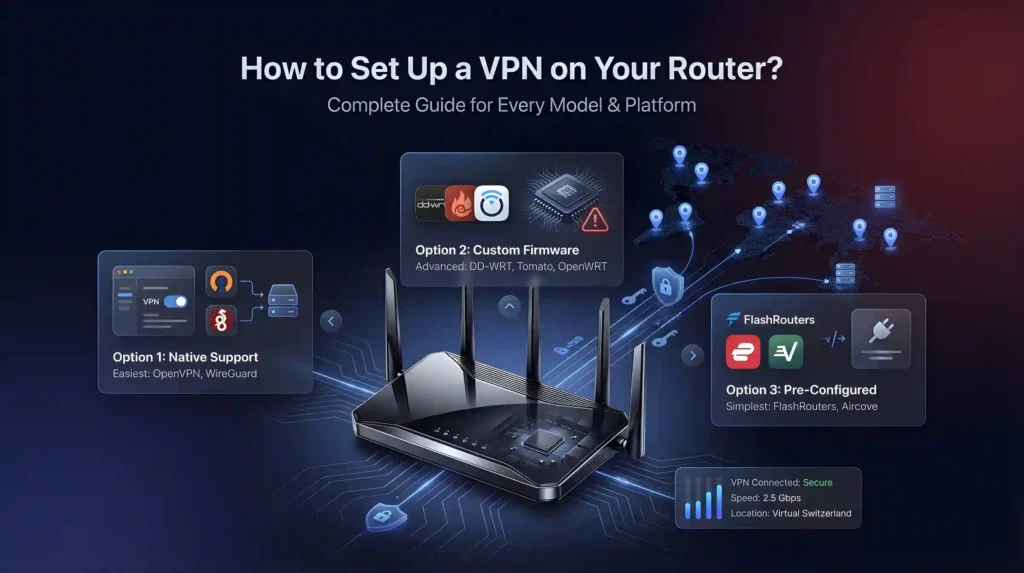
Option 1: Native Router Support (Easiest)
Many modern routers include VPN client settings out of the box. Estimated time: 10–15 minutes.
Log in to your router’s admin panel using its IP address (often 192.168.1.1).
Navigate to the VPN or VPN Client section.
Choose OpenVPN or WireGuard as the protocol.
Enter the server address, credentials and configuration file from your VPN provider.
Save, activate the VPN connection and reboot.
Connect your devices to the Wi-Fi. All traffic now routes through the VPN.
Option 2: Custom Firmware (DD-WRT or Tomato)
For routers that don’t natively support VPNs, you can flash custom firmware. Estimated time: 30–45 minutes.
Confirm your exact router model is supported by DD-WRT, Tomato or OpenWrt.
Download the correct firmware build for your hardware revision.
Flash the firmware through your router’s admin panel (this voids warranties and risks bricking).
Access the new admin panel and enter your VPN configuration files.
Configure iptables kill switch rules to prevent unencrypted traffic leaks.
Save and reboot. Verify the VPN connects before browsing.
The simplest path for non-technical users. Estimated time: under 5 minutes.
Buy a router pre-configured with your VPN from FlashRouters[1], ExpressVPN’s Aircove or similar.
Plug it in and follow the quick-start guide.
Select your server location through the web dashboard. Done.
Router VPN vs Device VPN: Pick the Right Approach
If you’re reading this guide, a router VPN is likely the right call. Here’s a quick comparison to confirm.
Feature
Router VPN
Device VPN App
Coverage
Every device on the network
Only devices with the app installed
Speed impact
Depends on router CPU, which handles encryption
Usually lighter, since device CPUs are faster
Server switching
Changes affect all devices; requires router reboot
Instant, per-device switching
Setup
One-time, 5–45 minutes depending on method
Per device, 2–3 minutes each
Best for
Smart TVs, consoles, IoT, always-on protection
Phones and laptops that travel off-network
Recommendation: Use a router VPN for your home network’s always-on protection. Install device apps on phones and laptops for when you leave the house. The two approaches complement each other.
Final Verdict
A router VPN is the most efficient way to protect an entire household. One setup, total coverage, no device left behind. ExpressVPN leads for its dedicated Aircove router app and plug-and-play setup. NordVPN ranks #1 of 22 on our Trust Score, aggregated from published third-party tests. Surfshark offers the best value with unlimited connections at $2.49/month. PIA and IPVanish round out the list for advanced users who want granular control over encryption and routing.
For the simplest path, grab a pre-configured router or ExpressVPN’s Aircove. For more control, flash DD-WRT firmware on a compatible model. Either way, a router VPN transforms your home network into a fully encrypted, always-on private connection.
VPN Guides by Router Brand
Find setup instructions and provider recommendations for your specific router:
Why install a VPN on my router instead of on each individual device?
A router VPN encrypts every device on your home network from one setup, covering gadgets that can’t run VPN apps natively like Xbox, PlayStation, Roku, and Apple TV. Security cameras, thermostats, and other IoT devices that lack built-in encryption get covered too. It’s one configuration versus installing and managing an app on every phone, laptop, and console separately.
Does my router only count as a single device against my VPN’s connection limit?
Yes, a router uses just one connection slot regardless of how many devices join your Wi-Fi behind it. That matters most on capped plans: NordVPN allows 10 simultaneous devices per account, while Surfshark and PIA offer unlimited connections. Even on NordVPN’s tighter limit, a router lets an entire household bypass the per-device cap entirely.
How long does ExpressVPN’s Aircove router actually take to set up?
Quick. Plug it in, open the web dashboard, and select a server, with no manual config files required. The dashboard also lets you assign different server locations to different devices, so a smart TV can route through one country while a laptop uses another. Firmware updates arrive automatically over the air.
What’s involved in getting NordVPN running on a router?
NordVPN has no dedicated router app, so setup runs through manual OpenVPN configuration, which takes longer than a plug-and-play router. NordVPN provides step-by-step guides with screenshots for 12+ router models to ease the process. The kill switch requires manual firmware configuration, and split tunneling isn’t available at the router level at all.
Should I pick WireGuard or OpenVPN for my router setup?
WireGuard generally suits router hardware better since it demands less processing power than OpenVPN, which matters on a router’s limited CPU. NordVPN uses its WireGuard-based NordLynx protocol, while Surfshark and PIA support WireGuard directly. ExpressVPN’s Aircove runs its own Lightway protocol instead. Check your router’s firmware version first, since older builds may only support OpenVPN.
Which VPN is best for speed on router hardware?
NordVPN’s WireGuard-based NordLynx protocol suits routers, and it ranks #1 of 22 on our Trust Score, aggregated from published third-party tests. ExpressVPN’s Aircove (Lightway) and Surfshark’s WireGuard implementation are also well suited to routers. Since router CPUs handle encryption, protocol efficiency matters more here than on phones or laptops.
What if my router is provided by my ISP and won’t support a VPN?
ISP-provided routers almost never support VPN installation, so you’ll need your own hardware. Models like the Asus RT-AX88U, RT-AC86U, and Netgear Nighthawk support OpenVPN out of the box. If buying new hardware feels daunting, FlashRouters sells routers pre-configured with NordVPN or Surfshark already installed, or ExpressVPN’s Aircove offers a plug-and-play alternative.
What’s the risk if I flash custom firmware like DD-WRT onto my router?
Flashing DD-WRT, Tomato, or OpenWrt voids your manufacturer’s warranty, and a failed flash can permanently brick the device. Always confirm your exact model number against the firmware’s supported hardware list and back up your current firmware first. If that risk feels too high, a pre-configured router from FlashRouters or ExpressVPN’s Aircove skips flashing entirely.
Which router VPNs actually support split tunneling?
ExpressVPN’s Aircove offers the most accessible version, letting you exclude specific devices through its web dashboard with no config files. Surfshark supports split tunneling on DD-WRT firmware to route specific IP addresses outside the tunnel, and PIA supports it on DD-WRT and pfSense. NordVPN offers none at the router level, so every connected device shares one server.
Can a router VPN actually secure smart home devices like cameras and thermostats?
Yes. Security cameras, smart thermostats, and other IoT devices often ship with no built-in encryption at all, and a router VPN closes that gap by encrypting their traffic automatically without any device-side setup. This matters most with a router-level kill switch enabled, which cuts all network traffic if the VPN connection drops, preventing any device from leaking data unencrypted.
Will a router VPN let me stream on a smart TV or console that has no VPN app?
Yes, since the encryption happens at the router level, devices like Roku, Apple TV, Xbox, and PlayStation get covered without needing any app installed. ExpressVPN’s Aircove dashboard even lets you assign a specific server location to your smart TV independently from other devices on the same network, useful for accessing region-locked content on a single screen.
Am I protected by a refund if router setup doesn’t work out for me?
Yes. ExpressVPN, NordVPN, Surfshark, and PIA all back their plans with a 30-day money-back guarantee, which covers router-based configurations the same as standard app installs. If firmware flashing proves too complex or your hardware isn’t compatible after purchase, request a refund through the provider directly rather than persisting with an unstable setup.
How much should I expect to pay to run a VPN on my router?
Pricing runs from $2.49/month on Surfshark’s longest-term plan, from $2.03/month on PIA’s, from $2.99/month on ExpressVPN’s, and from $3.49/month on NordVPN’s longest terms. Router use adds no extra provider fee beyond the subscription itself, though a pre-configured option like ExpressVPN’s Aircove hardware or a FlashRouters unit carries a separate one-time hardware cost.
We use cookies to understand how our site is used and, on some pages, to measure our ads. Accept to allow analytics cookies and personalized ads, or decline. If you decline, we only count visits without cookies. Privacy Policy