What is a VPN and How Does it Work: A Simple Explanation
What is a VPN and how does it protect you online? We explain how VPNs work, what they hide and why you need one for safe private browsing today.
Top-Rated VPNs




Bottom Line: A VPN (Virtual Private Network) encrypts your internet traffic and hides your IP address from ISPs, hackers, and surveillance. If you use public Wi-Fi, stream geo-blocked content, or care about online privacy, it is one of the most practical tools you can enable.
A VPN, or Virtual Private Network, is a tool that encrypts your internet connection and hides your IP address. It creates a secure tunnel between your device and a remote server so no one can read your data in transit. Hackers are smarter. ISPs are nosier. And Wi-Fi networks are more dangerous than ever. A VPN solves all three problems at once.
According to Forbes, 31% of all internet users worldwide now use a VPN. The top reason, cited by 47% of users, is privacy. Another 46% use VPNs to access streaming content in different regions.
What Is a Virtual Private Network?
VPN stands for Virtual Private Network. It is a security application that encrypts your internet traffic and conceals your actual IP address. When you connect, your data travels through an encrypted tunnel between your device and a remote server. Anyone who tries to intercept your traffic sees nothing but scrambled code.
Think of it like a private highway for your internet data. Instead of driving in plain sight where anyone can watch, a VPN puts your information in an armored vehicle that no one can see inside.
How Does a VPN Encrypt and Route Your Traffic?
Here is the step-by-step process:
- You open your VPN app and connect to a server
- Your device and the VPN server perform an encrypted “handshake” to verify identity
- All your outgoing data gets encrypted before it leaves your device
- The encrypted data travels through a secure tunnel to the VPN server
- The server decrypts your data and sends it to your destination
- Incoming data follows the same path in reverse
The encryption standard used by reputable VPNs is AES-256. Banks and military agencies rely on the same grade. A brute-force attack against AES-256 would take a modern computer millions of years to crack.
VPN protocols also matter. WireGuard delivers speeds averaging 300–400 Mbps on a 500 Mbps connection. OpenVPN is slower but battle-tested over two decades of audits. Avoid the outdated PPTP protocol, which has known vulnerabilities that attackers can exploit in minutes.
What Does a VPN Hide from ISPs and Hackers?
A VPN hides the following from your ISP, third parties, and hackers:
- Your IP address and physical location
- Your browsing history
- Websites you visit
- Files you download
- Data you send and receive online
But a VPN does not hide activity on sites you are logged into. It also cannot block cookies or prevent browser fingerprinting. For full protection, combine a VPN with a private browser and strong antivirus software.
Why Do You Need a VPN?
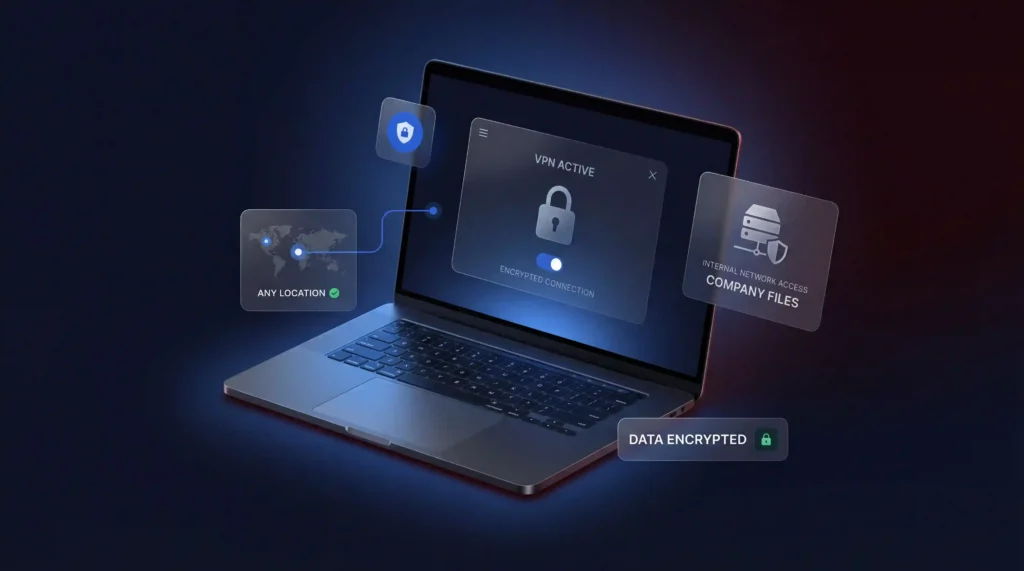
Here are the most common reasons people rely on one:
- Public Wi-Fi Safety: Coffee shops, airports, and hotels run unsecured networks. A hacker on the same network can intercept unencrypted data in seconds. A VPN encrypts everything so stolen packets are unreadable.
- Streaming Geo-Restricted Content: Platforms like Netflix display different libraries in different countries. A VPN lets you connect to a server in another region and access that catalog.
- ISP Tracking: Your ISP monitors all your internet activity. In the U.S., ISPs are legally permitted to sell browsing data to advertisers. A VPN blocks that surveillance at the source.
- Remote Work: Businesses use remote access VPNs to let employees reach company files and internal networks from any location.
- Price Discrimination: Airlines, hotels, and shopping sites sometimes charge different prices based on your location. Switching your VPN server can reveal lower rates.
What Types of VPNs Are There?
Not all VPNs work the same way. Different types serve different users, from individual remote workers to large enterprise networks. Understanding the differences helps you pick the right tool.
| Type | Best For | How It Works |
|---|---|---|
| Remote Access VPN | Individual users and remote workers | Connects a single device to a private network over the internet. Most consumer VPN apps (NordVPN, ExpressVPN, Surfshark) fall into this category. |
| Site-to-Site VPN | Connecting multiple office locations | Links two or more entire networks so employees at different offices share resources as if on one LAN. Common in enterprises with branch offices across regions. |
| SSL VPN | Browser-based access without extra software | Uses TLS encryption through a web browser, removing the need to install a dedicated client. Ideal for contractors or temporary access. |
| Mobile VPN | Users who switch between Wi-Fi and cellular | Maintains a persistent encrypted connection even when the device changes networks mid-session. Critical for field workers and delivery drivers. |
| Double VPN | Maximum privacy through two encrypted servers | Routes traffic through two VPN servers in sequence, encrypting data twice. Adds latency (typically 30–50% speed loss) but makes tracing nearly impossible. |
Remote access VPNs are what most consumers need. You install an app, tap connect, and your traffic is encrypted within seconds. Providers like NordVPN offer over 6,400 servers in 111 countries for this purpose.
Site-to-site VPNs are built for businesses. A company with offices in New York, London, and Tokyo uses a site-to-site VPN so all three locations operate on one unified network. IT teams manage these through dedicated hardware or cloud gateways.
SSL VPNs require no software installation. Employees open a browser, log in to a secure portal, and access internal tools. This makes them popular for organizations that work with outside contractors who need temporary access.
If you run a business and need to connect remote teams securely, a remote access or site-to-site VPN is the standard solution.
What Should You Look for When Choosing a VPN?
When choosing a VPN, these features are non-negotiable:
- AES-256 encryption: Anything weaker is not worth your trust. AES-256 has no known practical vulnerabilities.
- No-logs policy: The provider should not store records of your activity. Look for providers audited by independent firms like Deloitte, PricewaterhouseCoopers, or Cure53. NordVPN has passed four independent no-logs audits.
- Kill switch: Cuts your internet connection if the VPN drops, preventing accidental exposure of your real IP address.
- Strong protocols: OpenVPN and WireGuard are the current standards. WireGuard uses roughly 4,000 lines of code compared to OpenVPN’s 70,000, making it easier to audit and faster to execute.
- Multi-factor authentication: Adds another layer of login security so a stolen password alone cannot compromise your VPN account.
- Server network size: More servers mean less congestion and more location options. NordVPN offers 6,400+ servers. ExpressVPN covers 105 countries. Surfshark operates 3,200+ servers in 100 countries.
- Simultaneous connections: Most providers allow 5–10 devices on one account. Surfshark allows unlimited simultaneous connections.
Beyond features, check the provider’s jurisdiction. VPNs based in Five Eyes countries (U.S., U.K., Canada, Australia, New Zealand) may be subject to data-sharing agreements. NordVPN operates under Panama’s jurisdiction, which has no mandatory data retention laws.
Should You Use a Free VPN?
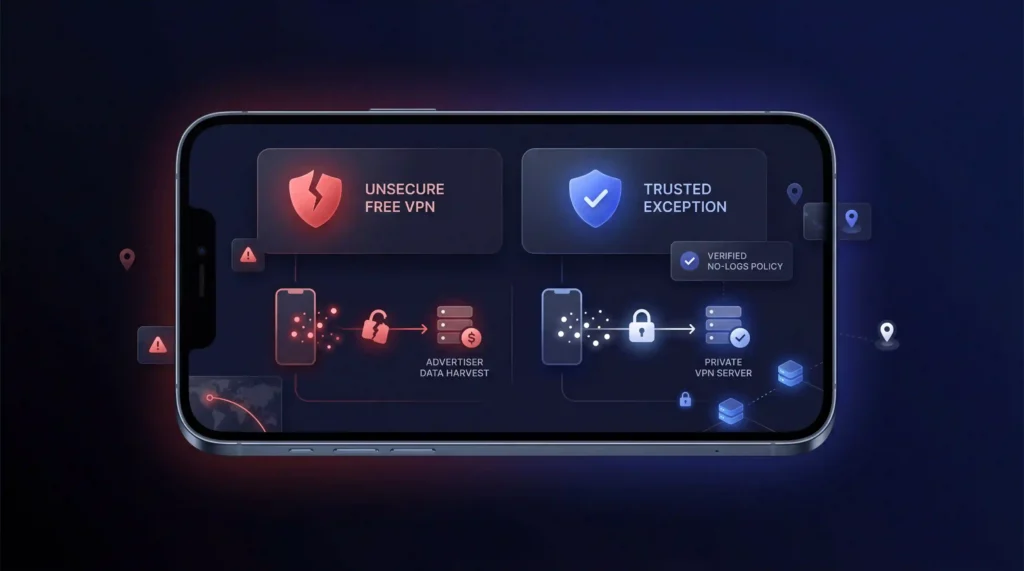
We recommend avoiding free VPNs in almost every case. The risks outweigh the savings for most users.
Data logging and selling: Many free VPN providers log your browsing activity and sell it to advertisers and data brokers. A 2024 study by Top10VPN found that 88% of free Android VPN apps had at least one privacy-leaking function. The entire point of a VPN is privacy, so a service that harvests your data defeats its own purpose.
Malware distribution: Security researchers have found free VPN apps bundled with trojans, adware, and spyware. In 2020, seven free Hong Kong-based VPN providers exposed 1.2 TB of user logs, including passwords and personal data, despite claiming no-logs policies.
Bandwidth reselling: Some free VPNs, most notably Hola VPN, have been caught routing other users’ traffic through your connection. This turns your device into an exit node without your knowledge, creating legal and security risks.
Speed throttling and data caps: Free tiers typically limit speeds to 1–5 Mbps and cap data at 500 MB to 10 GB per month. That is not enough for streaming, video calls, or daily browsing.
The one exception is Proton VPN’s free tier. It enforces no speed limits, no data caps, and operates under a verified no-logs policy audited by Securitum. However, it limits you to servers in 5 countries and does not support streaming or P2P.
Paid VPNs typically cost $3 to $15 per month depending on plan length, or $40 to $200 per year on multi-year subscriptions. NordVPN, Surfshark, and Proton VPN all offer plans under $5/month when billed annually. That is a small price for genuine online privacy.
Final Verdict
A VPN encrypts your internet traffic, hides your IP address, and protects your data from hackers, ISPs, and surveillance. It is one of the most practical privacy tools available whether you work from home, stream content abroad, or browse on public Wi-Fi.
Pick a reputable paid provider with AES-256 encryption, a verified no-logs policy, and a kill switch. NordVPN, ExpressVPN, and Surfshark all meet these criteria at under $5/month on long-term plans. Turn it on. Stay private.
Sources
Frequently Asked Questions
What is a VPN and what actually happens when I turn it on?
A VPN encrypts your internet traffic and hides your real IP address by routing your connection through a remote server. Your device and the server perform an encrypted handshake to verify identity, then all outgoing data is encrypted with AES-256, the same standard banks and military agencies use, before it travels through the tunnel and gets decrypted at the server.
What’s the difference between WireGuard, OpenVPN, and why should I avoid PPTP?
WireGuard uses roughly 4,000 lines of code compared to OpenVPN’s 70,000, making it easier to audit and faster to execute, though OpenVPN has two decades of battle-tested audits behind it. PPTP is outdated and carries known vulnerabilities attackers can exploit within minutes, so avoid any provider still offering it as an option.
What does a VPN actually hide, and what can it not hide?
A VPN hides your IP address, physical location, browsing history, and the files you send or download from your ISP and anyone monitoring the network. It does not hide activity on sites you’re already logged into, and it can’t block cookies or prevent browser fingerprinting. Pair it with a private browser and antivirus software for fuller coverage.
Why does a VPN provider’s jurisdiction matter for my privacy?
Jurisdiction determines what legal authorities can compel a provider to hand over, if it logs anything at all. VPNs based in Five Eyes countries, the US, UK, Canada, Australia, and New Zealand, may be subject to data-sharing agreements among member governments. NordVPN operates under Panama’s jurisdiction, which imposes no mandatory data retention laws, strengthening its audited no-logs claim.
Why do security researchers generally advise against free VPNs?
Free VPNs often fund themselves by logging and selling your data instead of protecting it. A 2024 Top10VPN study found 88% of free Android VPN apps had at least one privacy-leaking function. In 2020, seven free Hong Kong-based VPN providers exposed 1.2 TB of user logs including passwords, and Hola VPN was caught routing other users’ traffic through subscribers’ own connections.
Is there any free VPN that’s actually trustworthy?
Proton VPN’s free tier is the one notable exception, enforcing no speed limits and no data caps under a no-logs policy audited by Securitum. That said, the free tier restricts you to servers in a limited number of countries and doesn’t support streaming or P2P, so it suits basic private browsing better than daily heavy use.
Can a VPN really get me into Netflix libraries or other geo-restricted content from other countries?
Yes. Streaming platforms like Netflix display different catalogs by region, and connecting to a VPN server located in that country lets you access its specific library. Reliability depends heavily on the provider’s server network and speed. NordVPN, for example, ranks #1 of 22 in our Speed Lab, aggregated from independent labs, which supports steadier streaming performance.
Does routing my traffic through two VPN servers instead of one slow things down?
Yes, noticeably. Double VPN routes your traffic through two servers in sequence, encrypting it twice, which typically costs 30-50% of your speed compared to a single-hop connection. It’s built for users who need maximum protection against tracing, not everyday streaming or browsing, where a standard single-server connection performs far better.
How many devices can I actually connect under one VPN subscription?
It varies by provider and plan. NordVPN covers 10 simultaneous devices, ExpressVPN allows 10 to 14 depending on the plan tier, and ProtonVPN scales from 1 to 10 devices depending on which tier you choose. Surfshark is the outlier, covering unlimited simultaneous connections on every plan, which suits larger multi-device households.
How much should I realistically expect to pay for a reputable paid VPN?
Reputable providers typically start well under $5 a month on longer commitments. Surfshark starts from $1.99/month, ProtonVPN from $2.49/month, and both NordVPN and ExpressVPN start from $3.49/month on their longest-term plans. All four back their plans with a 30-day money-back guarantee, so testing one costs nothing if you cancel within that window.
What if I subscribe to a VPN and it doesn’t work for my needs?
You can request a refund. NordVPN, ExpressVPN, Surfshark, and ProtonVPN all back their paid plans with a 30-day money-back guarantee, giving you a full month to test speed, server access, and streaming performance before committing long-term. Cancel within that window through the provider’s support channel to get your payment back.
What type of VPN do I actually need, a personal app or a business setup?
Most individuals need a remote access VPN, the consumer app category that NordVPN, ExpressVPN, and Surfshark fall into, which connects a single device to an encrypted server within seconds. Businesses linking multiple offices instead need a site-to-site VPN managed through dedicated hardware or cloud gateways, while contractors needing temporary access often use browser-based SSL VPNs.
How do I confirm my VPN is actually hiding my IP and not leaking it?
Enable the kill switch, which cuts your internet entirely if the VPN connection drops, preventing your real IP from being exposed accidentally. After connecting, check a site like whatismyipaddress.com to confirm your displayed location matches the VPN server, not your actual one. If it still shows your real IP, the tunnel isn’t holding and you should reconnect.