Fastest WordPress Hosting: 2026 Speed Tests
Compare fastest WordPress hosting with real speed benchmarks. WP Engine hits 65ms TTFB, Kinsta 42ms cached. See which provider balances speed and security.
 Michael Gargiulo
Bottom Line: WP Engine leads with a 65ms global TTFB and 100% uptime. Kinsta hits 42ms on cached requests but 469ms uncached, so real-world performance depends on your caching hit rate. When we scanned each provider’s security headers, two of the six scored an F. The fastest WordPress hosting is the one that’s fast AND doesn’t cut corners on server-level security.
Your WordPress host controls how fast every page loads, how reliably it stays online, and how well it protects your visitors’ data. This guide compares six popular providers using two independent benchmark sources, then adds a security-header evaluation often missing from hosting comparisons. For a broader overview of all hosting types, see our web hosting guide.
Why Speed and Security Both Matter
WordPress hosting determines how quickly your server responds to each visitor request. A quality host optimizes server resources, caching layers, and network routing specifically for WordPress. Generic shared hosting treats WordPress like any other CMS, which leads to slower Time to First Byte (TTFB) and inconsistent load times.
Speed affects revenue. Akamai’s 2017 retail performance study[1] found that a 100-millisecond delay in load time can hurt conversion rates by 7 percent. Google’s Core Web Vitals[2] are used by its ranking systems, which seek to reward pages with a good experience.
But speed without security is a liability. A fast site with missing security headers can leave visitors more exposed to browser-side attacks like XSS and clickjacking. Speed can’t compensate for weak server-level defaults. We evaluate both dimensions because your hosting provider controls both.
What to Look for in Fast WordPress Hosting
These five capabilities separate speed-optimized hosts from basic shared plans:
- Staging Environment. Test theme changes, plugin updates, and code modifications on a clone of your site before pushing them live.
- Automated Backups. Daily automated backups protect your data. If a plugin conflict or security breach occurs, you restore a clean copy within minutes.
- Server-Level Security. DDoS protection, malware scanning, and Web Application Firewalls (WAFs) keep your site online and safe. Strong hosting-level security pairs well with broader cybersecurity practices.
- Expert WordPress Support. Staff who specialize in WordPress troubleshooting resolve issues faster than generic hosting teams. Look for 24/7 availability.
- Server Scalability. Traffic spikes from product launches or viral content shouldn’t crash your site. Scalable hosting allocates additional resources automatically.
How to Choose
Narrow your options by evaluating these factors:
Response Time Benchmarks. Check both average and worst-case response times. A host with 65ms average TTFB but 400ms spikes performs differently from one with a steady 42ms. Google’s web.dev guidance treats a TTFB of 0.8 seconds or less as good[3], so a consistently low figure is a sign of reliable infrastructure.
Uptime Guarantees. Look for providers guaranteeing 99.9% uptime or higher. Even 99% uptime means 87.6 hours of downtime per year.
Pricing Transparency. Compare renewal rates, not just promotional pricing. Some hosts advertise $2.99/month but require a 36-month commitment and renew at 3x the intro rate.
Security Posture. Check whether your host serves modern security headers (Content-Security-Policy, HSTS, Permissions-Policy). These protect your visitors from XSS, clickjacking, and data injection. We scanned each provider below.
2026 Comparison: Speed, Security, and Pricing
| Provider | Global TTFB | Page Load | Security Headers | Uptime | Starting Price |
|---|---|---|---|---|---|
| WP Engine | 65ms | 656ms | C (3/6) | 100% | $20/mo |
| Kinsta | 42ms cached / 469ms uncached | 635ms | B (4/6) | 99.9%+ | $35/mo |
| SiteGround | 341ms | 417ms | C (3/6) | 99.99% | $2.99/mo |
| Hostinger | 450ms | 757ms | F (0/6) | 99.9% | $1.99/mo |
| Bluehost | 500ms+ | 1,030ms | B (4/6) | N/R | $3.99/mo |
| Pressable | 74ms | N/A | E (1/6) | 100% | $25/mo |
TTFB source: HostingStep 2026 (24/7 monitoring). Page Load source: WPBeginner 2026 (Pingdom, identical test sites). Security: SecurityHeaders.com scans, May 2026. N/R = not reported. N/A = not tested by that source.
Quick verdict. WP Engine and Pressable tie for raw speed. Kinsta offers the best balance of speed, security, and features. SiteGround is the best budget option. Hostinger is fast for its price but has zero security headers. Bluehost trails on speed but has strong security headers.
WP Engine: Fastest TTFB, Strong Infrastructure
WP Engine recorded the fastest global TTFB at 65ms in HostingStep’s 2026 benchmarks, powered by Cloudflare Enterprise CDN integration. Load handling sits at 27ms. WPBeginner measured page load at 656ms with an A (90) grade. Uptime: 100% with zero recorded outages.
Security scan (May 2026). Grade: C (3/6). Serves Content-Security-Policy (with unsafe-eval and unsafe-inline directives), Strict-Transport-Security, and X-Frame-Options. Missing: X-Content-Type-Options, Referrer-Policy, Permissions-Policy.
Pricing: Startup $20/mo, Professional $33/mo, Growth $77/mo, Scale $193/mo. Annual billing includes two free months.
Best for: Teams that prioritize speed and uptime above all else. The CSP policy includes unsafe-eval, which is a trade-off worth noting for security-conscious deployments.
Kinsta: Best Balance of Speed and Security
Kinsta runs on Google Cloud Platform’s C2 compute-optimized machines. HostingStep recorded 42ms edge-cached TTFB, but 469ms uncached. That gap means your performance depends heavily on cache hit rate. WPBeginner measured 635ms page load. Kinsta ranks #13 of 34 hosts in HostingStep’s overall benchmarks.
Security scan (May 2026). Grade: B (4/6). Serves Content-Security-Policy, Strict-Transport-Security, X-Content-Type-Options, and X-Frame-Options. Missing: Referrer-Policy, Permissions-Policy. The strongest security posture among managed WordPress hosts in this comparison.
Pricing: Single 35k $35/mo (35,000 visits, $30 annual), Single 65k $50/mo, Single 125k $90/mo, Enterprise from $500/mo.
Best for: WordPress businesses that need consistent speed with above-average security. The only managed WordPress host in this comparison with both CSP and four security headers.
SiteGround: Best Budget Managed Host
WPBeginner measured 417ms page load with an A+ (95) grade. The proprietary SuperCacher system handles server-level, dynamic, and Memcached caching layers. Uptime: 99.99%.
Security scan (May 2026). Grade: C (3/6). Serves Strict-Transport-Security (with preload), X-Content-Type-Options, and X-Frame-Options. Missing: Content-Security-Policy, Referrer-Policy, Permissions-Policy.
Pricing: StartUp $2.99/mo (promotional), GrowBig $4.99/mo, GoGeek $7.99/mo. Renewal rates increase significantly. Verify renewal pricing before committing.
Best for: Budget-conscious sites that still want managed WordPress features. Fastest page load time in this comparison at 417ms. The missing CSP is the main security gap.
Hostinger: Cheapest, But Zero Security Headers
Hostinger is the cheapest provider in this comparison. WPBeginner measured 757ms page load with an A (91) grade and 66ms stress test response. LiteSpeed servers deliver solid performance at this price point.
Security scan (May 2026). Grade: F (0/6). Serves no security headers at all. No Content-Security-Policy, no HSTS, no X-Content-Type-Options, no X-Frame-Options, no Referrer-Policy, no Permissions-Policy. This is a meaningful gap for any site handling user data.
Pricing: Premium $1.99/mo (48-month promo, renews at $10.99), Business $2.99/mo, Cloud Startup $4.99/mo.
Best for: Personal blogs and static sites where security is handled at the application layer (e.g., Cloudflare in front). Not recommended for sites handling login credentials, payment data, or user PII without additional security layers.
Bluehost: Slowest, But Surprising Security
Bluehost offers the lowest entry price tied with SiteGround. WPBeginner measured 1,030ms page load with a B+ (88) grade, making it the slowest host in this comparison by a significant margin.
Security scan (May 2026). Grade: B (4/6). Serves X-Content-Type-Options, X-Frame-Options, Referrer-Policy, and a detailed Permissions-Policy. Missing: Content-Security-Policy and Strict-Transport-Security. Unusually strong for a budget host. The missing HSTS is the main concern.
Pricing: Starter $3.99/mo (promo, renews at $15.99), Business $6.99/mo, eCommerce $14.99/mo. Requires at least a one-year commitment.
Best for: Low-traffic sites where cost matters more than load times. The strong Permissions-Policy is a positive surprise, but the 1-second page load is a real disadvantage for SEO and conversions.
Pressable: Fastest Load Handling, Weakest Headers
Pressable recorded the fastest load handling response time in HostingStep’s 2026 benchmarks at just 12ms, with a 74ms global TTFB and 100% uptime. Pressable is owned by Automattic (the company behind WordPress.com).
Security scan (May 2026). Grade: E (1/6). Only serves Strict-Transport-Security. Missing all five other headers. Given Automattic’s position in the WordPress ecosystem, this gap is worth noting.
Pricing: Personal $25/mo, Starter $45/mo, Pro $100/mo, Enterprise custom.
Best for: High-traffic WordPress sites that prioritize raw speed. The Automattic pedigree and WordPress-native architecture are strong, but the security header gap should be addressed at the CDN/proxy layer.
Speed vs. Security: The Full Picture
| Provider | Speed Tier | Security Tier | Price Tier |
|---|---|---|---|
| Kinsta | Fast cached (42ms) / Mid uncached (469ms) | B (4/6 headers) | Premium ($35+) |
| WP Engine | Fastest (65ms) | C (3/6 headers) | Mid ($20+) |
| Pressable | Fastest (74ms) | E (1/6 headers) | Mid ($25+) |
| SiteGround | Mid (417ms load) | C (3/6 headers) | Budget ($2.99+) |
| Bluehost | Slow (1,030ms load) | B (4/6 headers) | Budget ($3.99+) |
| Hostinger | Mid (757ms load) | F (0/6 headers) | Cheapest ($1.99+) |
No provider scores highest on both speed and security. Kinsta comes closest with fast TTFB and the best security headers. WP Engine and Pressable lead on raw speed but have weaker security posture. Bluehost is the slowest but has the second-best security headers.
Final Verdict
WP Engine is the fastest. Kinsta is the most balanced. SiteGround is the best budget option. No provider aces both speed and security, which means your choice depends on which trade-off matters more for your site.
For sites handling 100,000+ monthly visitors or requiring compliance certifications, see our enterprise WordPress hosting guide. For teams running non-WordPress workloads, see our managed cloud providers comparison.
Speed benchmarks: HostingStep[4] (24/7 monitoring), WPBeginner[5] (identical test sites). Security: SecurityHeaders.com, May 2026. Pricing: Provider websites, May 2026.
References
- Akamai. 2017. Akamai Online Retail Performance Report. https://www.akamai.com/newsroom/press-release/akamai-releases-spring-2017-state-of-online-retail-performance-report.Archived: Wayback Machine snapshot
- Google for Developers. n.d. Understanding Core Web Vitals and Google search results | Google Search Central | Documentation. Retrieved October 16, 2026 from https://developers.google.com/search/docs/appearance/core-web-vitals.Archived: Wayback Machine snapshot
- web.dev. n.d. Time to First Byte (TTFB) | Articles. Retrieved October 16, 2026 from https://web.dev/articles/ttfb.Archived: Wayback Machine snapshot
- M. Raj. 2026. WordPress Hosting Benchmarks 2026: 24/7, 365 Days Tested. Hostingstep (September 2, 2026). Retrieved September 30, 2026 from https://hostingstep.com/wordpress-hosting-benchmarks/.Archived: Wayback Machine snapshot
- WPBeginner. 2026. 7 Best WordPress Hosting in 2026 (Speed Test Results). Retrieved September 30, 2026 from https://www.wpbeginner.com/showcase/fastest-wordpress-hosting/.Archived: Wayback Machine snapshot
Resources for this page
Charts and reference images from our research, free to view and share.
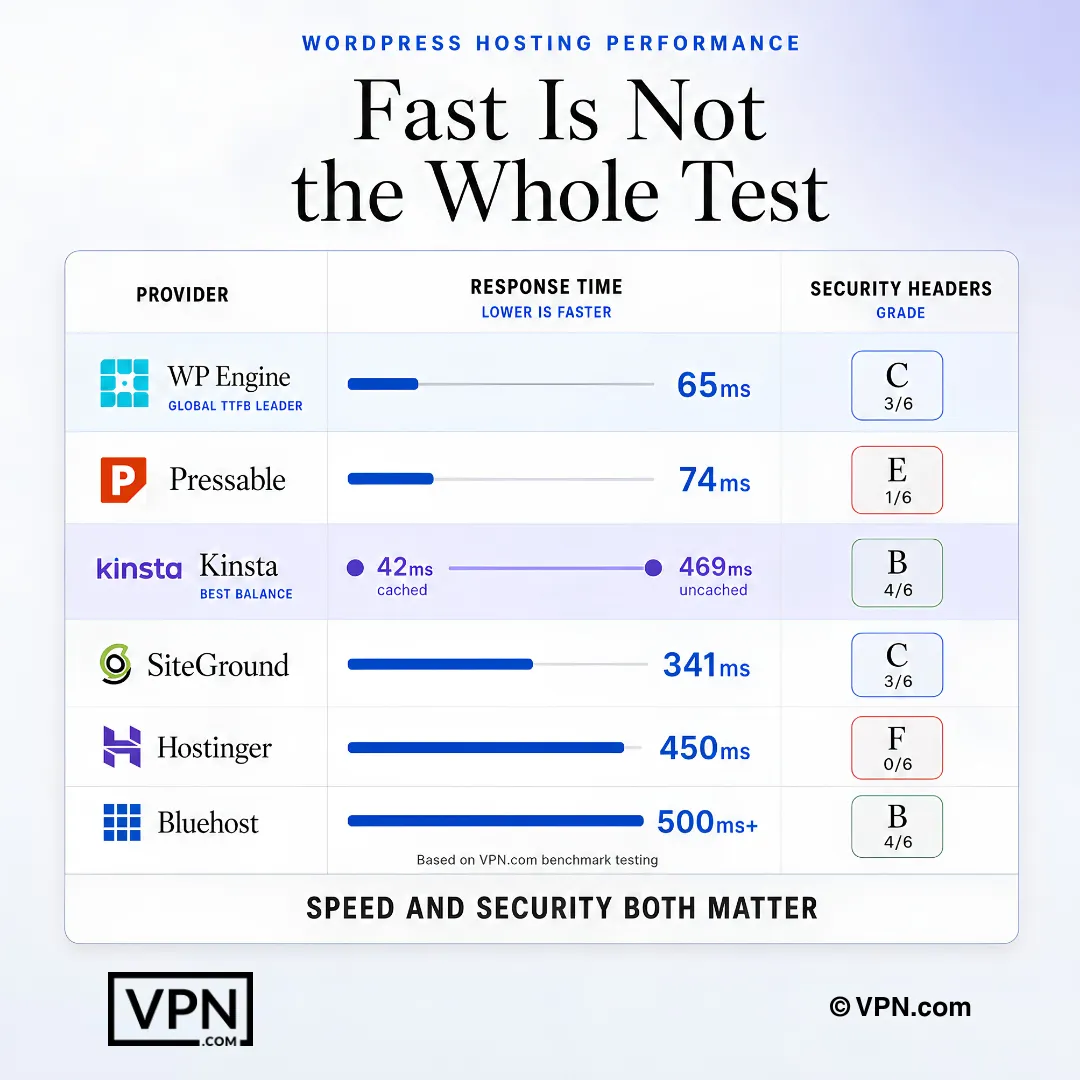
WordPress hosting should be evaluated on both response speed and security configuration.
Frequently Asked Questions
Which WordPress host actually recorded the fastest TTFB in 2026 testing?
WP Engine posted the fastest global TTFB in HostingStep’s 2026 benchmarks (24/7 monitoring across 34 hosts), aided by Cloudflare Enterprise CDN integration, and logged 100% uptime with zero recorded outages. Pressable tied for raw speed with the fastest load-handling response. Both scored weaker on security headers (WP Engine C, 3/6; Pressable E, 1/6).
Why does Kinsta’s cached vs. uncached TTFB gap matter for real-world speed?
HostingStep recorded fast edge-cached TTFB for Kinsta but a noticeably slower uncached TTFB, meaning your actual site speed depends heavily on cache hit rate rather than a single fixed number. Kinsta ranks #13 of 34 hosts in HostingStep’s overall benchmarks. It still holds the strongest security posture in this comparison, grade B (4/6 headers).
What is TTFB and why does it get more weight than page load time here?
Time to First Byte measures how fast your server responds to the initial request, before any content renders, and reflects server-side and caching efficiency rather than image or script weight. This guide sources TTFB from HostingStep’s continuous monitoring and page load from WPBeginner’s Pingdom and k6 tests, since the two metrics can diverge, as with Kinsta’s cached-vs-uncached split.
Which hosts in this comparison have the weakest security headers, and what’s the actual risk?
Hostinger scored an F (0/6 headers), serving no Content-Security-Policy, HSTS, X-Frame-Options, or Referrer-Policy at all. Pressable scored E (1/6), only serving Strict-Transport-Security. Missing headers leave visitors more exposed to browser-side attacks like XSS and clickjacking, a real gap for any site collecting login credentials or payment data.
What separates managed WordPress hosting from generic shared hosting on speed?
Managed WordPress hosts optimize server resources, caching layers, and network routing specifically for WordPress, while generic shared hosting treats WordPress like any other CMS, causing slower TTFB and inconsistent load times. In this comparison, WP Engine, Kinsta, and Pressable are purpose-built managed hosts, while Bluehost and Hostinger lean closer to budget shared infrastructure with correspondingly slower page loads.
Which host offers the best balance of speed and security for a WordPress business site?
Kinsta, according to this 2026 comparison. It runs on Google Cloud’s C2 compute-optimized machines, holds the strongest security grade among managed hosts (B, 4/6 headers including CSP and X-Content-Type-Options), and pairs fast edge-cached TTFB with above-average uptime. Pricing starts at $35/mo for the Single 35k plan (35,000 monthly visits).
How does WordPress hosting speed actually affect search rankings and conversions?
Google’s ranking systems seek to reward pages with good Core Web Vitals, and Akamai’s 2017 retail performance study found that a 100-millisecond delay in load time can hurt conversion rates by 7 percent. That’s why TTFB and page-load benchmarks matter beyond user experience. WPBeginner’s grades in this comparison, like SiteGround’s A+ (95) and WP Engine’s A (90), reflect measurable page-load performance differences.
Is Pressable’s speed advantage worth its security header gap?
Pressable recorded the fastest load-handling response time in HostingStep’s 2026 benchmarks with 100% uptime, and it’s owned by Automattic, the company behind WordPress.com. But it scored an E (1/6 headers), serving only Strict-Transport-Security. High-traffic sites prioritizing raw speed should plan to close that gap at the CDN or proxy layer rather than rely on Pressable’s defaults.
How do I fix missing security headers if my host doesn’t provide them by default?
Add them yourself through Cloudflare’s free tier, your site’s .htaccess file, or a WordPress plugin like Headers Security Advanced & HSTS WP. This matters most for hosts like Hostinger (F, 0/6 headers) or Pressable (E, 1/6). Your host’s out-of-the-box defaults still signal how seriously they treat security, even if you can patch gaps manually.
Is Hostinger safe enough for a site handling logins or payment data?
Not without additional layers. Hostinger’s May 2026 SecurityHeaders.com scan showed a grade F (0/6), missing Content-Security-Policy, HSTS, X-Frame-Options, Referrer-Policy, and Permissions-Policy entirely. It’s positioned for personal blogs and static sites where security is handled at the application layer, such as Cloudflare in front, rather than for sites collecting user PII or payments directly.
Which host is slowest in 2026 testing, and does that matter for a small site?
Bluehost measured the slowest page load in WPBeginner’s tests, described as roughly double the load time of faster competitors, despite a B+ (88) grade. For low-traffic sites where cost outweighs speed, this may be acceptable, especially since Bluehost’s security grade (B, 4/6 headers) is the second-strongest in the comparison. For SEO-sensitive or high-traffic sites, the load gap is a real disadvantage.
Is SiteGround a good budget option despite its renewal price jump?
Yes, for budget-conscious sites wanting managed WordPress features. SiteGround uses its proprietary SuperCacher system, and posted the fastest page load in this comparison at an A+ (95) WPBeginner grade with 99.99% uptime. Its StartUp plan promotes at $2.99/mo, but renewal rates increase significantly, so verify pricing before committing to a term.
What uptime guarantee should I actually look for in a fast WordPress host?
Look for 99.9% or higher, since even 99% uptime allows 87.6 hours of downtime per year. WP Engine and Pressable both reported 100% uptime in this comparison, SiteGround reported 99.99%, and Kinsta and Hostinger both reported 99.9%+. Bluehost’s uptime was not reported, which is itself worth factoring into a decision.