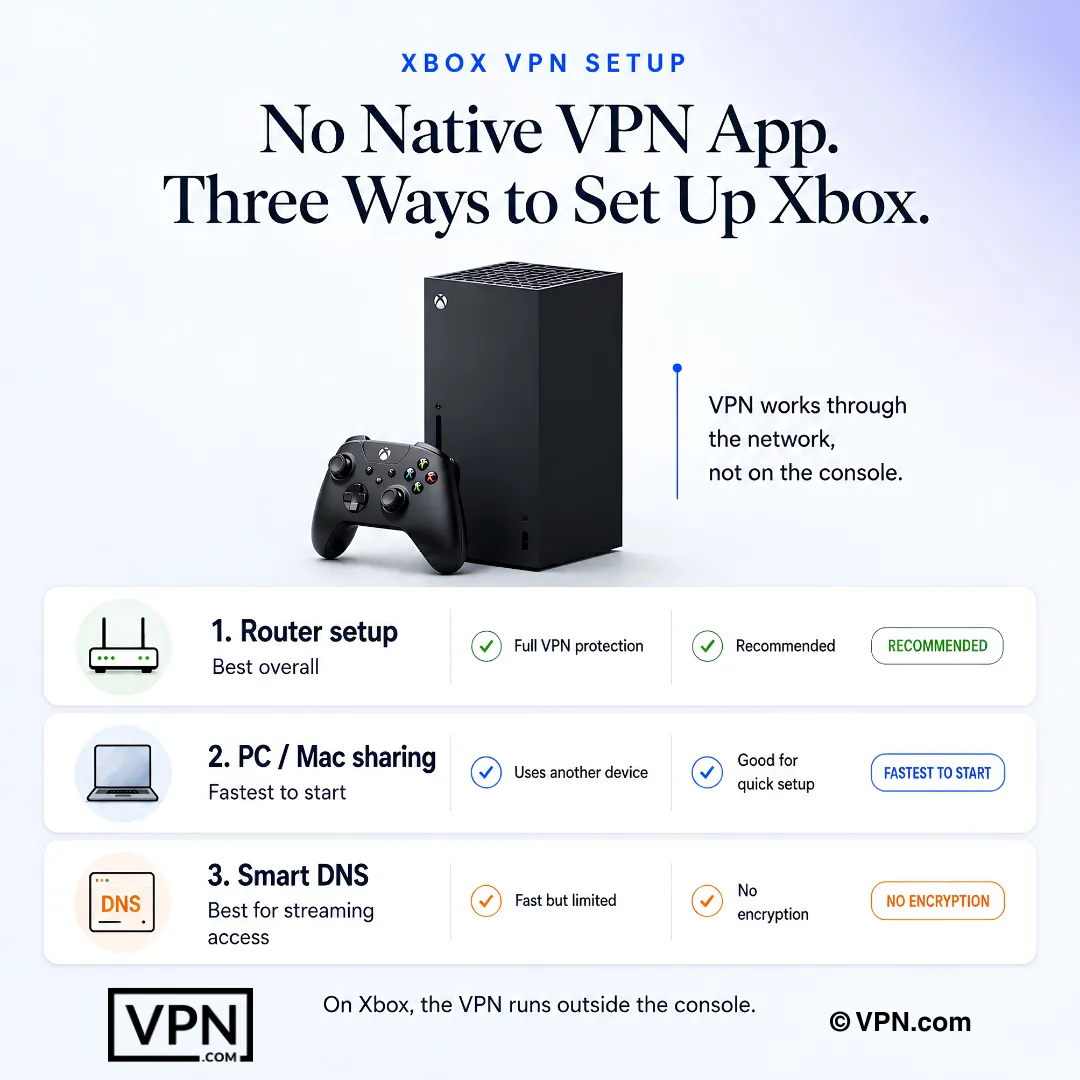
Xbox has no native VPN support, so you route it through your router or a PC hotspot. A good VPN blocks DDoS and opens up region-locked games, without adding much latency.
Privacy: VPN.com research ledger, cited. Counts, apps, plans: provider-stated, checked Oct 15, 2026. How we score →
Xbox gaming opens up massive worlds and online friendships. It also comes with real headaches: geo-restricted games, ISP throttling during peak hours, DDoS attacks, and exposed data on shared networks.
The right VPN solves all of this. It accesses region-locked content, smooths out lag, and keeps your connection encrypted. Here’s what every Xbox gamer needs to know about picking and setting up a VPN on console.
Why Xbox Gamers Need a VPN
Enhanced privacy: Gaming on public or shared networks exposes your data to hackers and attacks like MAC spoofing. A VPN encrypts your connection and keeps personal info locked down.
Access geo-restricted content: Connect to servers in other countries to access games, DLCs, and streaming apps unavailable in your region. You can even play titles before they launch locally.
Reduce lag and ping spikes: A VPN adds some latency, but a nearby server and a lightweight protocol keep it small, and routing can sidestep a congested ISP path.
Avoid ISP throttling: ISPs slow down bandwidth-heavy activity like gaming. A VPN hides what you’re doing, so your speeds stay consistent.
Block DDoS attacks: Competitive opponents sometimes try to knock you offline. A VPN masks your real IP, making you untargetable.
How a VPN Blocks DDoS Attacks on Xbox
DDoS (Distributed Denial of Service) attacks flood your IP address with junk traffic. This overwhelms your connection and kicks you offline. In competitive Xbox titles like Call of Duty, Halo, and Rainbow Six Siege, some players use DDoS tools to force opponents to disconnect mid-match.
When you connect through a VPN, your real IP address stays hidden. Attackers only see the VPN server’s IP. Even if they flood that address, the VPN provider’s infrastructure absorbs the traffic. Your home network stays untouched.
Three VPN features matter most for DDoS protection:
IP masking: Every VPN hides your real IP by default. This is the primary defense.
Dedicated or static IP options: Some providers like NordVPN offer dedicated IPs. These reduce the chance of being flagged or banned by Xbox Live while still hiding your home address.
No port forwarding exposure: Port forwarding can leak your real IP in peer-to-peer game lobbies. Choose a VPN that lets you disable this feature or doesn’t offer it by default.
DDoS attacks remain common in ranked and tournament play. A VPN is the simplest way to stay protected without changing your network hardware.
What to Look for in an Xbox VPN
Xbox consoles have no native VPN app support. This makes compatibility the most important factor. Every VPN on this list must work through a router, Smart DNS, or PC sharing method.
Beyond compatibility, focus on these specs:
Fast servers with minimal speed loss. Look for WireGuard or Lightway protocol support, which are built to keep speed loss low.
Wide server coverage across 60+ countries to access regional Xbox Game Pass libraries and early releases.
AES-256 encryption, a verified no-logs policy, and built-in DDoS protection.
Router firmware support or a dedicated Smart DNS feature for easy Xbox setup.
Unlimited simultaneous connections or at least 6+ devices per account.
Top 3 VPNs for Xbox
The right VPN boosts your Xbox gaming with faster connections, access to geo-restricted content, and real security improvements. Here are the three best options, for Xbox Series X and Xbox One.
ExpressVPN: Best Overall for Xbox
ExpressVPN runs the Lightway protocol. It operates 3,000+ servers across 113 countries. This gives Xbox gamers wide access to region-locked Game Pass titles and early-release windows.
ExpressVPN also offers a dedicated router app with a visual interface. You don’t need to manually enter server addresses or protocol settings. The MediaStreamer (Smart DNS) feature works directly on Xbox without a router, though it doesn’t encrypt traffic.
Price: Starting at $2.99/month (longest-term plan)
Server count: 3,000+ in 113 countries
Xbox setup: Router app, Smart DNS (MediaStreamer), PC/Mac sharing
DDoS protection: IP masking on all servers, no port forwarding by default
Best for: Gamers who want the easiest router setup and a fast protocol.
NordVPN: Strongest Security for Competitive Players
NordVPN runs the NordLynx protocol (built on WireGuard). It operates 7,213 servers across 150 countries.
NordVPN stands out for security. Its Threat Protection feature blocks malicious DNS requests and ads at the network level. The dedicated IP add-on (extra cost) gives you a static address that won’t trigger Xbox Live bans from shared VPN IPs.
Price: Starting at $3.49/month (2-year plan)
Server count: 7,213 in 150 countries
Xbox setup: Router manual config, Smart DNS, PC/Mac sharing
DDoS protection: IP masking, dedicated IP option, Threat Protection
Best for: Ranked and tournament players who need DDoS protection and a dedicated IP.
Surfshark: Best Budget VPN for Xbox
Surfshark offers unlimited simultaneous connections on a single account. This means your Xbox, PC, phone, and every other device in your household can connect at once. It runs WireGuard.
Surfshark operates 4,500+ servers across 100+ countries. Its Smart DNS feature works directly on Xbox without a router. The CleanWeb feature blocks ads and trackers at the DNS level.
Price: Starting at $2.49/month (2-year plan)
Server count: 4,500+ in 100+ countries
Xbox setup: Router manual config, Smart DNS, PC/Mac sharing
DDoS protection: IP masking on all servers, CleanWeb DNS filtering
Bonus: Unlimited simultaneous device connections
Best for: Budget-conscious gamers and households with multiple devices.
Xbox VPN Comparison Table
Feature
ExpressVPN
NordVPN
Surfshark
Monthly price (best plan)
$2.99
$3.49
$2.49
Servers
3,000+
7,213
4,500+
Countries
113
150
100+
Protocol
Lightway
NordLynx
WireGuard
Smart DNS for Xbox
Yes (MediaStreamer)
Yes
Yes
Router app
Yes (visual UI)
Manual config
Manual config
Dedicated IP option
No
Yes (extra cost)
No
Simultaneous connections
10
10
Unlimited
DDoS protection
IP masking
IP masking + dedicated IP
IP masking
How to Set Up a VPN on Xbox
Xbox doesn’t support VPN apps natively. This is the same limitation PlayStation users face. You’ll need one of three methods.
Setup Method
Security Level
Difficulty
Devices Protected
Best For
Router setup
Highest
Moderate
All devices on the network
Permanent always-on protection
PC hotspot (wireless)
High
Easy
Xbox only
Quick temporary setup
PC via Ethernet share
High
Easy
Xbox only
Wired stability without router access
Router Setup (Most Secure)
Confirm your router supports VPN firmware. Popular options include Asus RT-AX86U, Netgear Nighthawk R7000, and Linksys WRT3200ACM.
Log in to the router admin panel (usually 192.168.1.1). Navigate to the VPN client section. Enter the VPN server address, your credentials, and select the protocol (WireGuard or OpenVPN). Save the settings and reboot the router.
On your Xbox, go to Settings > General > Network Settings > Set Up Wireless Network. Connect to your router’s network. All traffic now routes through the VPN.
Xbox-specific note: If your Xbox shows “NAT Type: Strict” after connecting, enable UPnP in your router settings. Some VPN protocols restrict NAT, which can block party chat and multiplayer matchmaking.
Share VPN From PC or Mac
Install the VPN on your computer and connect to a server. Plug an Ethernet cable from your PC to your Xbox. On Windows, go to Settings > Network & Internet > Mobile Hotspot and enable sharing. On Mac, go to System Preferences > Sharing > Internet Sharing and select the Ethernet interface.
On your Xbox, go to Settings > General > Network Settings > Set Up Wireless Network (or wired, if using Ethernet). Connect to the shared network.
Xbox-specific note: This method adds some latency because traffic routes through your PC first. Use Ethernet sharing instead of Wi-Fi hotspot for the most stable connection.
Smart DNS Setup (No Encryption)
Smart DNS changes your DNS server address to access geo-restricted content. It does not encrypt traffic or hide your IP. This method works for accessing region-locked Game Pass content but offers zero DDoS protection.
On your Xbox, go to Settings > General > Network Settings > Advanced Settings > DNS Settings. Select Manual. Enter the Smart DNS addresses from your VPN provider (ExpressVPN MediaStreamer: check your account dashboard for current IPs). Restart your Xbox.
Xbox-specific note: Smart DNS works on Xbox 360, Xbox One, and Xbox Series X|S. It’s the fastest method because it adds no encryption overhead.
Common Xbox VPN Issues and Fixes
High Ping or Lag After Connecting
Connect to a VPN server geographically close to the Xbox game server. For Halo Infinite (Azure servers in East US), use a US East VPN server. For Forza Motorsport (Azure servers in West Europe), use a UK or Netherlands server. Switch from OpenVPN to WireGuard or Lightway for lower protocol overhead.
NAT Type Shows “Strict” or “Moderate”
Strict NAT blocks party chat, voice comms, and some multiplayer modes. Enable UPnP in your router’s admin panel. If that doesn’t work, manually forward Xbox Live ports: TCP 3074 and UDP 3074, 88, 500, 3544, 4500. Some VPN protocols block these ports by default.
Geo-Restricted Content Still Blocked
Clear your Xbox DNS cache first. Go to Settings > Devices & Connections > Blu-ray > Persistent Storage > Clear Persistent Storage. Then restart your Xbox. If content is still blocked, disconnect and reconnect to a server in the correct region. Some Game Pass titles check your Microsoft account region, not just your IP.
Xbox Live Connection Errors
Double-check your router VPN settings. Make sure the VPN protocol matches your provider’s recommended option. Restart both your router and Xbox. Run the Xbox network test (Settings > General > Network Settings > Test Network Connection) to confirm connectivity.
Slow Download Speeds on Game Updates
Large Xbox game updates (50-100 GB) suffer more from VPN encryption overhead. Switch to WireGuard or Lightway for the fastest download speeds. If you only need the VPN for online play, disconnect during downloads and reconnect before launching multiplayer.
Final Verdict
A VPN is essential for serious Xbox gamers. It accesses region-restricted games and streaming apps, blocks DDoS attacks, and keeps your data encrypted. Since Xbox doesn’t support native VPN apps, your setup method matters as much as your provider choice.
Here’s how to choose based on your situation:
Your Priority
Best VPN
Best Setup Method
Easiest setup + fast protocol
ExpressVPN
Router app or Smart DNS
DDoS protection + ranked play
NordVPN
Router + dedicated IP
Budget + multiple devices
Surfshark
Smart DNS or PC sharing
access Game Pass regions only
Any of the three
Smart DNS (fastest)
Whole-home protection
ExpressVPN or NordVPN
Router setup
ExpressVPN offers the best overall experience with its dedicated router app and Lightway protocol. NordVPN leads on security with its dedicated IP option and Threat Protection feature. Surfshark is the best budget pick with unlimited device connections at $2.49/month.
Pick the VPN that matches your setup, follow the installation steps above, and start gaming with fewer restrictions and better protection.
Quick tip: Use the router method for a permanent setup. It protects your Xbox and every other device on the network without any per-session configuration. If you experience lag after connecting, switch to a geographically closer server and use a wired Ethernet connection instead of Wi-Fi. If geo-restricted content is still unavailable after connecting, clear your Xbox persistent storage: go to Settings > Devices & Connections > Blu-ray > Persistent Storage > Clear Persistent Storage, then restart your console and reconnect to the VPN.
VPN.com does not encourage or condone using VPN services to violate the terms of service of any platform. Information on this page is provided for educational purposes. Users are responsible for complying with the policies of the services they use.
How do I even connect a VPN to my Xbox since there’s no app for it?
Xbox has no native VPN app, so you route traffic through a VPN-compatible router (Asus RT-AX86U, Netgear Nighthawk R7000, and Linksys WRT3200ACM all support VPN firmware), a PC or Mac sharing its connection over Ethernet or hotspot, or a Smart DNS feature like ExpressVPN’s MediaStreamer. Router setup protects every device on the network; the other two methods cover only the Xbox.
How does a VPN actually stop DDoS attacks in ranked Xbox matches?
A VPN hides your Xbox’s real IP, so attackers flooding traffic only hit the VPN server, which absorbs the load while your home connection stays untouched. NordVPN’s dedicated IP add-on reduces the chance of a shared address getting flagged by Xbox Live, and disabling port forwarding closes the peer-to-peer leak DDoS tools exploit in titles like Rainbow Six Siege.
What’s the actual difference between Smart DNS and a full VPN for Xbox?
Smart DNS only reroutes DNS requests to access geo-restricted Game Pass content; it adds no encryption, doesn’t hide your IP, and offers zero DDoS protection. A full VPN routed through a router or PC-sharing encrypts all traffic and masks your IP. ExpressVPN’s MediaStreamer runs Smart DNS directly on Xbox without a router, but pair it with an encrypted connection if DDoS protection matters for ranked play.
Which VPN gives Xbox players the lowest ping?
NordVPN ranks #1 of 22 on our Trust Score, aggregated from published third-party tests, reflecting strong overall throughput, and its NordLynx (WireGuard-based) protocol keeps overhead low. Ping itself depends more on server distance than protocol: connect to a server near your game’s host region, since Halo Infinite runs on East US Azure servers and Forza Motorsport runs on West Europe servers.
Can a VPN actually get me Game Pass titles locked to other regions?
Yes. Connecting to a VPN server in another country accesses region-locked Xbox Game Pass titles, DLC, and sometimes games before their local release date. NordVPN spans 150 countries, ExpressVPN covers 113, and Surfshark reaches 100+, giving you plenty of regional libraries to try. Smart DNS features like MediaStreamer also work directly on Xbox without a router for this specific use case.
Does using a VPN to access early-release Xbox content violate Xbox Live’s terms?
It can. Microsoft sometimes checks your Xbox account region separately from your IP address, so a VPN alone may not access content, and combining one with a region change can run against Xbox Live’s terms of service. A VPN itself isn’t illegal to use, but region-shifting to access unreleased games or Game Pass libraries is done at your own risk under Microsoft’s platform rules.
How many devices can one VPN account actually cover for a gaming household?
It depends on the provider. Surfshark allows unlimited simultaneous connections, useful if your Xbox, PC, and phones all need coverage at once. NordVPN covers 10 devices, ExpressVPN covers 10 to 14 depending on plan, and CyberGhost covers 7. Any of the four also support a router setup, which protects every device on the network as a single connection.
How do these Xbox VPNs compare on price?
Promotional long-term rates range from $2.19 to $3.49 per month across this list. CyberGhost starts from $2.19/month on its longest-term plan, Surfshark from $2.49/month, ExpressVPN from $2.99/month, and NordVPN from $3.49/month, all on their longest terms. NordVPN’s dedicated IP add-on for reducing Xbox Live flags on shared addresses costs extra on top of the base plan.
What if a VPN doesn’t improve my Xbox connection, can I get my money back?
Yes, every provider on this list backs its plans with a guarantee. NordVPN, ExpressVPN, and Surfshark each offer a 30-day money-back guarantee, while CyberGhost extends that to 45 days. Test router setup, ping, and DDoS protection during that window and request a refund through support before it closes if performance doesn’t hold up.
How do I set up a VPN on my router for permanent Xbox protection?
Confirm your router supports VPN client firmware (Asus RT-AX86U, Netgear Nighthawk R7000, and Linksys WRT3200ACM all work), log into the admin panel at 192.168.1.1, and enter your VPN’s server address, credentials, and protocol under the VPN client section. On Xbox, go to Settings, General, Network Settings, Set Up Wireless Network, then connect to your router’s network to route all traffic through it.
How do I share my PC’s VPN connection with my Xbox instead of using a router?
Install the VPN on your PC or Mac, connect to a server, then share that connection over Ethernet: on Windows via Settings, Network and Internet, Mobile Hotspot, or on Mac via System Preferences, Sharing, Internet Sharing. This method adds a small amount of extra latency since traffic routes through your computer first, so use Ethernet sharing rather than a Wi-Fi hotspot for the most stable connection.
What do I do if my Xbox shows “NAT Type: Strict” after connecting a VPN?
Strict NAT blocks party chat, voice comms, and some multiplayer modes because certain VPN protocols restrict NAT type by default. Enable UPnP in your router’s admin panel first. If that doesn’t fix it, manually forward Xbox Live’s ports: TCP 3074 and UDP 3074, 88, 500, 3544, and 4500, since some protocols block these ports outright.
Why did my ping get worse after turning on a VPN, and how do I fix it?
Switch to a server geographically closer to your game’s host servers, since distance drives ping more than the VPN itself. Also switch protocols: WireGuard-based NordLynx or Lightway carry less overhead than OpenVPN. Large Xbox game updates of 50 to 100 GB suffer more from encryption overhead too, so disconnect the VPN during downloads and reconnect only before online multiplayer sessions.
We use cookies to understand how our site is used and, on some pages, to measure our ads. Accept to allow analytics cookies and personalized ads, or decline. If you decline, we only count visits without cookies. Privacy Policy